
Important Safety Instructions
Please read these instructions carefully before installation and use. Keep this manual for future reference. Incorrect installation or use may cause damage to the product or injury.
- Ensure all components are present and undamaged before assembly.
- Do not exceed the maximum weight capacity of the mount.
- Use appropriate tools for installation.
- If you are unsure about any part of the installation, seek professional assistance.
- Keep children and pets away during installation.
- Regularly check all connections and fasteners for tightness.
Product Overview
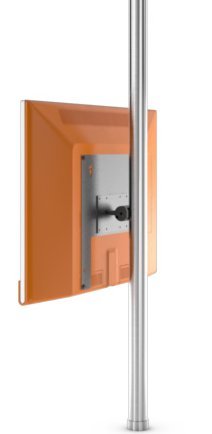
Image showing the Loewe Screen LIFT PLUS (65486B10) TV mount, designed for floor mounting. This image illustrates the overall design and structure of the product.
The Loewe Screen LIFT PLUS (65486B10) is a floor-standing mount designed to securely hold compatible Loewe televisions. It offers a stable and elegant solution for positioning your display.
Package Contents
Before proceeding with the installation, please verify that all the following components are included in your package:
- Loewe Screen LIFT PLUS main assembly
- Mounting hardware kit (screws, washers, spacers)
- Assembly instructions (this manual)
- Tools required for assembly (not included): Phillips head screwdriver, Allen wrench set, level.
Setup and Installation
1. Unpacking and Preparation
- Carefully remove all components from the packaging.
- Lay out all parts on a soft, clean surface to prevent scratches.
- Identify all components against the package contents list.
2. Assembling the Floor Stand
Follow the diagrams provided in the separate assembly guide (if applicable) to connect the base to the main support column. Ensure all screws are tightened securely but do not overtighten.
3. Attaching the VESA Mount to the TV
This mount supports VESA 75 x 75 standard. Refer to your television's manual for specific VESA mounting hole locations.
- Carefully place your television face down on a soft, clean surface.
- Align the VESA mounting plate from the Screen LIFT PLUS with the mounting holes on the back of your TV.
- Secure the mounting plate using the appropriate screws and washers from the hardware kit. Ensure a snug fit without overtightening.
4. Mounting the TV onto the Stand
- With assistance, carefully lift the television with the attached VESA plate.
- Hook the VESA plate onto the corresponding bracket on the Screen LIFT PLUS stand.
- Secure the TV to the stand using the provided locking mechanism or screws, as detailed in the assembly guide.
- Ensure the TV is level and securely attached before releasing it.
Operating Instructions
The Loewe Screen LIFT PLUS is primarily a static floor mount. Once installed, its operation involves ensuring the television is securely positioned.
- Positioning: Place the assembled unit in your desired viewing location. Ensure it is on a stable, level surface.
- Cable Management: Utilize any integrated cable management features of the stand to route power and signal cables neatly and safely.
Maintenance
Regular maintenance ensures the longevity and safety of your Loewe Screen LIFT PLUS.
- Cleaning: Wipe the stand with a soft, dry cloth. Do not use abrasive cleaners or solvents.
- Fastener Check: Periodically check all screws and bolts to ensure they remain tight. Retighten if necessary.
- Stability Check: Ensure the stand remains stable and level. If it appears wobbly, re-check the assembly.
Troubleshooting
This section addresses common issues you might encounter.
| Problem | Possible Cause | Solution |
|---|---|---|
| Stand is wobbly. | Loose fasteners; uneven floor. | Ensure all screws are tightened. Move to a level surface or use shims under the base. |
| TV not securely attached. | Incorrect VESA plate attachment; locking mechanism not engaged. | Re-check VESA plate installation on TV. Ensure TV is properly hooked onto the stand and locking screws are tightened. |
| Scratches on TV during installation. | Lack of protective surface. | Always place TV face down on a soft, clean blanket or cloth during assembly. |
Specifications
- Model: Loewe Screen LIFT PLUS (65486B10)
- Part Number: 65486B10
- Mounting Type: Floor Mount
- Maximum VESA Standard: VESA 75 x 75
- Compatible Devices: Loewe Individual 40 Compose, Loewe Individual 46 Compose
- Screen Size Compatibility: Up to 46 Inch (as per compatible devices)
- Batteries Included: No
- First Available Date: January 15, 2020
Warranty and Support
For warranty information and technical support, please refer to the documentation provided with your original purchase or visit the official Loewe website. Keep your proof of purchase for warranty claims.
Manufacturer: Loewe
Website: www.loewe.tv