
1. Introduction
This manual provides comprehensive instructions for the setup, operation, and maintenance of your Brondi Bravo DUOS Professional fixed-line telephone system. This system includes a base unit with a corded handset and a cordless DECT handset, designed for use on a single telephone line.
Key features include hands-free operation on the base unit, call transfer capabilities between the base and cordless handsets, support for up to 5 connectable cordless handsets, a phonebook capacity of 50 names and numbers, and a large illuminated display showing the last 30 received calls.
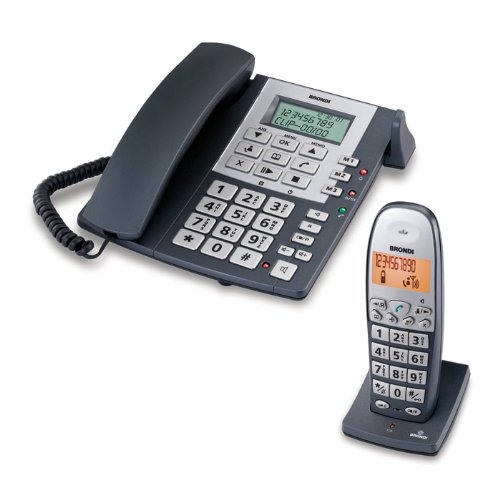
Figure 1.1: Brondi Bravo DUOS Professional Telephone System (Base Unit and Cordless Handset)
2. Package Contents
Please check the package for the following items:
- Brondi Bravo DUOS Professional Base Unit with corded handset
- Brondi Bravo DUOS Professional Cordless Handset
- Cordless Handset Charging Cradle
- Telephone Line Cord
- Power Adapter for Base Unit
- Power Adapter for Charging Cradle
- Rechargeable AAA Batteries (for cordless handset)
- User Manual (this document)
3. Setup
3.1 Base Unit Connection
- Connect the telephone line cord to the "LINE" port on the base unit and to your telephone wall socket.
- Connect the base unit power adapter to the "POWER" port on the base unit and plug it into an electrical outlet.
- Place the base unit on a flat, stable surface.
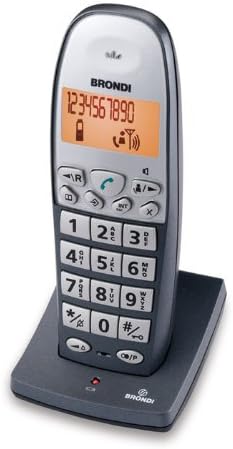
Figure 3.1: Base Unit Connections
3.2 Cordless Handset Setup
- Open the battery compartment cover on the back of the cordless handset.
- Insert the provided rechargeable AAA batteries, observing the correct polarity (+/-).
- Close the battery compartment cover.
- Connect the charging cradle power adapter to the cradle and plug it into an electrical outlet.
- Place the cordless handset in the charging cradle. The handset display should indicate charging. Allow at least 12-15 hours for the initial charge.

Figure 3.2: Cordless Handset and Charging Cradle
3.3 Registering Additional Handsets (Optional)
The system supports up to 5 cordless handsets. To register an additional handset:
- On the base unit, press and hold the PAGE button (or equivalent registration button) for approximately 5 seconds until the registration indicator on the base unit flashes.
- On the cordless handset, access the menu, navigate to "Registration" or "Add Handset", and confirm.
- Enter the system PIN (default is usually 0000 or 1234) if prompted.
- The handset will display a confirmation message upon successful registration.
4. Operating Instructions
4.1 Making and Receiving Calls
- Making a Call (Corded Handset): Lift the corded handset, dial the number, and press the CALL button (green receiver icon) or wait for automatic dialing.
- Making a Call (Cordless Handset): Press the CALL button, dial the number, or dial the number first and then press CALL.
- Receiving a Call: When the phone rings, lift the corded handset or press the CALL button on the cordless handset.
- Hands-free (Base Unit): During a call on the base unit, press the SPEAKER button to activate hands-free mode. Press again to deactivate.
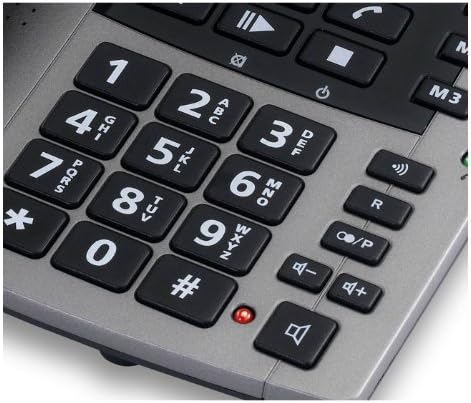
Figure 4.1: Base Unit Keypad Layout
4.2 Phonebook
The phonebook stores up to 50 names and numbers.
- Adding an Entry: Access the menu, select "Phonebook", then "Add New Entry". Enter the name and number using the keypad.
- Calling from Phonebook: Access the phonebook, scroll to the desired entry, and press the CALL button.
4.3 Call Log (Caller ID)
The illuminated display shows the last 30 received calls (Caller ID service required from your telephone provider).
- Viewing Call Log: Press the CALL LOG button (or navigate via menu) to view the list of received calls.
- Calling Back: Select an entry from the call log and press the CALL button to dial the number.

Figure 4.2: Base Unit Display
4.4 Call Transfer (Base to Cordless Handset)
During an active call on the base unit, you can transfer the call to a registered cordless handset:
- During a call on the base unit, press the TRANSFER button (often labeled INT or with an arrow icon).
- Select the desired cordless handset number (e.g., 1, 2, etc.).
- The cordless handset will ring. The user on the cordless handset can answer the call.
- Hang up the corded handset to complete the transfer.
5. Maintenance
- Cleaning: Use a soft, damp cloth to clean the surfaces of the telephone units. Do not use abrasive cleaners or solvents.
- Battery Care (Cordless Handset):
- Always use the original rechargeable AAA batteries provided or approved replacements.
- If the handset will not be used for an extended period, remove the batteries to prevent leakage.
- Ensure the handset is placed correctly in the charging cradle when not in use to maintain battery charge.
- Environmental Conditions: Avoid exposing the telephone system to direct sunlight, excessive heat, moisture, or dust.
6. Troubleshooting
| Problem | Possible Cause | Solution |
|---|---|---|
| No dial tone on base unit. | Telephone line cord not connected or faulty. | Check the telephone line cord connection. Try a different cord or wall socket. |
| Cordless handset not working/no power. | Batteries low or not inserted correctly; handset out of range; handset not registered. | Ensure batteries are charged and correctly inserted. Move closer to the base unit. Re-register the handset if necessary (see Section 3.3). |
| Cannot hear caller / Caller cannot hear me. | Volume too low; faulty connection; microphone/speaker issue. | Adjust volume. Check all connections. Test with another phone if possible. |
| Display is blank or unreadable. | Power issue; contrast setting; battery issue (cordless). | Check power adapter for base unit. Ensure cordless handset batteries are charged. Adjust display contrast if available in settings. |
7. Specifications
- Model: BRAVOPROF2
- Brand: Brondi
- Type: Fixed-line telephone system (Corded Base Unit + Cordless DECT Handset)
- Connectable Handsets: Up to 5
- Phonebook Capacity: 50 names and numbers
- Call Log Capacity: Last 30 received calls
- Display: Illuminated
- Batteries (Cordless Handset): AAA rechargeable
- Package Dimensions: 34 x 33.8 x 10.4 cm
- Product Weight: Approximately 499 g (1.1 lbs)
- GTIN (Global Trade Item Number): 08015908714609
8. Warranty and Support
For warranty information and technical support, please refer to the documentation included in your product packaging or visit the official Brondi website. Keep your purchase receipt as proof of purchase for warranty claims.
Note: Specific warranty terms may vary by region and retailer.