1. Introduction
This manual provides essential information for the safe and efficient operation, setup, and maintenance of your Amewi Buggy Booster Pro Brushless RC Buggy. Please read this manual thoroughly before operating the vehicle to ensure proper use and to prevent damage.
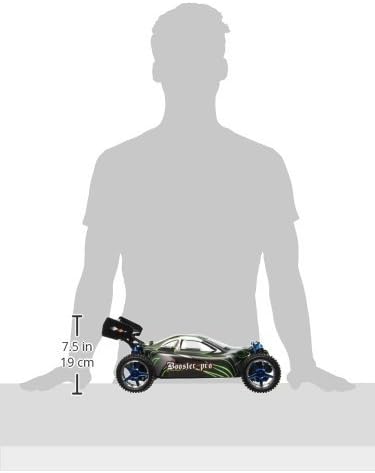
The Amewi Buggy Booster Pro is a fast and powerful 1:10 scale 4WD RC Buggy, designed for both indoor and outdoor use. It features a brushless motor, 2.4 GHz proportional remote control, and durable construction.
2. Safety Information
WARNING: Small parts. Choking hazard. Not suitable for children under 14 years.
- Always operate the RC buggy in open areas, away from people, pets, and obstacles.
- Do not operate near public roads or in crowded areas.
- Keep hands, hair, and loose clothing away from moving parts.
- Ensure the battery is correctly installed and charged according to instructions.
- Do not expose the vehicle or remote control to water or extreme temperatures.
- Always turn off the vehicle and remote control when not in use.
- Adult supervision is recommended for users under 18 years of age.
3. Package Contents
Verify that all items listed below are included in your package:
- Amewi Buggy Booster Pro RC Buggy (Model 22033)
- 2.4 GHz Proportional Pistol Remote Control
- Brushless Motor (pre-assembled)
- Speed Controller (pre-assembled)
- 2.4 GHz Receiver (pre-assembled)
- 7.4V 3000mAh LiPo Battery
- LiPo Battery Charger
- Detailed Instruction Manual

4. Setup
4.1 Charging the LiPo Battery
- Connect the provided LiPo battery charger to a suitable power source.
- Connect the 7.4V 3000mAh LiPo battery to the charger.
- Observe the charger's indicator lights for charging status. Do not leave charging batteries unattended.
- Once fully charged, disconnect the battery from the charger.
4.2 Installing Batteries in the Remote Control
The remote control requires 8 AA batteries (not included).
- Locate the battery compartment on the bottom of the remote control.
- Open the battery compartment cover.
- Insert 8 AA batteries, ensuring correct polarity (+/-).
- Close the battery compartment cover securely.

4.3 Installing the LiPo Battery in the Buggy
- Carefully remove the buggy's body shell.
- Locate the battery compartment or tray within the chassis.
- Insert the charged 7.4V 3000mAh LiPo battery into the compartment.
- Connect the battery to the vehicle's speed controller (ESC) connector, ensuring correct polarity.
- Secure the battery if a strap or retainer is present.
- Reattach the buggy's body shell.


5. Operating Instructions
5.1 Powering On
- Turn on the remote control first. The indicator light should illuminate.
- Turn on the power switch on the RC buggy. The vehicle's electronics will initialize.
- Wait for the remote control and buggy to establish a connection (binding). This usually takes a few seconds, indicated by a solid light on both devices.
5.2 Basic Controls
- Throttle Trigger: Pull the trigger to move forward. Push the trigger to brake or reverse. The throttle is proportional, allowing for variable speed control.
- Steering Wheel: Turn the steering wheel left to turn the buggy left, and right to turn the buggy right. Steering is proportional for precise control.
5.3 Driving Tips
- Start with slow speeds to familiarize yourself with the controls.
- Avoid sudden acceleration or braking, especially at high speeds, to maintain control.
- The 4WD system provides excellent traction on various terrains.
- Be mindful of battery life. When the vehicle starts to slow down significantly, it's time to recharge the battery.


6. Maintenance
6.1 Cleaning
- After each use, especially in dusty or dirty conditions, clean the buggy.
- Use a soft brush or compressed air to remove dirt and debris from the chassis, motor, and suspension components.
- Wipe the body shell with a damp cloth. Do not use harsh chemicals.
6.2 Component Inspection
- Regularly check all screws and fasteners for tightness.
- Inspect the tires for wear and tear.
- Check the suspension components (oil-filled shock absorbers) for leaks or damage.
- Ensure the steering mechanism operates smoothly.
6.3 Battery Care
- Always store LiPo batteries in a cool, dry place, away from direct sunlight and heat.
- Do not overcharge or over-discharge LiPo batteries.
- If storing for extended periods, charge the LiPo battery to a storage voltage (typically around 3.8V per cell).
7. Troubleshooting
- Vehicle not responding:
- Check if both the remote control and buggy are powered on.
- Ensure the LiPo battery in the buggy is charged and correctly connected.
- Replace the AA batteries in the remote control.
- Re-bind the remote control and buggy if necessary (refer to specific binding instructions if provided separately).
- Reduced performance/speed:
- The LiPo battery may be low; recharge it.
- Check for debris obstructing moving parts or drivetrain.
- Inspect motor and ESC for overheating (allow to cool down).
- Steering issues:
- Check for damage to steering linkages or servo.
- Ensure the steering trim on the remote control is centered.
8. Specifications
| Model Name | Amewi Buggy Booster Pro Brushless 4WD Buggy |
| Model Number | 22033 |
| Scale | 1:10 |
| Motor | 3300 KV Brushless, Air-cooled |
| Power Supply | 7.4V 3000mAh LiPo Battery |
| Maximum Speed | Up to 70 km/h |
| Dimensions (L x W x H) | 400 x 250 x 160 mm |
| Weight | 1.41 kg |
| Drive System | 4-Wheel Drive (4WD) |
| Remote Control | 2.4 GHz Proportional Pistol Grip |
| Suspension | Aluminum Oil-filled Shock Absorbers |
| Chassis | Ball Bearings |
| Body Material | Crash-resistant Lexan |
| Tires | Rubber All-Terrain |
| Recommended Age | 14 years and up |
9. Warranty and Support
For warranty claims or technical support, please contact your retailer or the manufacturer, Amewi, directly. Retain your proof of purchase for warranty validation. Information regarding spare parts availability may be obtained through the manufacturer's support channels.


