
TEMPO 601K-G
TEMPO 601K-G Standard Wire Tracer Electrical, Tone Generator and Probe Kit
User Instruction Manual
Product Overview
The TEMPO 601K-G Standard Wire Tracer Electrical, Tone Generator and Probe Kit is a comprehensive solution for professionals working with various types of wiring. This kit enables efficient and accurate tracing, identification, and testing of voice, data, and video cables. It is designed to simplify complex wiring tasks and improve troubleshooting efficiency.
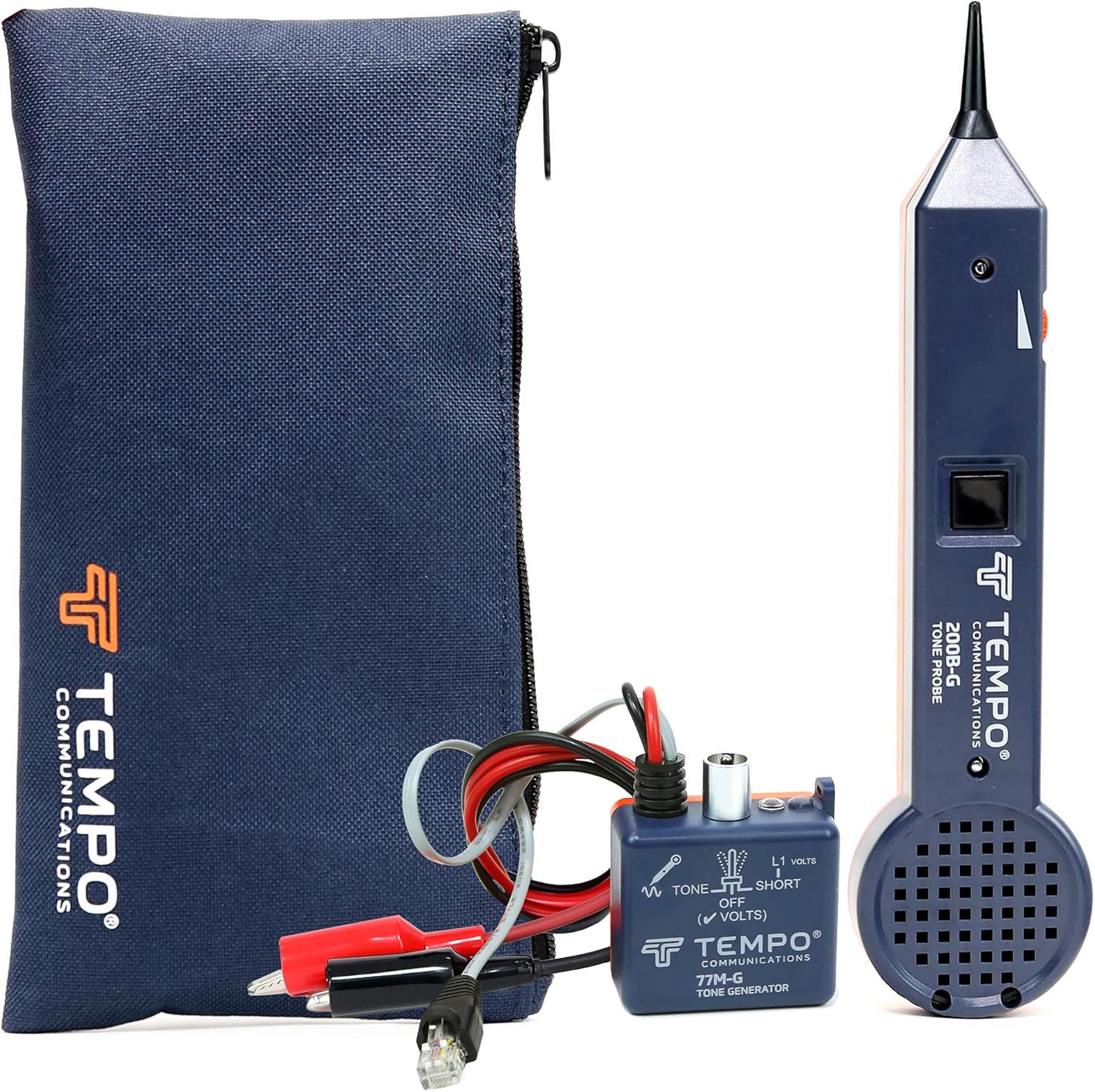
Image: The TEMPO 601K-G kit, including the 200B-G Probe, 77M-G Tone Generator, and nylon pouch.
Setup
Battery Installation
The 601K-G kit requires batteries for operation, which are not included. Ensure you have the correct battery types for both the 200B-G Probe and the 77M-G Tone Generator. Refer to the battery compartments on each device for specific battery requirements (e.g., 9V batteries). Open the battery cover, insert the batteries with correct polarity, and securely close the cover.
Component Connection
The kit includes a 200B-G Probe and a 77M-G Tone Generator with alligator clips and a modular plug. For most operations, the tone generator will be connected to the cable or circuit you wish to trace, and the probe will be used to detect the tone along the cable path.
Operating Instructions
Wire Tracing
To trace voice, data, or video wiring, connect the 77M-G Tone Generator to one end of the cable. Turn on the tone generator. Use the 200B-G Probe to scan along the cable path. The probe will emit an audible tone when it detects the signal from the generator, allowing you to follow the wire's route, even through walls.

Image: A technician using the TEMPO probe to accurately trace wires within a complex wiring setup.
Multi-Pair Cable Identification
For identifying specific wires within multi-pair cables, connect the tone generator to the desired wire. The probe's precise detection allows you to isolate the correct wire from a bundle, facilitating efficient troubleshooting and connectivity.

Image: Close-up view of multi-pair cables, illustrating the process of identifying individual wires with the probe.
Telephone Line Polarity and Voltage Monitoring
The 601K-G-BOX Tone Generator and Probe Kit provides polarity indication for telephone lines, which is crucial for proper installation and maintenance. It can also monitor voltage passing through a circuit. The LED indicator on the probe provides visual feedback for continuity, voltage, polarity, and ringing status.

Image: The probe's LED indicator illuminated while testing connections on a wiring panel, showing its functionality for continuity, voltage, polarity, and ringing.
Continuity Testing
The included tone generator can be used to check for continuity and detect short circuits in a circuit. This helps in quickly identifying breaks or faults in wiring.
Adjustable Gain Control
The probe features adjustable gain control, allowing you to optimize performance in noisy environments. This improves the accuracy and efficiency of tracing by filtering out interference.

Image: The TEMPO probe with a visual overlay highlighting its adjustable gain control feature for optimal performance in varied environments.
Maintenance
To ensure the longevity and optimal performance of your TEMPO 601K-G kit, follow these maintenance guidelines:
- Cleaning: Wipe down the devices with a soft, dry cloth after each use. Avoid using abrasive cleaners or solvents.
- Storage: Store the kit in its provided nylon pouch in a cool, dry place away from direct sunlight and extreme temperatures.
- Battery Care: Remove batteries if the device will not be used for an extended period to prevent leakage and damage.
- Cable Inspection: Regularly inspect the modular plug and alligator clips for any signs of wear or damage. Replace if necessary.
Troubleshooting
- No Tone/Weak Signal:
- Ensure batteries are installed correctly and are not depleted in both the tone generator and the probe.
- Verify proper connection of the tone generator to the cable.
- Adjust the gain control on the probe to a higher sensitivity setting, especially in quiet environments.
- In environments with many bundled wires, interference can occur. Try to isolate the cable if possible, or use the continuity test function.
- Inaccurate Tracing:
- Ensure the tone generator is securely connected and transmitting.
- Adjust the probe's gain control to reduce interference from adjacent wires.
- Avoid strong electromagnetic fields that might interfere with the signal.
- Device Not Powering On:
- Check battery orientation and ensure they are fresh.
- Inspect battery contacts for corrosion and clean if necessary.
Specifications

Image: A detailed specifications sheet for the TEMPO 601K-G Standard Tone Tracing Kit, outlining features and technical data for both the probe and tone generator.
| Attribute | Value |
|---|---|
| Manufacturer | Tempo Communications |
| Part Number | 601K-G |
| Item Weight | 9.9 ounces |
| Package Dimensions | 10.91 x 5.08 x 1.93 inches |
| Country of Origin | USA |
| Item Model Number | 601K-G |
| Size | Compact |
| Color | Black, Orange |
| Style | 601K-G-BOX |
| Material | Plastic |
| Power Source | Battery Powered |
| Item Package Quantity | 1 |
| Included Components | 200B-G Probe; 77M-G Tone Generator with Alligator Clips; Nylon Pouch |
| Batteries Included? | No |
| Batteries Required? | Yes |
| Warranty Description | 1 year Manufacturer's Warranty |
Official Product Video
Video: An overview of Tempo Communications, highlighting their history, manufacturing processes, and commitment to empowering technicians with reliable tools. This video showcases various aspects of the company's operations and product applications.
Warranty and Support
The TEMPO 601K-G Standard Wire Tracer Electrical, Tone Generator and Probe Kit comes with a 1-year Manufacturer's Warranty. For warranty claims, technical support, or any product-related inquiries, please contact Tempo Communications directly. Refer to the official Tempo Communications website or product packaging for the most current contact information and support resources.
For additional information and resources, you may visit the TEMPO Store on Amazon.
Related documents601K-G


Ask a question about this manual
Ask about setup, troubleshooting, compatibility, parts, safety, or missing instructions. Manuals+ will review the question and use this page’s manual context to help answer it.