
1. Introduction
Welcome to the Harman Kardon SoundSticks III 2.1 Speaker System user manual. This document provides essential information for setting up, operating, maintaining, and troubleshooting your new speaker system. Please read these instructions carefully to ensure optimal performance and longevity of your product.
2. Product Overview
The Harman Kardon SoundSticks III is a 2.1 channel multimedia speaker system designed to deliver high-quality audio. It features a powerful downward-firing subwoofer and two elegant satellite speakers, offering a unique blend of stunning industrial design and exceptional sound clarity.
Key Features:
- Compatible with all devices featuring a stereo minijack output.
- Outstanding bass performance from a 6-inch, 20-watt downward-firing powered subwoofer.
- Eight 1-inch full-range transducers in the satellite speakers.
- Intuitive touch volume and mute controls on the right satellite speaker.
- Subwoofer volume control for customized bass levels.
- Angle-adjustable satellites for optimal sound direction.
- Amplifier output power of 10 Watt RMS per channel.

Figure 2.1: The Harman Kardon SoundSticks III 2.1 Speaker System, showcasing the transparent design of the subwoofer and satellite speakers.
Video 2.1: An official overview of the Harman Kardon SoundSticks III, demonstrating its design and features.
3. What's in the Box
Upon unboxing your Harman Kardon SoundSticks III system, you should find the following components:
- 1 x Subwoofer
- 2 x Satellite Speakers
- Necessary Cords (Power cable, Audio input cable)
4. Setup Instructions
Follow these steps to correctly set up your SoundSticks III speaker system:
- Placement: Place the subwoofer on the floor or a sturdy surface where bass can resonate effectively. Position the two satellite speakers on either side of your listening area, typically on a desk or shelf, ensuring they are equidistant from your listening position for optimal stereo imaging.
- Connect Satellite Speakers: Connect the cables from the satellite speakers to the corresponding ports on the back of the subwoofer. Ensure a secure connection for both left and right channels.
- Connect Audio Source: Plug the 3.5mm stereo minijack cable from the subwoofer into the audio output (headphone jack) of your multimedia device (e.g., computer, MP3 player, television).
- Power Connection: Connect the power cable to the subwoofer and then plug it into a wall outlet.
- Power On: Locate the power button on the subwoofer and press it to turn on the system. The LED indicator should illuminate.

Figure 4.1: Optimal placement of the subwoofer and satellite speakers for balanced sound.
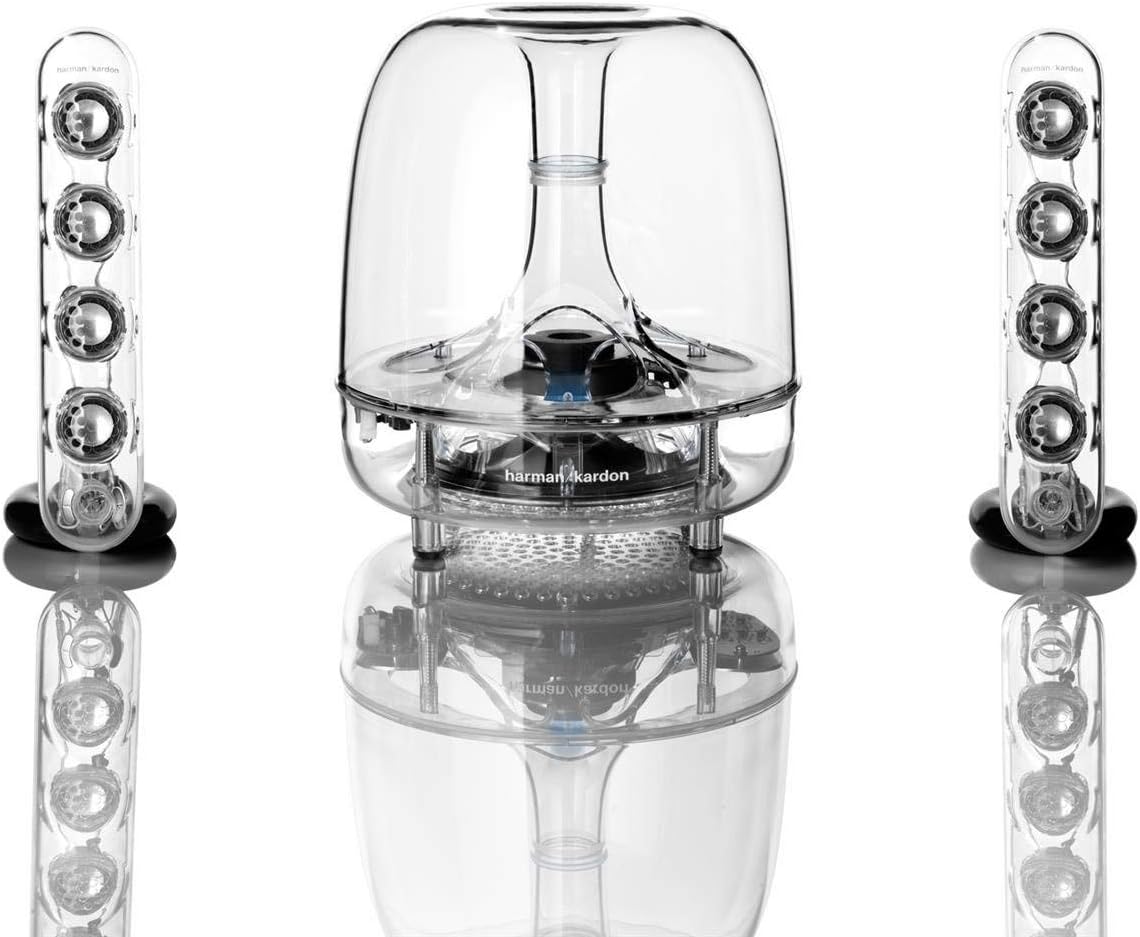
Figure 4.2: Rear view of the subwoofer showing audio input and satellite speaker connections.
5. Operating Instructions
Operating your SoundSticks III system is straightforward:
- Volume Control: The right satellite speaker features touch-sensitive controls for adjusting the master volume. Gently touch the '+' symbol to increase volume or the '-' symbol to decrease volume.
- Mute Function: To mute the audio, briefly touch both the '+' and '-' symbols simultaneously on the right satellite speaker. Repeat the action to unmute.
- Subwoofer Volume: The subwoofer has a dedicated rotary knob to adjust its bass output independently. Turn the knob clockwise to increase bass and counter-clockwise to decrease it.

Figure 5.1: Touch-sensitive volume controls located on the right satellite speaker.

Figure 5.2: Subwoofer volume control knob for adjusting bass levels.
6. Maintenance
To keep your SoundSticks III system in optimal condition:
- Cleaning: Use a soft, dry cloth to clean the surfaces of the speakers and subwoofer. Avoid using abrasive cleaners or solvents.
- Placement: Ensure the speakers are placed on stable surfaces to prevent accidental falls. Avoid placing them in direct sunlight or near heat sources.
- Cable Management: Keep cables tidy and untangled to prevent damage and ensure safety.
7. Troubleshooting
If you encounter any issues with your SoundSticks III, refer to the following common problems and solutions:
- No Sound:
- Ensure the power cable is securely connected and the system is powered on.
- Verify the 3.5mm audio minijack cable is fully inserted into both the subwoofer and your audio source.
- Check the volume levels on both the speaker system and your audio source. Ensure the system is not muted.
- Distorted Sound:
- Reduce the volume on both the speaker system and your audio source.
- Ensure audio cables are not damaged or loosely connected.
- Test with a different audio source to rule out device-specific issues.
- Intermittent Sound:
- Check all cable connections for looseness.
- Ensure there are no strong electromagnetic interferences nearby.
8. Specifications
| Feature | Detail |
|---|---|
| Model Name | Soundsticks III |
| Speaker Type | Satellite, Subwoofer |
| Surround Sound Channel Configuration | 2.1 |
| Subwoofer Diameter | 6 Inches |
| Woofer Diameter | 6 Inches |
| Speaker Maximum Output Power | 20 Watts |
| Amplifier Output Power | 10 Watt RMS per channel |
| Connectivity Technology | Wired |
| Control Method | Touch |
| Color | Clear |
| Material | Metal, Plastic |
| Product Dimensions | 11"D x 11.3"W x 15.5"H |
| Item Weight | 6.39 pounds (2900 Grams) |
| Compatible Devices | MP3 Player, Personal Computer, Television |
| Power Source | Corded Electric |
| Mounting Type | Tabletop Mount, Wall Mount |
9. Warranty and Support
The Harman Kardon SoundSticks III comes with a Limited Warranty. For detailed information regarding warranty coverage, terms, and conditions, please refer to the official Harman Kardon website or contact their customer support directly.
Legal Disclaimer: Sold as-is. All sales final.


