
1. Product Overview
The Pentax K-r is a compact and lightweight digital single-lens reflex (DSLR) camera designed for both novice and experienced photographers. It combines advanced imaging capabilities with user-friendly features, making it suitable for a wide range of photographic situations. This manual provides detailed instructions for setting up, operating, and maintaining your Pentax K-r camera.
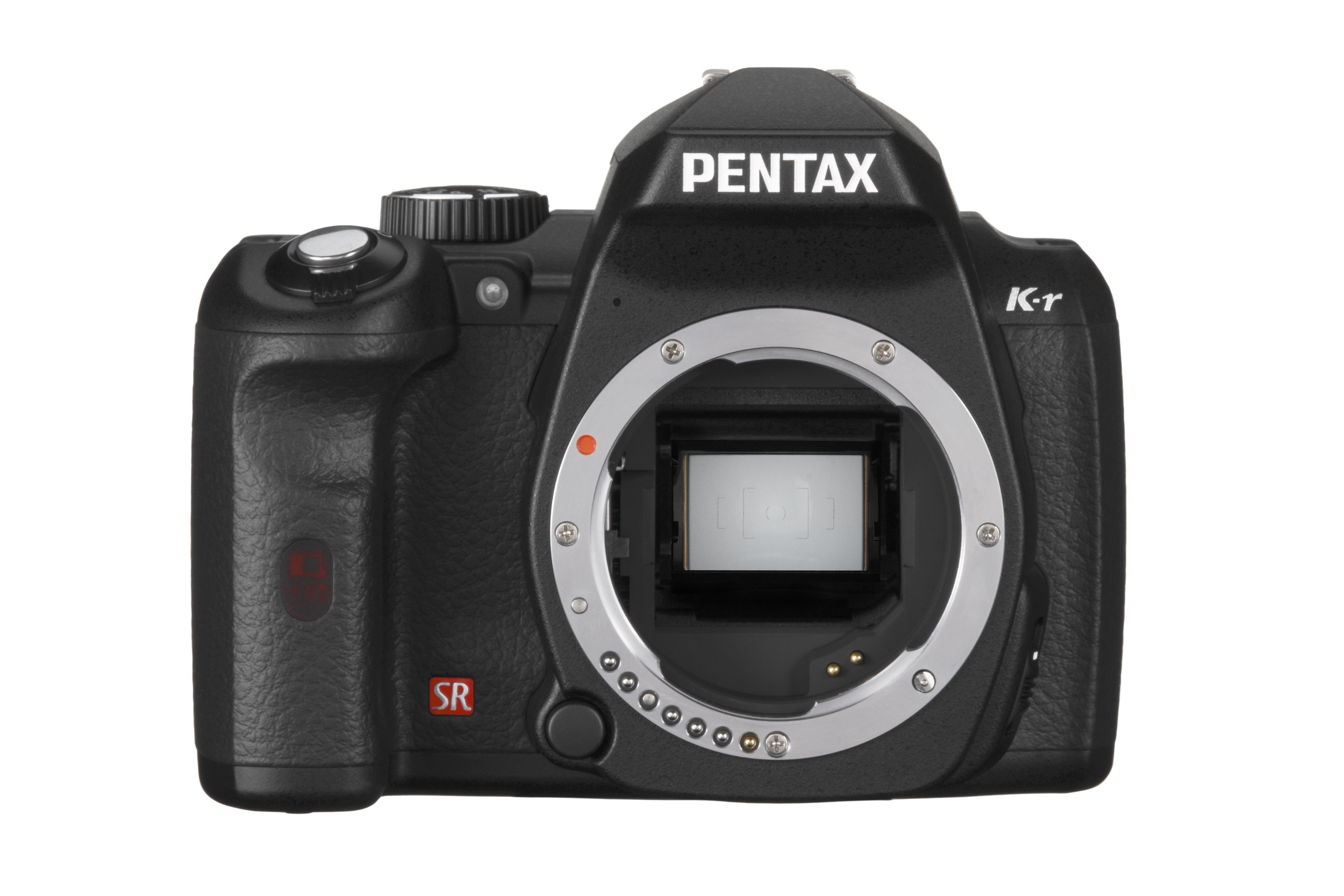
Figure 1: Front view of the Pentax K-r Digital SLR Camera (Black Body).
2. Initial Setup
2.1. Battery Installation and Charging
The Pentax K-r offers versatile power options, supporting either a rechargeable lithium-ion battery or four AA-size batteries (with an optional D-BH109 AA Battery Holder). The camera typically includes one rechargeable lithium-ion battery.
- Insert the Battery: Open the battery compartment cover located at the bottom of the camera. Insert the rechargeable lithium-ion battery with the correct orientation, ensuring it clicks into place. If using AA batteries, insert them into the optional D-BH109 holder first, then insert the holder into the camera.
- Charge the Battery: Use the provided battery charger to fully charge the lithium-ion battery before first use. The charging indicator will typically change color or turn off once charging is complete.
2.2. Memory Card Insertion
The Pentax K-r is compatible with SD/SDHC/SDXC memory cards (not included). Ensure you use a high-speed memory card for optimal performance, especially when recording HD video.
- Open the Memory Card Slot: Locate the memory card slot cover on the side of the camera and open it.
- Insert the Memory Card: Insert the memory card with the label facing the front of the camera until it clicks into place.
- Format the Memory Card: It is recommended to format a new memory card or one that has been used in another device using the camera's menu system. This ensures proper operation and prevents data corruption. Refer to the 'Operating the Camera' section for instructions on formatting.
3. Operating the Camera
3.1. Power On/Off
To power on the camera, rotate the power switch located near the shutter button. To power off, rotate the switch back to the OFF position.
3.2. Basic Photography Modes
The K-r features various shooting modes to simplify photography. The mode dial on the top of the camera allows you to select your desired mode.
- Auto Picture Mode: This intelligent mode automatically selects the most appropriate scene mode for your subject, taking the guesswork out of settings. It is effective even during Live View shooting.
- Scene Modes: Choose from a wide variety of specific scene modes (e.g., Portrait, Landscape, Macro, Night Scene) to optimize settings for different photographic scenarios.
- Program (P), Shutter Priority (Tv), Aperture Priority (Av), Manual (M): For more advanced control, these modes allow you to manually adjust exposure settings.
3.3. Autofocus System
The camera is equipped with a highly responsive and accurate 11-point SAFOX IX autofocus system, including a dedicated AF assist lamp for improved focus speed in low-light conditions. A focus point indicator in the viewfinder confirms the area of focus as you frame your shot.
3.4. ISO Sensitivity
The K-r offers a wide ISO sensitivity range from 100 to 25600. This allows for excellent performance in various lighting conditions, with improved noise performance from the 12.4-megapixel CMOS sensor, enabling clear images even in low light.
3.5. Continuous Shooting
Capture fast-moving subjects with the high-speed continuous shooting mode, which records up to 25 images (in JPEG format) in a single sequence at a maximum speed of approximately six frames per second. Shutter speeds can be as quick as 1/6000th of a second.
3.6. Live View and LCD Monitor
The large, high-resolution 3-inch LCD monitor features approximately 921,000 dots, providing exceptionally clear views of live action and reviewed images. Its wide-view design ensures clarity from approximately 170 degrees horizontally and vertically, useful for low- and high-angle shooting.
3.7. HD Video Recording
The K-r provides a movie-recording function that captures beautiful, true-to-life movie clips in 16:9 high-definition TV proportions (1280 x 720 pixels) at a frame rate of 25 frames per second. You can use various interchangeable Pentax lenses (wide-angle, standard, telephoto, zoom) to achieve different visual effects in your videos. After recording, you can watch your HD movies on any HD TV.
Video 1: An overview of the Pentax K-r camera's features and capabilities.
Video 2: A detailed look at the Pentax K-r's video recording functions.
4. Key Features
- Pentax-original Shake Reduction (SR): This in-body mechanism effectively compensates for camera shake by up to approximately four shutter steps, ensuring sharp, blur-free images. It works with almost all Pentax interchangeable lenses, including older film-format lenses.
- Dust Removal (DR) Mechanism: Helps to shake dust off the CMOS image sensor, maintaining image quality.
- High Dynamic Range (HDR) Function: Create composite images with an extra-wide gradation range from three images with different exposures, directly in-camera. Includes Auto, Standard, Expanded (three levels), and Night Scene HDR modes. The Auto Align function allows for handheld HDR shooting.
- Custom Image Function: Select from nine custom image modes, including 'Bleach Bypass', to apply distinctive finishing touches to your images.
- Digital Filter Function: Apply various creative filters (e.g., Starburst, Sketch, Posterization) to recorded images without needing a computer. Multiple filters can be applied sequentially.
- Cross Process Mode: Automatically shifts photographic parameters for each exposure to create images with dramatic, stylized colors, mimicking the cross-processing technique in film photography. Options include 'Random', 'Preset' (three sets), and 'Favorite' (user-input parameters).
- IrSimple High-Speed Infrared Data Transmission: Transfer image data wirelessly to IrSimple-compatible digital devices or upload to the web via a cellular phone. Also allows for image comparison between two K-r cameras.
- Versatile White Balance Control: Features a new CTE mode designed to emphasize dominant color components, ideal for scenes like sunsets.
- Automatic Lens Correction: Automatic compensation of distortion and lateral chromatic aberration is available with DA-, DFA- and FA Limited-series lenses.
- Pentax Digital Camera Utility 4: Software package included for RAW-data processing and image browsing.
5. Maintenance
To ensure the longevity and optimal performance of your Pentax K-r camera, regular maintenance is recommended.
- Cleaning the Camera Body: Use a soft, dry cloth to wipe the camera body. For stubborn dirt, slightly dampen the cloth with water or a mild cleaning solution. Avoid using strong solvents.
- Cleaning the Lens: Use a lens brush or blower to remove dust from the lens surface. For smudges, use a specialized lens cleaning cloth and lens cleaning fluid. Never touch the lens surface with your fingers.
- Sensor Cleaning: The camera features a Dust Removal mechanism. If dust spots persist on your images, manual sensor cleaning may be required. This is a delicate procedure and should ideally be performed by a qualified service technician.
- Battery Care: Store batteries in a cool, dry place. If the camera will not be used for an extended period, remove the battery.
- Storage: Store the camera in a dry, well-ventilated area, away from direct sunlight, high temperatures, and humidity.
6. Troubleshooting
This section addresses common issues you might encounter with your Pentax K-r camera.
- Camera does not power on: Ensure the battery is fully charged and correctly inserted. If using AA batteries, confirm they are new or fully charged and inserted correctly into the optional holder.
- Images are blurry: Check your focus mode and ensure the camera has locked onto the subject. Verify that the Shake Reduction (SR) is active if shooting handheld in low light. Ensure shutter speed is appropriate for the subject's movement.
- Images are too dark/bright: Adjust exposure settings (aperture, shutter speed, ISO) or switch to an automatic mode like Auto Picture. Check metering mode.
- Noise in images (grainy): High ISO settings can introduce noise. Try lowering the ISO if lighting conditions permit, or use a wider aperture/slower shutter speed.
- Memory card error: Ensure the memory card is inserted correctly. Try formatting the card (note: this will erase all data). If the error persists, try a different memory card.
- Video recording stops unexpectedly: This can occur if the sensor overheats during extended recording, especially in warm environments. Allow the camera to cool down. Ensure your memory card has sufficient write speed for video.
- LCD display issues: If the display is not functioning correctly, try powering the camera off and on. If issues persist, it may indicate a hardware problem.
For more complex issues, please refer to the full Pentax K-r user manual or contact Pentax customer support.
7. Specifications
| Feature | Detail |
|---|---|
| Model Name | K-r Body Black |
| Brand | Pentax |
| Photo Sensor Technology | CMOS |
| Image Sensor Resolution | 12.4 Megapixels |
| Supported File Format | JPEG, RAW |
| Image Stabilization | Sensor-shift (Pentax-original SR) |
| ISO Range | 100-25600 (Expanded ISO Minimum: 200) |
| Autofocus System | 11-point SAFOX IX |
| Continuous Shooting Speed | Up to 6 FPS |
| Shutter Speed | Up to 1/6000 second |
| LCD Monitor | 3-inch with 921,000 dots of resolution |
| Video Recording | 720p HD at 25 FPS |
| Compatible Mountings | Pentax KAF2, Pentax KAF3 |
| Metering Description | Multi, Center-weighted, Spot |
| Power Source | Rechargeable Lithium-ion battery or 4 AA-size batteries (with optional D-BH109 holder) |
| Product Dimensions | 4.92 x 2.68 x 3.82 inches |
| Item Weight | 1.32 pounds |
| Date First Available | September 7, 2010 |
8. Warranty & Support
This product is covered by a 90-day parts and labor warranty. For specific warranty details and to register your product, please refer to the warranty card included in the product packaging or visit the official Pentax website.
For technical support, service, or inquiries, please contact Pentax customer service. Contact information can typically be found on the manufacturer's website or in the documentation provided with your camera.
Legal Disclaimer: BODY SERIAL #8216498 FULL 14 DAY NO HASSLE SATISFACTION GUARANTEE AND A 90 DAY PARTS AND LABOR WARRANTY.


