
1. Introduction
This manual provides essential information for the safe and effective operation and maintenance of your Gaggia Accademia 1003380 Espresso Machine. The Gaggia Accademia is a super automatic espresso machine designed for home use, offering one-touch beverage preparation and customizable settings. It features a ceramic burr grinder, integrated milk carafe, and programmable options for various coffee and milk-based drinks.
Video: Gaggia 1003380 Accademia Espresso Machine Overview. This video provides a general overview of the Gaggia Accademia espresso machine, highlighting its design and key functionalities.
Video: Gaggia Accademia Feature Overview. This video demonstrates various features and functionalities of the Gaggia Accademia espresso machine.
2. Safety Information
Please read all safety instructions before using the appliance. Failure to follow these instructions may result in electric shock, fire, or serious injury.
- Do not immerse the appliance, power cord, or plug in water or other liquids.
- Ensure the appliance is placed on a stable, level surface away from heat sources.
- Do not operate the appliance with a damaged cord or plug. Contact customer support for assistance.
- Keep children away from the appliance during operation due to hot surfaces and liquids.
- Unplug the appliance before cleaning and when not in use.
3. Package Contents
Verify that all components are present in the package:
- Gaggia Accademia Espresso Machine
- Milk Carafe
- User Manual (this document)
4. Product Overview
4.1 Key Features
- Adjustable telescopic coffee dispenser with a maximum height of over 6-1/2 inches to accommodate various cup sizes.
- Ceramic burr grinder with integrated bean hopper and double lid aroma saver.
- Integrated coffee grounds container, removable from the front for easy disposal.
- Programmable coffee quantity, from 7 to 10-cup settings.
- Pre-brewing system for enhanced flavor extraction.
- 0.5 liter milk carafe for one-touch preparation of specialty beverages.
4.2 Components

Image: Front view of the Gaggia Accademia Espresso Machine, showcasing the control panel, coffee dispenser, and drip tray.

Image: Top-down view of the Gaggia Accademia Espresso Machine, showing the bean hopper on the right and the water tank on the left.

Image: Close-up of the Gaggia Accademia's display panel, showing beverage selection options and customization settings.

Image: The Gaggia Accademia Espresso Machine with its integrated milk carafe attached, ready for milk-based beverages.
5. Setup
Follow these steps for initial setup of your espresso machine:
- Unpacking: Carefully remove all packaging materials and ensure all components are present.
- Placement: Place the machine on a stable, level surface. Ensure adequate ventilation around the unit.
- Water Tank: Remove the water tank, rinse it, and fill it with fresh, cold water. Reinsert it securely.
- Bean Hopper: Open the bean hopper lid and fill it with whole coffee beans. Close the lid to preserve aroma.
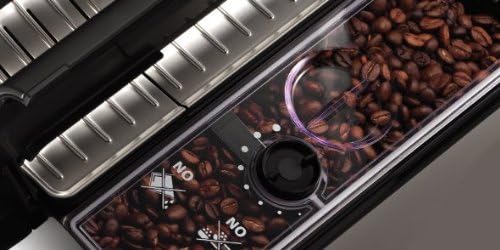
Image: Close-up of the bean hopper filled with whole coffee beans, showing the grinder adjustment dial.

Image: The pre-ground coffee chute on the Gaggia Accademia, used for adding pre-ground coffee.
6. Operating Instructions
6.1 Basic Coffee Preparation
- Power On: Press the power button to turn on the machine. It will perform an automatic rinse cycle.
- Select Beverage: Use the display to select your desired coffee beverage (e.g., Espresso, Coffee, Caffe Lungo).
- Customize (Optional): Adjust coffee strength, temperature, and volume using the on-screen options.
- Start Brewing: Place a cup under the dispenser and press the start button.
Video: How to Make an Espresso with the Gaggia Accademia. This video demonstrates the process of making a single espresso shot.
Video: How to Make a Coffee with the Gaggia Accademia. This video shows how to prepare a standard coffee using the machine.
Video: How to Make a Long Coffee with the Gaggia Accademia. This video guides you through making a longer coffee beverage.
Video: How to Make a Decaf Espresso with the Gaggia Accademia. This video demonstrates preparing a decaffeinated espresso.
6.2 Milk-Based Drinks
The integrated milk carafe allows for easy preparation of cappuccinos, lattes, and latte macchiatos.
- Attach Milk Carafe: Fill the milk carafe with fresh, cold milk and attach it to the machine.
- Select Drink: Choose your desired milk-based beverage from the display.
- Start Brewing: Place a cup under the dispenser and press the start button. The machine will automatically froth and dispense milk and coffee.
Video: How to Make a Cappuccino with the Gaggia Accademia. This video illustrates the steps for making a cappuccino.
Video: How to Make a Latte Macchiato with the Gaggia Accademia. This video demonstrates the preparation of a latte macchiato.
Video: How to Make Latte Art with the Gaggia Accademia. This video provides a guide on creating latte art using the machine's milk frothing capabilities.
6.3 Hot Water and Americano
The machine can also dispense hot water for tea or other beverages, and prepare Americanos.
- Select Hot Water/Americano: Choose the appropriate option from the display.
- Dispense: Place a cup under the hot water spout and press the start button.
Video: How to Make an Americano with the Gaggia Accademia. This video demonstrates the process of making an Americano.
7. Maintenance
Regular cleaning and maintenance ensure optimal performance and longevity of your Gaggia Accademia.
7.1 Daily Cleaning
- Drip Tray: Empty and rinse the drip tray daily.
- Coffee Grounds Container: Empty the coffee grounds container when prompted by the machine or daily.
- Milk Carafe: After each use, perform the quick clean cycle for the milk carafe. Disassemble and wash regularly.
7.2 Weekly Cleaning
- Brew Group: Remove the brew group and rinse it under lukewarm water. Allow it to air dry before reinserting.

Image: The side panel of the Gaggia Accademia Espresso Machine opened to reveal the removable brew group for cleaning.
7.3 Descaling
The machine will prompt you when descaling is required. Follow the on-screen instructions and use a Gaggia-approved descaling solution to prevent mineral buildup and maintain performance.
8. Troubleshooting
If you encounter issues with your machine, refer to the following common solutions:
- No Coffee Dispensing: Check if the water tank is filled and correctly inserted. Ensure the bean hopper has enough beans.
- Weak Coffee: Adjust the coffee strength setting on the display. Check the grinder setting; a finer grind may produce stronger coffee.
- Milk Not Frothing: Ensure the milk carafe is clean and properly assembled. Use fresh, cold milk.
- Machine Not Turning On: Verify the power cord is securely plugged into a working outlet.
For persistent issues, contact Gaggia customer support.
9. Specifications
| Feature | Detail |
|---|---|
| Brand | Gaggia |
| Model Number | 1003380 |
| Color | Silver |
| Product Dimensions | 11"D x 16"W x 14.6"H |
| Item Weight | 45 pounds |
| Capacity | 0.5 Liters (Milk Carafe) |
| Voltage | 120 Volts |
| Operation Mode | Fully Automatic |
| Special Feature | Integrated Coffee Grinder, Milk Frother, Programmable, Water Filter |
| Coffee Input Type | Whole Bean |
| Made in | Italy |
10. Warranty and Support
For warranty information, product registration, or technical support, please refer to the official Gaggia website or contact their customer service department. Keep your purchase receipt as proof of purchase for warranty claims.


