
1. Product Overview
The Gaggia for Illy Espresso Machine Model 105399 is designed to deliver authentic espresso using Illy's iperEspresso capsules. This single-serve machine combines the expertise of Gaggia and Illy to provide a convenient and consistent brewing experience. It features dedicated controls for on/off, cup volume, and steam, along with an integrated steam wand for milk-based beverages.

Figure 1.1: The Gaggia for Illy Espresso Machine in operation, dispensing espresso.
Key Features:
- Dedicated on/off, cup-volume, and steam controls for ease of use.
- Programmable cup-volume button to customize espresso shot size.
- Integrated steam wand and hot water dispenser for preparing milk-based drinks and teas.
- Mavea Water Filter for improved water quality and reduced scale buildup.
- Capsule container with a capacity for up to 12 spent capsules.
- Durable stainless steel boiler for consistent performance.
2. Important Safety Information
Please read all instructions carefully before using the appliance. Failure to follow these instructions may result in electric shock, fire, or serious injury.
- Always connect the machine to a grounded power outlet.
- Do not immerse the machine, power cord, or plug in water or other liquids.
- Keep hands and cords away from hot surfaces, such as the steam wand and espresso dispenser.
- Unplug the machine before cleaning and when not in use for extended periods.
- Do not operate the machine with a damaged cord or plug. Contact customer support for repairs.
- This appliance is for household use only.
3. Initial Setup
3.1 Unpacking
- Carefully remove all packaging materials from the machine.
- Place the machine on a stable, flat, and heat-resistant surface.
- Ensure adequate clearance around the machine for ventilation.
3.2 Water Tank Preparation
- Remove the water tank from the back of the machine.
- Rinse the water tank thoroughly with fresh water.
- Install the Mavea Water Filter (if not pre-installed) according to its instructions.
- Fill the water tank with fresh, cold drinking water up to the MAX level indicator.
- Place the water tank back into the machine, ensuring it is seated correctly.
3.3 First Use and Priming
- Plug the machine into a grounded electrical outlet.
- Press the On/Off button (ⓘ) to turn on the machine. The indicator light will illuminate.
- Place a cup under the espresso dispenser.
- Press the espresso button (☕) to dispense water. Repeat this process until water flows consistently, priming the system.
- The machine is now ready for use.
4. Operating Instructions
4.1 Making Espresso
- Ensure the machine is on and the water tank is filled.
- Lift the capsule lever to open the capsule compartment.
- Insert one Illy iperEspresso capsule into the compartment.
- Close the capsule lever firmly until it clicks into place.
- Place an espresso cup under the dispenser.
- Press the espresso button (☕). The machine will begin brewing.
- The machine will automatically stop when the programmed volume is reached. To stop manually, press the espresso button again.
- After brewing, lift the capsule lever to eject the spent capsule into the internal container.

Figure 4.1: Inserting an Illy iperEspresso capsule.

Figure 4.2: Closing the capsule lever securely.

Figure 4.3: Pressing the cup volume button to start brewing.
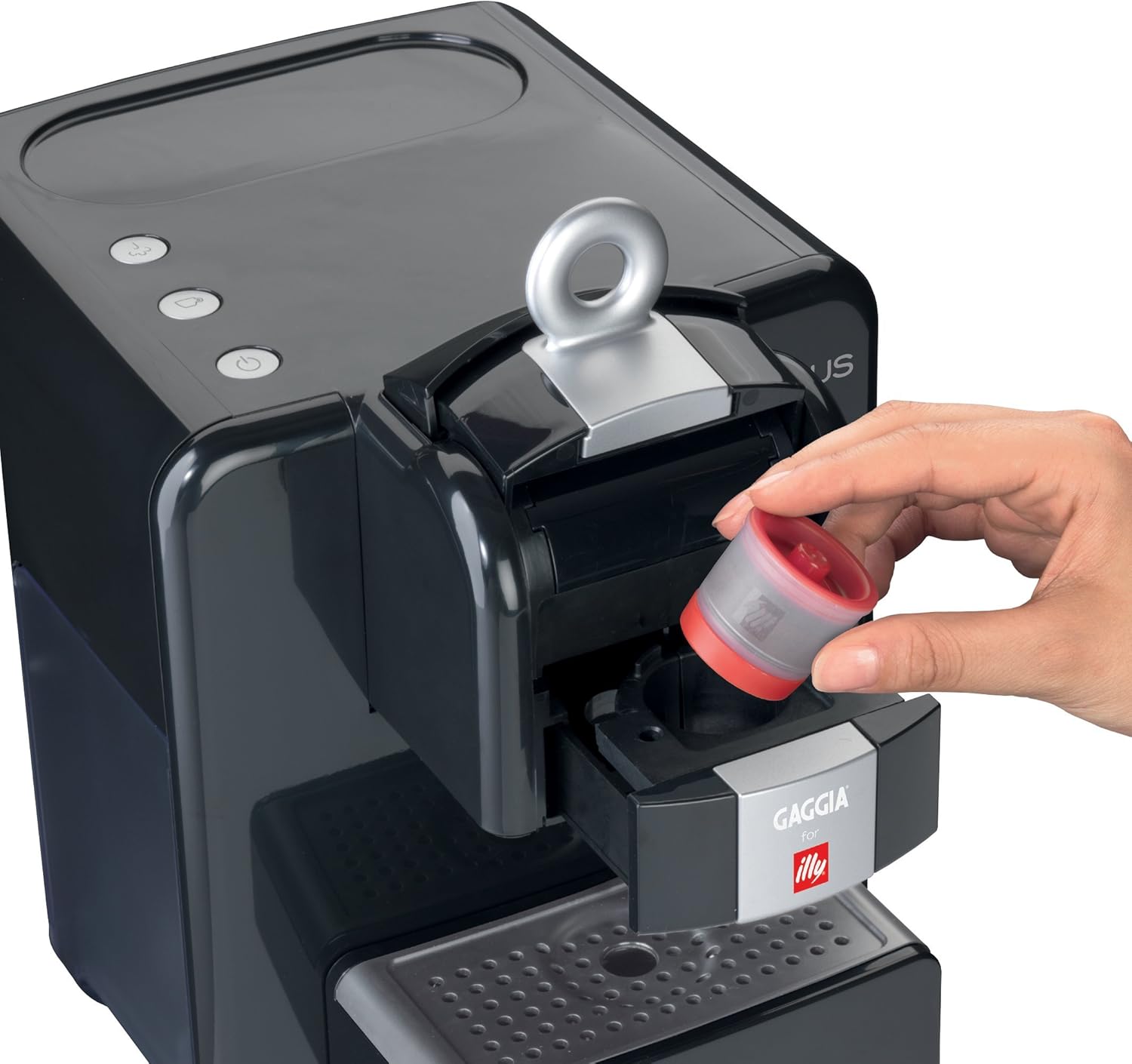
Figure 4.4: Ejecting a spent capsule.
4.2 Programming Cup Volume
- Follow steps 1-5 from "4.1 Making Espresso".
- Press and hold the espresso button (☕). The machine will begin brewing.
- Release the button when your desired espresso volume is reached. The machine will remember this setting for future brews.
4.3 Using the Steam Wand (for Milk Frothing and Hot Water)
- Ensure the machine is on.
- Press the steam button (☁). The indicator light will blink while heating, then remain solid when ready.
- For Frothing Milk:
- Fill a metal pitcher with cold milk (dairy or non-dairy) up to one-third full.
- Submerge the steam wand tip just below the surface of the milk.
- Turn the steam knob to release steam. Move the pitcher up and down to create foam.
- Once desired foam and temperature are reached, turn off the steam knob.
- Immediately wipe the steam wand with a damp cloth to prevent milk residue from drying.

Figure 4.5: Frothing milk with the integrated steam wand.

Figure 4.6: Combining frothed milk with espresso for a latte or cappuccino.
- For Hot Water:
- Place a cup under the steam wand.
- Turn the steam knob to dispense hot water.
- Turn off the steam knob when the desired amount of hot water is reached.
- Press the steam button again to exit steam mode.
5. Cleaning and Maintenance
Regular cleaning ensures optimal performance and extends the life of your espresso machine.
5.1 Daily Cleaning
- Drip Tray and Spent Capsule Container: Empty and rinse daily. The capsule container holds up to 12 spent capsules.
- Water Tank: Rinse daily and refill with fresh water.
- Steam Wand: Immediately after each use, wipe the steam wand with a damp cloth. Purge a small amount of steam to clear any internal milk residue.
- Exterior: Wipe the exterior of the machine with a soft, damp cloth. Do not use abrasive cleaners or solvents.
5.2 Descaling
Descaling is crucial to remove mineral buildup and maintain machine performance. The frequency depends on water hardness and usage. The Mavea Water Filter helps reduce scale, but descaling is still necessary.
- Use a Gaggia-approved descaling solution. Follow the descaler manufacturer's instructions carefully.
- Empty the water tank and fill it with the descaling solution mixed with water as directed.
- Place a large container under the espresso dispenser and steam wand.
- Run several cycles of espresso and hot water through the machine until the water tank is empty.
- Rinse the water tank thoroughly and refill with fresh water.
- Run several cycles of fresh water through the machine to rinse out any descaling solution residue.
6. Troubleshooting
| Problem | Possible Cause | Solution |
|---|---|---|
| Machine does not turn on. | Not plugged in; power outlet issue. | Ensure the power cord is securely plugged into a working, grounded outlet. |
| No water or coffee dispenses. | Water tank empty; machine not primed; air bubble in system; clogged dispenser. | Fill water tank. Prime the machine (see Section 3.3). Run hot water through the steam wand to clear air. Descale the machine if necessary. |
| Espresso flows too slowly or drips. | Machine needs descaling; capsule not inserted correctly. | Perform a descaling cycle (see Section 5.2). Ensure the capsule is properly seated and the lever is fully closed. |
| Espresso is cold. | Cups not pre-warmed; machine not fully heated. | Pre-warm cups with hot water. Allow the machine to fully heat up before brewing. |
| Steam wand not producing steam. | Machine not in steam mode; wand clogged. | Press the steam button and wait for the indicator light to be solid. Clean the steam wand thoroughly. |
| Capsule compartment difficult to close. | Capsule not aligned correctly. | Ensure the capsule is seated perfectly flat in the compartment before closing the lever. Do not force it. |
7. Product Specifications
| Feature | Detail |
|---|---|
| Brand | Gaggia |
| Model Number | 105399 |
| Color | Black |
| Coffee Maker Type | Espresso Machine |
| Operation Mode | Fully Automatic |
| Special Features | Programmable, Water Filter (Mavea) |
| Human Interface Input | Buttons |
| Product Dimensions | 8.5 x 12.8 x 10 inches |
| Item Weight | 16.55 pounds |
| Boiler Material | Stainless Steel |
| Capsule Capacity | Up to 12 spent capsules |
| UPC | 693042911528 |
| ASIN | B00416L8OQ |
8. Warranty and Customer Support
8.1 Warranty Information
This Gaggia for Illy Espresso Machine is covered by a manufacturer's warranty. Please refer to the warranty card included with your purchase for specific terms, conditions, and duration. Keep your proof of purchase for warranty claims.
8.2 Customer Support
For technical assistance, troubleshooting beyond this manual, or warranty service, please contact Gaggia customer support. Contact information can typically be found on the manufacturer's website or in the documentation provided with your machine.
You may also visit the official Gaggia website for FAQs and additional resources: www.gaggia.com


