
Introduction
The JAZZ DV173 is a versatile multi-function digital device designed for capturing memories. It functions as a digital still camera, a digital video camcorder, a PC webcam, a mass storage device, and a voice recorder. This manual provides instructions for proper setup, operation, and maintenance of your DV173 camera.
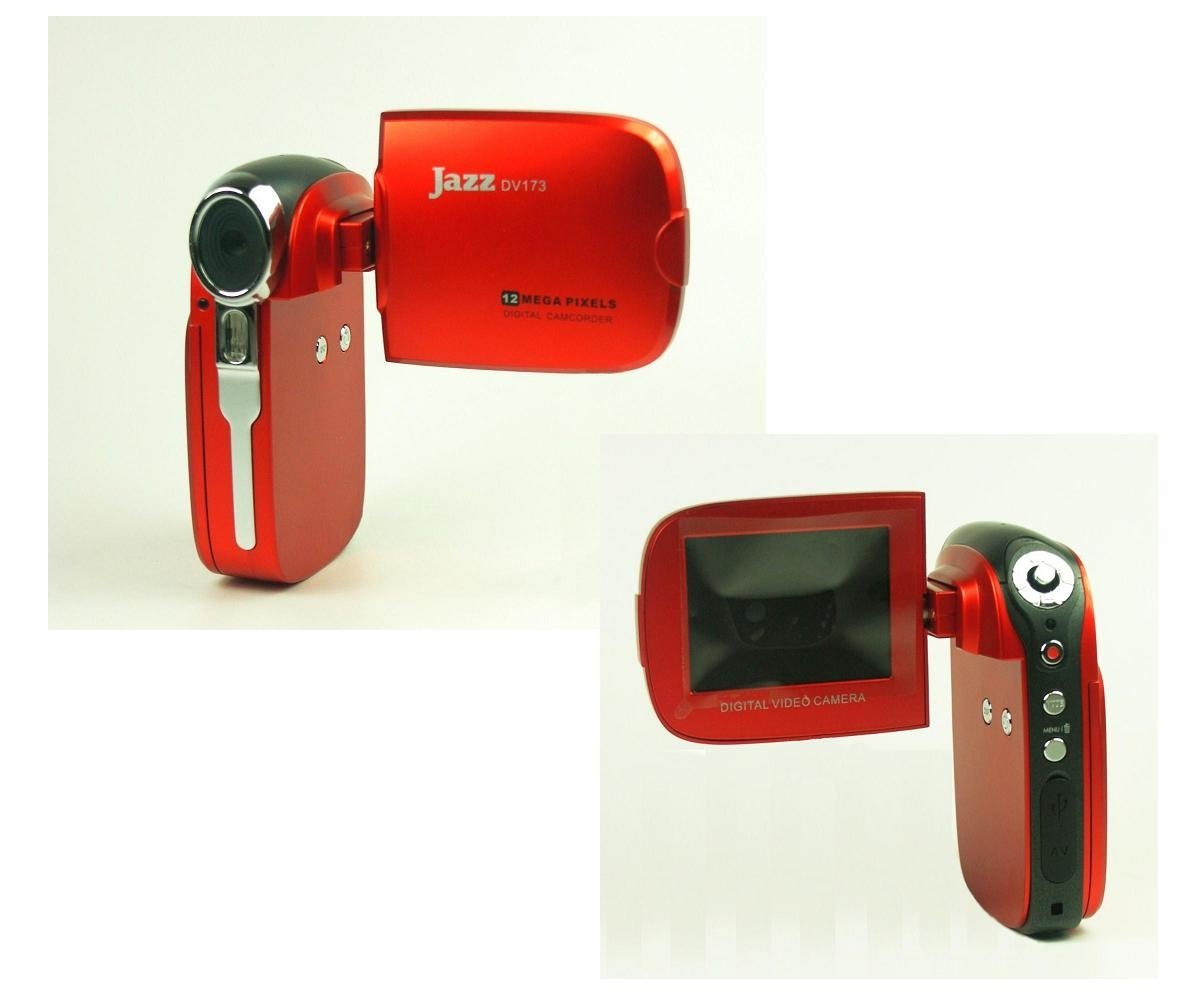
Figure 1: JAZZ DV173 Digital Video Camera. This image shows the compact design of the camera with its 2.4-inch TFT LCD flip-up display open.
Setup
1. Battery Installation
The DV173 camera requires three AAA batteries (not included). Ensure correct polarity when inserting the batteries.
- Locate the battery compartment cover on the camera.
- Slide the cover open.
- Insert three AAA batteries, matching the (+) and (-) terminals as indicated inside the compartment.
- Close the battery compartment cover securely.
2. Memory Card Installation
The camera supports SD/MMC memory cards up to 8GB capacity (card not included). A memory card is essential for storing photos and videos.
- Locate the SD/MMC card slot on the side of the camera.
- Insert the memory card with the metal contacts facing down, until it clicks into place.
- To remove the card, gently push it in until it springs out.
3. Initial Power On
After installing batteries and a memory card, press and hold the power button to turn on the camera. The 2.4" Color TFT LCD display will illuminate.
Operating Instructions
1. Basic Controls
Familiarize yourself with the camera's buttons and the 2.4" LTPS TFT LCD flip-up display. The display can be rotated 270 degrees for various viewing angles.
2. Taking Still Photos
To capture still images:
- Turn on the camera.
- Select the "Digital Still" mode using the mode button.
- Frame your shot using the LCD display.
- Press the shutter button to take a picture. The camera has a 12.0 Mega Pixels resolution.
- Use the 4X digital zoom to adjust your view.
3. Recording Videos
To record video clips:
- Turn on the camera.
- Select the "Video Recording" mode.
- Press the record button to start recording.
- Press the record button again to stop recording. Videos are saved in AVI format with 720p resolution.
4. Playback
To view your captured photos and videos:
- Enter playback mode.
- Use the navigation buttons to browse through your files.
- Press the play button to view videos.
5. Connecting to a Computer (PC Webcam & Mass Storage)
The camera can connect to a computer via USB 2.0.
- Mass Storage Device: Connect the camera to your PC using the provided USB cable. The camera will appear as a removable disk, allowing you to transfer files.
- PC Webcam: Select "PC Camera" mode on the device when connected to a computer to use it as a webcam.
6. Connecting to a Television (AV Out)
You can view your media on a television using the AV Out port and cable.
- Connect the AV cable to the camera's AV Out socket and to the corresponding input on your television.
- Select the correct AV input channel on your television.
- The camera display will mirror on your TV screen.
7. Voice Recording
The DV173 includes a voice recorder function for capturing audio notes. Files are saved in WAV format.
- Select "Voice Recording" mode.
- Press the record button to start recording audio.
- Press the record button again to stop.
Maintenance
1. Cleaning the Camera
- Use a soft, dry cloth to clean the camera body.
- For the lens and LCD screen, use a specialized lens cleaning cloth and solution if necessary. Avoid harsh chemicals.
2. Battery Care
- Remove batteries if the camera will not be used for an extended period to prevent leakage.
- Replace all three AAA batteries simultaneously for optimal performance.
3. Storage
Store the camera in a cool, dry place, away from direct sunlight and extreme temperatures. Use the provided camera pouch for protection.
Troubleshooting
| Problem | Possible Cause | Solution |
|---|---|---|
| Camera does not power on. | Batteries are drained or incorrectly inserted. | Replace with fresh AAA batteries, ensuring correct polarity. |
| Cannot take photos/videos. | Memory card is full, not inserted, or corrupted. | Insert a compatible SD/MMC card, delete unnecessary files, or format the card (this will erase all data). |
| Poor image/video quality. | Insufficient lighting, dirty lens, or digital zoom used excessively. | Ensure adequate lighting. Clean the lens. Avoid over-reliance on digital zoom. |
| Flash not working. | Flash setting is off or batteries are low. | Check flash settings in the menu. Replace batteries. |
| Camera not recognized by PC. | Incorrect USB mode, faulty cable, or driver issue. | Ensure "Mass Storage" or "PC Camera" mode is selected on the camera. Try a different USB port or cable. Install drivers from the included CD if necessary. |
Specifications
- Model: DV173
- Digital Camera Modes: Video Recording, Digital Still, PC Camera, Voice Recording, Mass Storage
- Image Resolution: 12.0 Mega Pixels
- Video Resolution: 720p
- Digital Zoom: 4X
- Display Screen: 2.4" Color TFT LCD (LTPS technology, 270-degree hinged flip)
- Internal Memory: 32 MB
- External Memory: SD/MMC Card Slot (up to 8GB capacity)
- File Formats: AVI (Video), JPEG (Still Image), WAV (Audio)
- USB Interface: USB 2.0
- AV Out: NTSC / PAL TV Socket
- Power Source: 3 x AAA batteries (not included)
- Special Features: Low Light capability, Digital Image Stabilization
- Included Accessories: USB cable, AV cables (for TV), Wrist strap, Camera pouch, Adobe Reader Image Software (CD), Arcsoft Photo Impression Software, Arcsoft ShowBiz DVD Manual