Introduction
Welcome to the user manual for your Zeppelin 100 Years Automatic Chronograph Watch, Model 7618-1. This document provides essential information for the proper setup, operation, maintenance, and care of your timepiece. Please read these instructions carefully to ensure optimal performance and longevity of your watch.
Product Overview
The Zeppelin 100 Years Automatic Chronograph Watch, Model 7618-1, is a precision timepiece featuring an automatic mechanical movement. It includes a chronograph function for measuring elapsed time, a clear case back to view the intricate movement, and is water-resistant to 5 ATM. The watch is fitted with a black leather strap and features a classic silver dial with multiple sub-dials and scales.
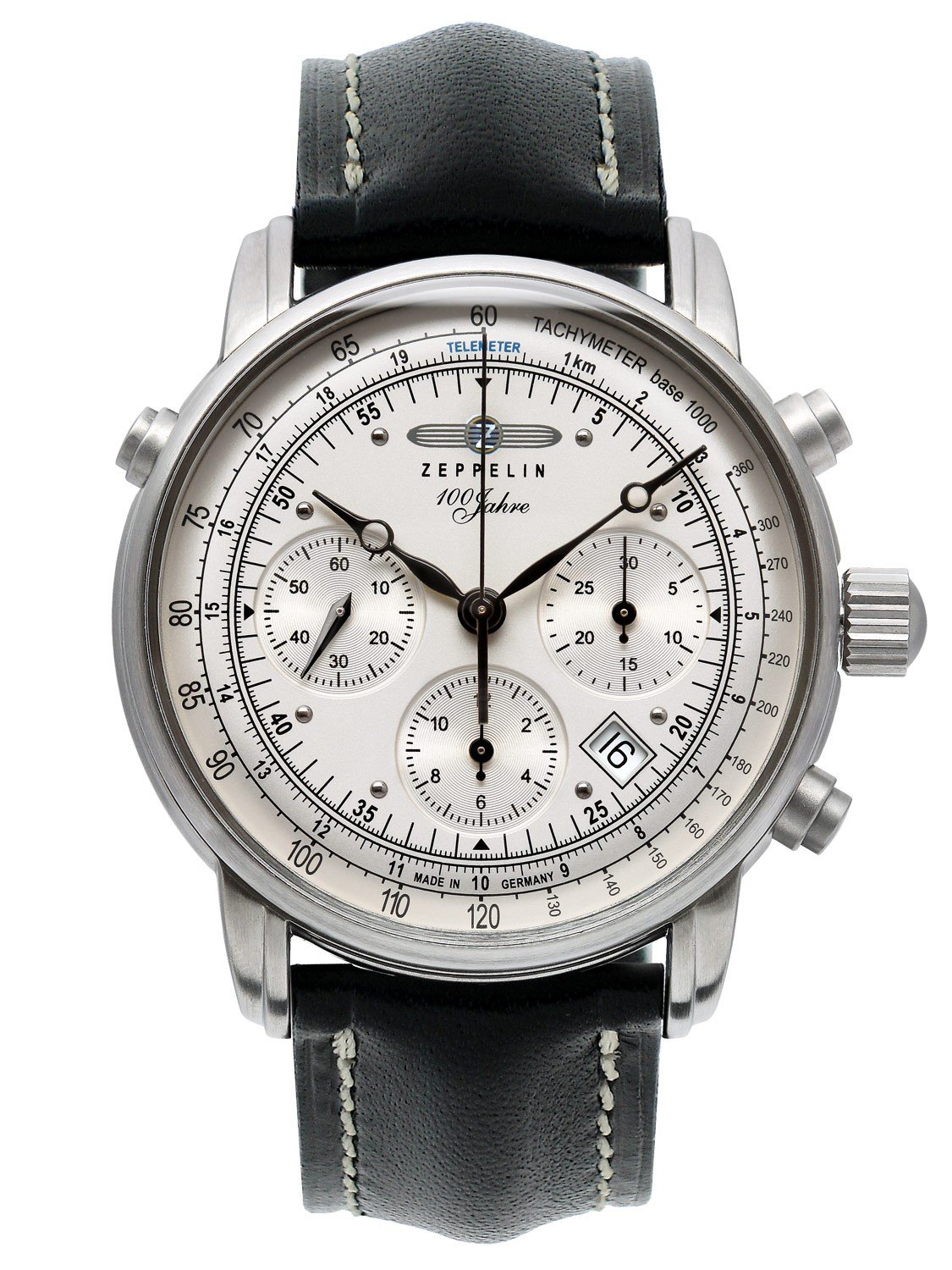
Image showing the front view of the Zeppelin 100 Years Automatic Chronograph Watch, Model 7618-1. The watch features a silver dial with multiple sub-dials, a black leather strap, and a polished stainless steel case.
Setup
Initial Winding
Your automatic watch is powered by the motion of your wrist. If the watch has stopped or has not been worn for an extended period, it may require manual winding to initiate operation and build up its power reserve.
- Ensure the crown is in the fully pushed-in position (position 0).
- Turn the crown clockwise approximately 20-30 times. This will provide sufficient power to start the watch.
- The watch will continue to wind automatically as you wear it.
Setting the Time
- Pull the crown out to position 2.
- Turn the crown clockwise or counter-clockwise to set the hour and minute hands to the correct time.
- Push the crown back into position 0 to engage the movement and start the watch.
Setting the Date
The Model 7618-1 features a date display. The date is adjusted using a dedicated pusher located on the left side of the watch case, typically around the 10 o'clock position.
- Use a small, non-sharp tool (e.g., a toothpick or a specialized pusher tool) to gently press the date corrector button.
- Each press will advance the date by one day.
- Avoid setting the date between 9 PM and 3 AM, as this is when the date change mechanism is active and could be damaged. If you need to set the date during this period, first set the time outside this range (e.g., to 6 AM), adjust the date, and then reset the time.
Operating the Chronograph
Your watch is equipped with a chronograph function for measuring elapsed time. It typically operates using two pushers on the side of the case, usually at 2 and 4 o'clock.
- Start: Press the upper pusher (typically at 2 o'clock) to start the chronograph. The central chronograph second hand will begin to move.
- Stop: Press the upper pusher again to stop the chronograph. The elapsed time will be indicated by the chronograph hands.
- Reset: After stopping the chronograph, press the lower pusher (typically at 4 o'clock) to reset all chronograph hands to their zero positions.
Tachymeter and Telemeter Scales
The dial may feature tachymeter and telemeter scales for specific measurements.
- Tachymeter: Used to measure speed over a known distance (e.g., 1 kilometer or 1 mile). Start the chronograph at the beginning of the distance and stop it at the end. The number indicated by the chronograph second hand on the tachymeter scale corresponds to the speed in units per hour.
- Telemeter: Used to measure the distance to an event that can be both seen and heard (e.g., a lightning strike). Start the chronograph when you see the event and stop it when you hear it. The number indicated by the chronograph second hand on the telemeter scale corresponds to the distance.
Maintenance and Care
Cleaning
- For the watch case and sapphire crystal, wipe gently with a soft, dry, lint-free cloth.
- For the leather strap, avoid prolonged exposure to water, direct sunlight, and harsh chemicals. Clean with a slightly damp cloth and allow to air dry.
Water Resistance (5 ATM / 50 Meters)
Your watch is water-resistant to 5 ATM (50 meters). This means it is suitable for everyday use, splashes, rain, and brief immersion in water.
Important:
- Do not operate the crown or pushers when the watch is wet or submerged in water.
- Not suitable for swimming, diving, or showering, as steam and water pressure can compromise the seals.
- Ensure the crown is always fully pushed in to maintain water resistance.
Storage
When not wearing your watch, store it in a cool, dry place away from direct sunlight and strong magnetic fields. A watch winder can be used to keep the automatic movement running if you wear it infrequently.
Troubleshooting
- Watch Not Running: If the watch has stopped, manually wind it using the crown (20-30 turns clockwise). If it still does not start after winding and wearing, the power reserve may be depleted or a service may be required.
- Inaccurate Timekeeping: Automatic movements can vary slightly in accuracy. If the deviation is significant (e.g., more than +/- 30 seconds per day), the watch may need regulation or service.
- Date Not Changing: Ensure the time is set correctly and not within the forbidden date-setting period (9 PM - 3 AM). If the issue persists, check the date setting mechanism using the pusher.
- Chronograph Malfunction: If the chronograph hands do not reset to zero or do not operate smoothly, try resetting them. If the problem continues, professional service is recommended.
For issues not resolved by these steps, please contact authorized service personnel.
Specifications
| Feature | Detail |
|---|---|
| Model Number | 7618-1 |
| Movement | ETA Valjoux 7753 Automatic-Self-Wind |
| Case Material | Stainless Steel |
| Dial Color | Silver |
| Strap Material | Black Leather (Calfskin) |
| Water Resistance | 5 ATM (50 meters) |
| Crystal (Front) | Sapphire Glass |
| Case Back | Mineral Glass (Clear) |
| Case Diameter | 42 mm (without crown) |
| Case Height | 16 mm |
| Power Reserve | Approximately 48 hours |
Warranty and Support
For warranty information, service, or technical support, please refer to the documentation provided with your purchase or contact Zeppelin customer service directly. Keep your proof of purchase for warranty claims.


