
1. Product Overview
The STANLEY J509 Portable Power Station Jump Starter is a versatile device designed to provide reliable jump-starting power for various vehicles, including cars, trucks, SUVs, motorcycles, boats, RVs, ATVs, and tractors. It also features integrated power outlets for charging electronic devices and a high-powered LED light for convenience in low-light conditions.

Figure 1: Front view of the STANLEY J509 Portable Power Station Jump Starter, showcasing its main features and compact design.
Key features include 1000 peak amps for robust jump-starting, a reverse polarity alarm for safe connections, a 270-degree rotating LED light, and built-in 12V DC and USB ports for portable power. The unit is designed for ease of use and portability, making it an essential tool for roadside emergencies and outdoor activities.
2. What's in the Box
Upon unboxing your STANLEY J509 Portable Power Station Jump Starter, please ensure all components are present and in good condition:
- STANLEY J509 Portable Power Station Jump Starter Unit
- Heavy-duty metal powder-coated clamps (integrated)
- Integrated AC charging cube (requires standard household extension cord, not included)

Figure 2: The STANLEY J509 unit with its integrated heavy-duty clamps, as typically found in the product packaging.
3. Setup and Initial Charging
Before first use, it is crucial to fully charge your STANLEY J509 unit. For optimal performance, the unit should be charged every 30 days when not in use. Once used, the unit should be charged immediately overnight.
3.1 Initial Charging
- Locate the integrated AC charging cube on the unit.
- Connect a standard household extension cord (not included) to the AC charging cube.
- Plug the other end of the extension cord into a standard 120V AC wall outlet.
- Allow the unit to charge until the "Full" indicator light illuminates, indicating a complete charge. This may take several hours for the initial charge.

Figure 3: A hand connecting a standard extension cord to the integrated AC charging cube on the back of the STANLEY J509 unit.
3.2 Understanding Battery Status Indicators
The unit features LED battery status indicators to show the current charge level:
- Red Light: Low battery. Recharge immediately.
- Yellow Light: Medium charge. Consider recharging soon.
- Green Light: High charge/Full. Unit is ready for use.

Figure 4: Diagram illustrating the LED battery status indicators (Full, Low) on the control panel of the STANLEY J509.
4. Operating Instructions
4.1 Jump Starting a Vehicle
The STANLEY J509 provides 1000 peak amps for jump-starting most 12V vehicles, including those with V8 engines.
- Ensure the vehicle's ignition is off and all accessories are unplugged.
- Connect the black (negative) clamp to the vehicle's negative battery terminal or a solid, unpainted metal part of the vehicle's chassis away from the battery.
- Connect the red (positive) clamp to the vehicle's positive battery terminal.
- Turn the Jump Starter Power Switch to the "ON" position. The unit will indicate a proper connection. If an improper connection is detected, the reverse polarity alarm will sound.
- Attempt to start the vehicle. If the vehicle does not start immediately, wait a few minutes to allow the jump starter to provide a charge to the vehicle's battery, then try again.
- Once the vehicle starts, immediately disconnect the red (positive) clamp, followed by the black (negative) clamp.
- Return the Jump Starter Power Switch to the "OFF" position.

Figure 5: The STANLEY J509 unit with its clamps connected to a vehicle battery, ready for jump-starting.
Video 1: "Stanley - Charger vs Jump Starter" - This video from the seller demonstrates the difference between a battery charger and a jump starter, highlighting the immediate boost provided by a jump starter like the J509.
Video 2: "J509 Product Overview" - A brief overview of the STANLEY J509's features and functions, provided by the seller.
4.2 Using the 12V DC Outlet and USB Port
The J509 unit is equipped with a 12V DC outlet and a USB port to power or charge various electronic devices.
- 12V DC Outlet: Ideal for powering 12V DC appliances (e.g., portable coolers, small air compressors). Simply plug your device into the 12V DC outlet.
- USB Port: Use the USB port to charge smartphones, tablets, and other USB-powered devices. Press the "USB" button to activate the USB power output.

Figure 6: Close-up view of the USB and 12V DC power outlets on the STANLEY J509 unit, showing a device plugged into the 12V DC port.
4.3 Using the LED Light
The integrated high-powered LED light rotates 270 degrees, providing illumination for repairs or tasks in low-light conditions.
- To turn the LED light on or off, press the dedicated light button located near the light itself.
- Adjust the angle of the light by rotating it as needed.

Figure 7: The pivoting LED light on the STANLEY J509, demonstrating its utility for illuminating work areas.
5. Maintenance
Proper maintenance ensures the longevity and optimal performance of your STANLEY J509 unit.
5.1 Charging Schedule
- Regular Charging: When not in use, charge the unit every 30 days to maintain battery health.
- Post-Use Charging: After each use, fully recharge the unit immediately, preferably overnight, to ensure it's ready for the next emergency.
5.2 Cleaning and Storage
- Clean the unit with a dry, soft cloth. Do not use abrasive cleaners or solvents.
- Store the unit in a cool, dry place, away from direct sunlight and extreme temperatures.
- Ensure the clamps are properly stored in their designated holders to prevent damage or accidental contact.
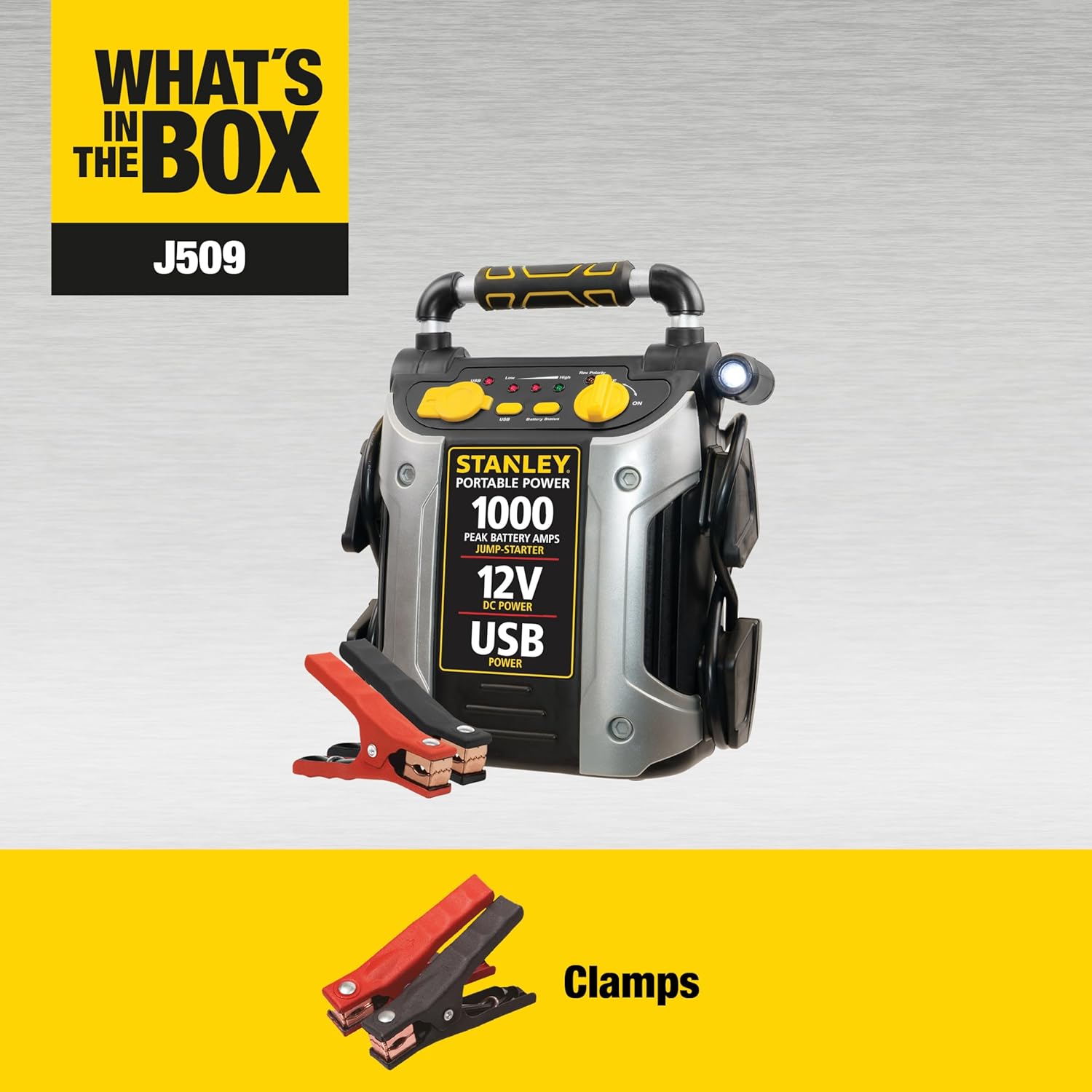
Figure 8: Side view of the STANLEY J509, illustrating the integrated cable and clamp storage for neatness and protection.
6. Troubleshooting
This section addresses common issues you might encounter with your STANLEY J509 unit.
| Problem | Possible Cause | Solution |
|---|---|---|
| Unit does not turn on or charge. | Battery is completely discharged or charging cable is not properly connected. | Ensure the extension cord is securely connected to the unit and a live AC outlet. Allow a prolonged charge time for deeply discharged batteries. |
| Vehicle does not jump start. | Improper clamp connection, unit battery is low, or vehicle battery is severely damaged. | Check clamp connections for proper polarity (red to positive, black to negative/chassis). Ensure the unit is fully charged. If the reverse polarity alarm sounds, correct the connection. If the vehicle battery is completely dead, allow the J509 to charge it for a few minutes before attempting to start. |
| Reverse polarity alarm sounds. | Clamps are connected incorrectly. | Immediately disconnect the clamps and re-connect them with correct polarity: red clamp to positive (+) battery terminal, black clamp to negative (-) battery terminal or vehicle chassis. |
| USB port or 12V DC outlet not working. | Unit is off, USB button not pressed, or device requires more power than available. | Ensure the unit is powered on. For USB, press the "USB" button. Check if the device is compatible with the unit's power output. |
7. Product Specifications
| Feature | Detail |
|---|---|
| Brand | STANLEY |
| Model | J509 |
| Peak Amperage | 1000 Amps |
| Product Dimensions | 10.8"D x 6.5"W x 13"H |
| Item Weight | 16 ounces (approx. 1 pound) |
| DC Power Outlet | 12V |
| USB Port | Yes |
| LED Light | High-powered, 270-degree rotating |
| Charging Method | Integrated AC charging cube (requires standard household extension cord) |
| Manufacturer | Baccus Global LLC |
| Country of Origin | China |
8. Warranty & Support
The STANLEY J509 Portable Power Station Jump Starter comes with a limited 1-year manufacturer warranty.
- For warranty claims or technical support, please refer to the contact information provided in your product packaging or visit the official STANLEY website.
- Keep your purchase receipt as proof of purchase for warranty purposes.
Additional resources:
- User Guide (PDF): Download PDF
- Visit the STANLEY Store: STANLEY Store on Amazon
9. Safety Information
WARNING - Cancer and reproductive harm. For more information go to www.P65Warnings.ca.gov.
Always read and understand all safety warnings and instructions before using this product. Failure to follow these instructions may result in electric shock, fire, and/or serious injury.
- Do not expose the unit to rain or wet conditions.
- Do not operate the unit if it has been dropped or damaged.
- Ensure proper ventilation during charging and operation.
- Keep out of reach of children.
- Always wear appropriate personal protective equipment, such as safety glasses, when working with batteries.


