
1. Introduction
Thank you for choosing the Philips SFL1342RH Rechargeable Headlamp. This headlamp is designed for various outdoor activities, offering powerful illumination, multiple light modes, and a convenient sensor function. Its durable and lightweight construction makes it an ideal companion for camping, hiking, fishing, car repairs, and other outdoor adventures.
Key Features:
- Super Bright and Durable: Utilizes super bright lamp beads and a large, deep lamp cup (74mm diameter, 45mm depth) for enhanced brightness and irradiation distance.
- Long-lasting Battery: Equipped with a 1200 mAh 18650 lithium battery, providing up to 260 minutes of illumination on a full charge.
- 4 Lighting Modes: Features Strong Light, Weak Light, Strobe, and SOS modes to suit different needs.
- 90° Adjustable Angle: The illumination direction can be freely adjusted by 90 degrees.
- Sensor Function: Allows hands-free control of the light by simply waving a hand, ideal for situations where hands are wet or dirty.
- Lightweight and Comfortable: Made from ABS material, weighing only 128g, making it resistant to drops, waterproof, and comfortable for extended wear.
- Type-C Charging: Supports fast and convenient charging via a Type-C port.
2. Safety Information
Please read and understand all safety instructions before using this product. Failure to follow these instructions may result in electric shock, fire, or serious injury.
- Eye Safety: Do not look directly into the light beam or shine it directly into the eyes of others. The intense light can cause temporary vision impairment or permanent eye damage.
- Battery Care:
- Charge the headlamp regularly, preferably before the battery is completely depleted, to prolong its lifespan.
- Do not attempt to replace the internal battery.
- Avoid exposing the headlamp to extreme temperatures (hot or cold) or direct sunlight for prolonged periods.
- Keep away from flammable materials during charging.
- Water Resistance: The headlamp is designed to be waterproof against light rain and splashes. Do not submerge it in water or expose it to heavy downpours for extended periods.
- Children: Keep out of reach of children. This is not a toy.
- Disposal: Dispose of the product and its battery responsibly according to local regulations.
3. Product Components
The Philips SFL1342RH Headlamp consists of the main lamp unit, an adjustable elastic headband, and a Type-C charging port.

Image: Philips SFL1342RH Headlamp showing its main components.
Lightweight Design and Lamp Structure:
The headlamp features a lightweight ABS body, weighing approximately 128g, ensuring comfort during prolonged use. The lamp head incorporates high-quality lamp beads and an enlarged light cup for optimal light output.

Image: Illustration of the headlamp's lightweight body (128g) and comfortable fit.

Image: Detailed view of the headlamp's high-power lamp bead, high lens, and enlarged light cup for enhanced illumination.
4. Setup
4.1 Initial Charging
Before first use, fully charge the headlamp. The device uses a Type-C charging port for quick and convenient power replenishment.
- Connect the provided Type-C charging cable to the headlamp's charging port.
- Connect the other end of the cable to a USB power source (e.g., wall adapter, power bank, computer USB port).
- The charging indicator light will show red during charging and turn green when fully charged.
- It is recommended to charge the product before the battery is completely exhausted to maintain optimal battery life.

Image: Illustration of the 18650 lithium battery and its capacity, indicating long-lasting illumination.

Image: Close-up of the headlamp showing the Type-C charging port and charging status indicators (red for charging, green for full).
4.2 Adjusting the Headband
The elastic headband is adjustable to ensure a comfortable and secure fit for various head sizes.
- Place the headlamp on your head.
- Adjust the elastic straps by pulling them through the buckles until the headlamp feels snug but not too tight.
- Ensure the strap is positioned to prevent sweat from dripping into your eyes and to keep the headlamp stable during activity.

Image: Depiction of the elastic, breathable headband and the 90-degree adjustable lamp head for versatile use.
5. Operation
5.1 Power On/Off and Mode Selection
The headlamp features a dual switch system for easy operation.

Image: Diagram illustrating the dual switch buttons (Power and Sensor) and their functions for mode selection.
- Power Button:
- Press once for Strong Light.
- Press again for Weak Light.
- Double-click for Strobe mode.
- Double-click again for SOS mode.
- Press and hold to turn off the headlamp.
5.2 Sensor Function
The sensor function allows for convenient hands-free control.
- While the headlamp is on, click the Sensor Switch button to activate infrared detection.
- Once activated, you can control the light by waving your hand in front of the sensor.
- Wave once to turn the light on/off.
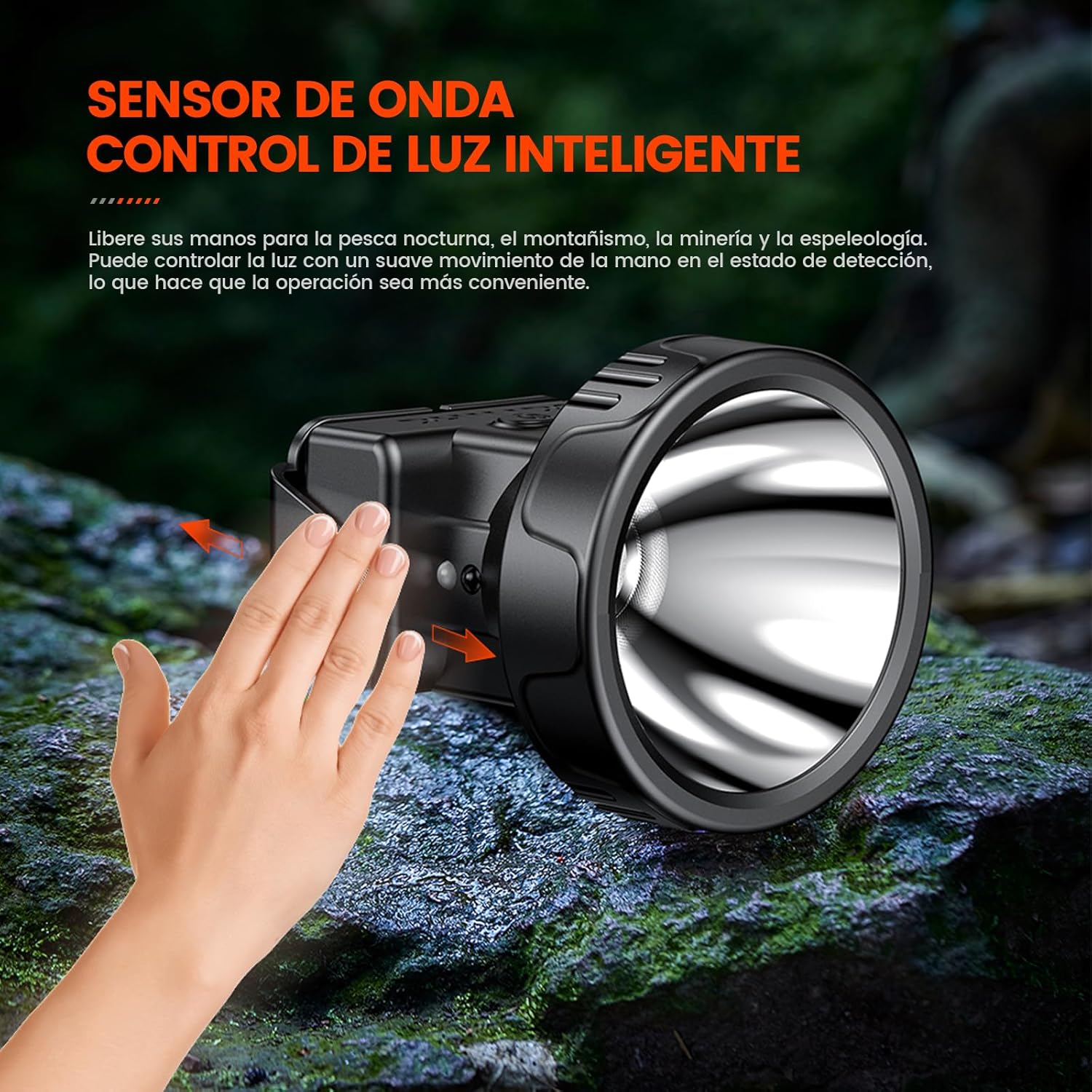
Image: A hand waving in front of the headlamp, demonstrating the intelligent wave sensor control for hands-free operation.
5.3 Angle Adjustment
The headlamp's angle can be adjusted up to 90 degrees to direct light precisely where needed.
- Gently tilt the lamp head up or down to achieve the desired illumination angle.
- The mechanism is designed to hold the chosen angle securely.
Image: Illustration showing the headlamp's ability to adjust its angle by 90 degrees for flexible lighting.
5.4 Continuous Dimming
After turning on the headlamp, a long press on the power button will linearly adjust the brightness from dim to 100% bright. The adjustment can also be reversed.
- With the headlamp on, press and hold the power button. The brightness will gradually increase or decrease.
- Release the button when the desired brightness level is reached.
- A double flash indicates the end of the dimming range.

Image: Graphic demonstrating the continuous dimming function, allowing brightness adjustment from minimum to 100%.
5.5 High and Low Beam Comparison
The headlamp provides distinct high and low beam options for various lighting needs.

Image: Comparison of the headlamp's high beam and low beam illumination in an outdoor setting, highlighting its bright light source and clear vision.
6. Maintenance
6.1 Cleaning
To ensure optimal performance and longevity, keep your headlamp clean.
- Wipe the exterior of the headlamp with a soft, damp cloth.
- Do not use abrasive cleaners or solvents, as these can damage the surface.
- Ensure the charging port cover is securely closed to prevent dust and moisture ingress.
6.2 Storage
When not in use for extended periods, store the headlamp properly.
- Store in a cool, dry place away from direct sunlight and extreme temperatures.
- Charge the battery every 3-6 months to prevent deep discharge and maintain battery health.
6.3 Waterproof Feature
The headlamp is designed with a waterproof rating to withstand various weather conditions.

Image: The headlamp shown in a wet environment, illustrating its waterproof capability against wind and rain.
7. Troubleshooting
If you encounter issues with your Philips SFL1342RH Headlamp, refer to the following common problems and solutions:
| Problem | Possible Cause | Solution |
|---|---|---|
| Headlamp does not turn on. | Battery is depleted. | Charge the headlamp fully using the Type-C cable. |
| Light is dim or flickers. | Low battery level. | Recharge the headlamp. |
| Sensor function is unresponsive. | Sensor not activated or obstructed. | Ensure the sensor switch is on. Clear any obstructions from the sensor area. |
| Short battery life. | Battery not fully charged or aged battery. | Ensure full charge. Avoid deep discharge. If battery life significantly degrades, consider product replacement. |
| Headlamp gets wet. | Exposure to water beyond waterproof rating. | Wipe dry immediately. Do not charge if wet. Allow to air dry completely before next use. |
8. Specifications
| Feature | Detail |
|---|---|
| Brand | Philips |
| Model Number | SFL1342RH (Internal part number: 121) |
| Material | ABS |
| Color | Black |
| Light Source Type | LED |
| Power Source | Battery (Rechargeable) |
| Battery Type | 18650 Lithium (1200 mAh capacity) |
| Illumination Time | Up to 260 minutes (on full charge, low light mode) |
| Number of Light Modes | 4 (Strong, Weak, Strobe, SOS) |
| Special Features | Rechargeable, Water Resistant, Motion Sensor, Adjustable Light Modes, Durable |
| Adjustable Angle | 90 degrees |
| Lamp Cup Diameter | 74 mm |
| Lamp Cup Depth | 45 mm |
| Product Dimensions | 10 x 8 x 12 cm |
| Weight | 160 g |
9. Warranty and Support
For warranty information and customer support, please refer to the documentation included with your purchase or visit the official Philips website. Keep your proof of purchase for any warranty claims.
No official product videos were found for this model.


