
Introduction
This manual provides instructions for the safe and efficient use of your AVBcable LTS-6H 6-Outlet Basic Power Strip. This device is designed to expand a single wall outlet into six grounded outlets, providing power distribution and basic protection for your electronic devices.
Safety Information
Please read and understand all safety instructions before using this product. Failure to follow these instructions may result in electric shock, fire, or serious injury.
- Do not exceed the electrical ratings of this power strip (15 Amps, 125 Volts, 1875 Watts).
- Do not use in wet environments or near water.
- Do not plug into another relocatable power tap.
- Do not use with extension cords. Plug directly into a grounded wall outlet.
- This device is intended for indoor use only.
- Keep children away from the power strip.
- Do not disassemble or modify the power strip.
- If the power strip becomes damaged, discontinue use immediately.
Product Overview
Features:
- Provides home power protection for computers and other appliances.
- Equipped with a 15 amp circuit breaker for overload protection.
- Sleek design with 6 grounded outlets.
- Features a 2-foot cord with a right-angle plug for convenient placement.
- TVSS rating of 400.
Components:
The AVBcable LTS-6H power strip includes the following main components:
- Six (6) Grounded Outlets: For connecting your electronic devices.
- On/Off Switch with Circuit Breaker: Controls power to all outlets and provides overload protection.
- 2-Foot Power Cord: Connects the power strip to a wall outlet.
- Right-Angle Plug: Allows for flush placement against a wall.

Image 1: The AVBcable LTS-6H 6-outlet power strip showing the six outlets, the red illuminated on/off switch with integrated circuit breaker, and the attached 2-foot power cord with a white right-angle plug.
Setup
- Unpack: Carefully remove the power strip from its packaging.
- Placement: Position the power strip on a flat, stable surface, away from sources of heat or moisture. Ensure the power cord can reach a grounded wall outlet without being stretched or obstructed.
- Connect to Wall Outlet: Plug the power strip's right-angle plug directly into a standard 3-prong, 125V AC grounded wall outlet. Do not use an extension cord.
- Connect Devices: Plug your electronic devices into the six available outlets on the power strip. Ensure that the total power consumption of all connected devices does not exceed 1875 Watts (15 Amps at 125 Volts).
Operating Instructions
- Power On: Press the red ON/OFF switch to the "ON" position. The switch will illuminate, indicating that power is being supplied to the outlets.
- Power Off: Press the red ON/OFF switch to the "OFF" position. The illumination will turn off, and power will be disconnected from all connected devices.
- Circuit Breaker Reset: If the power strip experiences an overload, the integrated 15-amp circuit breaker will trip, cutting power to protect your devices. The ON/OFF switch will pop out or remain in the "OFF" position. To reset, unplug some devices to reduce the load, then press the switch back to the "ON" position.
Maintenance
- Cleaning: Disconnect the power strip from the wall outlet before cleaning. Use a dry, soft cloth to wipe the exterior. Do not use liquid cleaners or sprays.
- Inspection: Periodically inspect the power cord and the power strip for any signs of damage, such as frayed wires, cracks, or loose connections. If damage is found, discontinue use and replace the unit.
- Storage: When not in use, store the power strip in a cool, dry place, away from direct sunlight and extreme temperatures.
Troubleshooting
| Problem | Possible Cause | Solution |
|---|---|---|
| No power to devices. | Power strip switch is OFF. | Press the ON/OFF switch to the "ON" position. |
| No power to devices. | Circuit breaker tripped due to overload. | Unplug some devices to reduce the load, then reset the circuit breaker by pressing the ON/OFF switch. |
| No power to devices. | Wall outlet has no power. | Check the wall outlet by plugging in another known working device. Check your home's circuit breaker panel. |
| Power strip is damaged. | Physical damage or internal fault. | Discontinue use immediately and replace the power strip. Do not attempt to repair. |
Specifications
- Model Number: LTS-6H
- Brand: AVBcable
- Total Power Outlets: 6
- Voltage: 125 Volts AC
- Maximum Current: 15 Amps
- Amperage: 15 Amps
- Maximum Wattage: 1875 Watts
- Cord Length: 2 feet
- Plug Type: Type B (Right-Angle)
- Color: Black
- Shape: Rectangle
- Compatible Devices: Computers and other electronic appliances
- Item Weight: 0.6 Pounds
- UPC: 610074923305
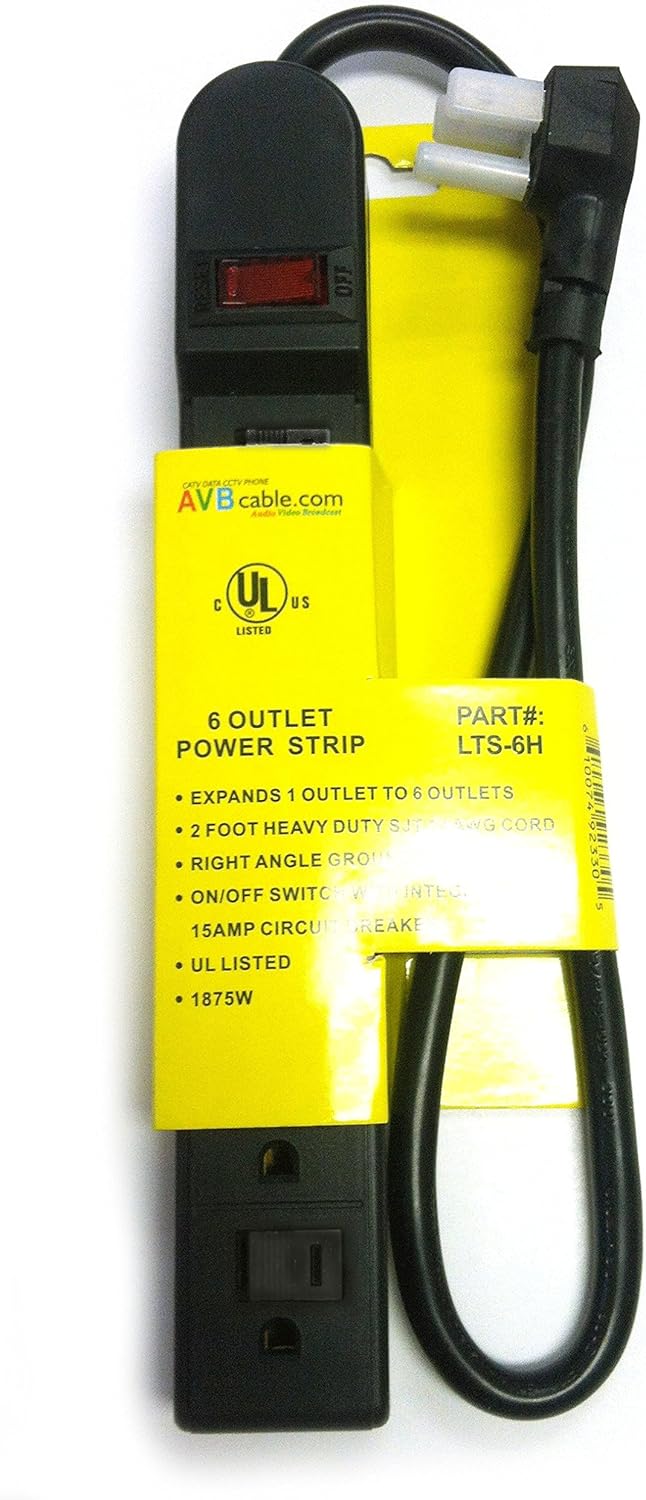
Image 2: The AVBcable LTS-6H power strip shown with its yellow packaging label, which lists key specifications such as 6 outlets, 2-foot cord, right-angle plug, and 15-amp circuit breaker.
Warranty and Support
For warranty information or technical support, please refer to the documentation included with your purchase or contact AVBcable customer service. Keep your purchase receipt for warranty claims.
Manufacturer: AVBcable.com