
1. Introduction
The Wrights Simplicity Deluxe Rotary Cutter & Embosser Extension Table is designed to expand your workspace when using the Deluxe Rotary Cutter & Embosser (sold separately) or the Deluxe Felting Machine. This extension table provides a stable and enlarged surface, measuring 18 inches by 24 inches, making it easier to handle larger fabric pieces and improve cutting efficiency. It integrates seamlessly with your existing machine, enhancing precision and ease of use for various crafting projects.
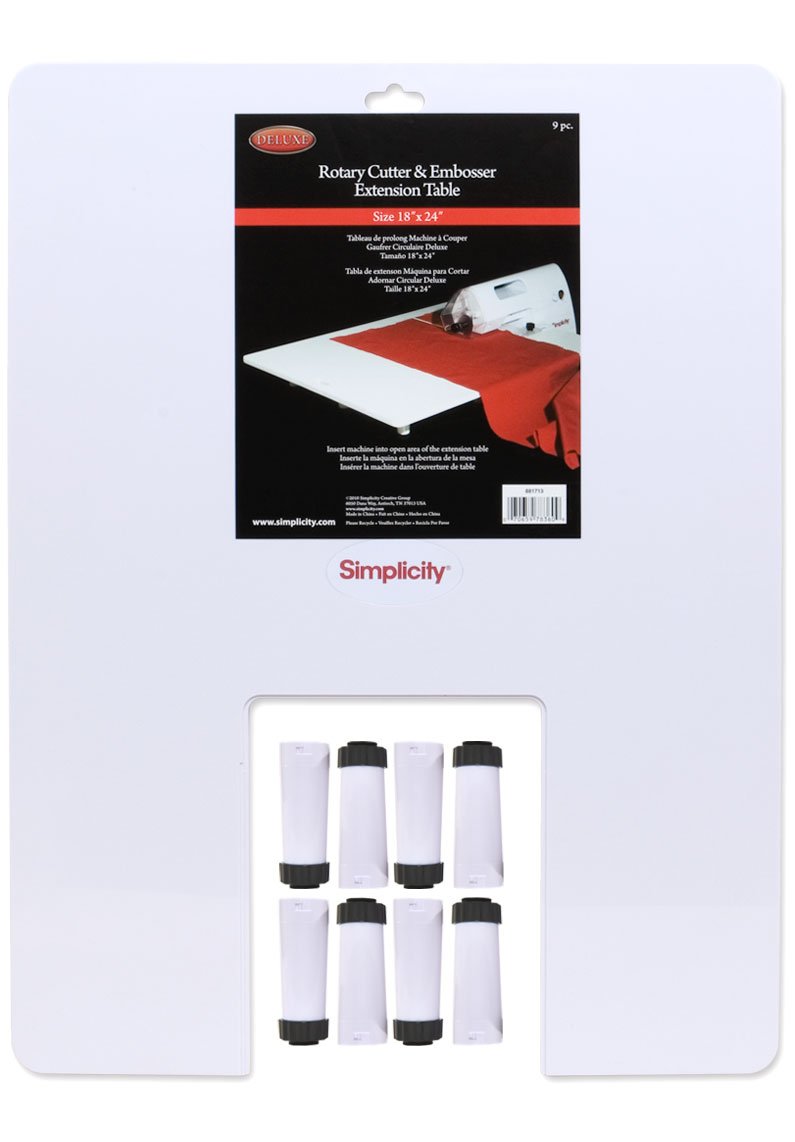
Image 1.1: The Simplicity Extension Table, showing its clear acrylic surface and the central cutout designed to accommodate a rotary cutter or embosser machine. The table is supported by its removable legs.
2. Package Contents
Please verify that all items listed below are present in your package before proceeding with assembly.
- 1 x Extension Table (18" x 24" acrylic surface)
- 8 x Removable Legs (for stability and evenness)
3. Setup Instructions
- Unpack Components: Carefully remove the extension table and all 8 legs from the packaging. Inspect all parts for any signs of damage.
- Attach Legs: Locate the designated slots on the underside of the extension table for the legs. Gently insert each leg into its slot and twist to lock it securely. Exercise caution during this step to avoid overtightening or forcing the legs, as this may cause damage to the locking mechanism. Ensure all 8 legs are firmly attached and the table is stable.
- Position the Table: Place the assembled extension table on a flat, stable work surface.
- Insert Machine: Carefully slide your Simplicity Deluxe Rotary Cutter & Embosser or Deluxe Felting Machine into the open area of the extension table. Ensure the machine is seated properly and is level with the table surface.
- Verify Stability: Gently press down on various points of the table to confirm it is stable and does not wobble. Adjust legs if necessary.
4. Operating Instructions
The extension table is designed to provide an expanded and stable work surface for your Simplicity Deluxe Rotary Cutter & Embosser or Deluxe Felting Machine. Follow these guidelines for optimal use:
- Prepare Your Fabric: Lay your fabric flat on the extension table, ensuring it is smooth and free of wrinkles. The larger surface allows for easier positioning of large pieces.
- Align with Machine: Guide your fabric towards the rotary cutter or embosser, utilizing the extended table surface to maintain straight alignment and support the material as it passes through the machine.
- Maintain Even Pressure: As you operate your machine, use the extension table to support the fabric evenly, preventing sagging or uneven cuts/embossings.
- Work Area: The 18" x 24" surface significantly increases your effective work area, making it ideal for quilting, garment construction, and other projects requiring large material handling.
5. Maintenance
Proper care will ensure the longevity and performance of your extension table.
- Cleaning: Wipe the acrylic surface with a soft, damp cloth. For stubborn marks, use a mild soap solution. Avoid abrasive cleaners or solvents, as these can damage the acrylic.
- Storage: When not in use, the legs can be removed for compact storage. Store the table flat in a safe place to prevent warping or scratching.
- Inspection: Periodically check the legs and their attachment points for any signs of wear or damage. Ensure they remain securely fastened.
6. Troubleshooting
| Problem | Possible Cause | Solution |
|---|---|---|
| Table is wobbly or unstable. | Legs not fully inserted or locked. Uneven surface. | Ensure all 8 legs are securely twisted into their slots. Place the table on a completely flat and level surface. |
| Legs detach or break easily. | Improper installation (forcing/overtightening). Manufacturing defect. | When attaching, gently insert and twist until snug, do not force. If legs are damaged, contact customer support for replacements. |
| Machine does not sit flush with the table. | Machine not properly seated in the cutout. | Adjust the machine's position within the table's open area until it sits level with the extension surface. |
7. Specifications
- Model Number: 881713
- Product Dimensions: 18 x 24 x 1 inches (L x W x H, without legs)
- Item Weight: 2.29 pounds
- Material: Acrylic
- Compatibility: Simplicity Deluxe Rotary Cutter & Embosser, Simplicity Deluxe Felting Machine
- Package Includes: 1 Extension Table, 8 Removable Legs
8. Warranty and Support
For specific warranty information, please refer to the documentation included with your original purchase or contact Simplicity customer support directly. If you encounter any issues or require assistance with your Wrights Simplicity Deluxe Rotary Cutter & Embosser Extension Table, please reach out to the manufacturer's customer service department.
Manufacturer: Wrights
Contact details for support are typically found on the product packaging or the manufacturer's official website.
