
Introduction
This manual provides essential information for the safe and efficient installation, operation, and maintenance of your Emerson Thru-Bolt Mount Motor, Model AGH10FL1. Please read this manual thoroughly before attempting to install or operate the motor. Retain this manual for future reference.
Safety Information
Always observe basic safety precautions to reduce the risk of fire, electric shock, and personal injury. This motor operates on 230 Volts and can cause severe injury or death if not handled properly. Disconnect power before servicing.
- Ensure all electrical connections are made by a qualified electrician and comply with local and national electrical codes.
- Verify the power supply voltage matches the motor's rated voltage (230 Volts).
- Do not operate the motor in wet or damp conditions.
- Keep hands, hair, and clothing away from moving parts.
- Always wear appropriate personal protective equipment (PPE).
Product Overview
The Emerson AGH10FL1 is a 1 Horsepower, 230 Volt thru-bolt mount motor designed for various industrial and scientific applications. Its robust construction, featuring copper components, ensures reliable performance.
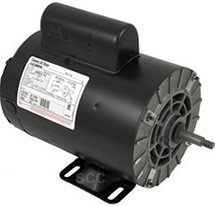
Figure 1: Emerson AGH10FL1 Thru-Bolt Mount Motor. This image shows the black motor casing with a finned end, a mounting base, and the output shaft extending from the front.
Setup and Installation
- Unpacking: Carefully remove the motor from its packaging. Inspect for any shipping damage. Report any damage to the carrier immediately.
- Mounting: Secure the motor firmly using the thru-bolt mounting points. Ensure the mounting surface is stable and capable of supporting the motor's weight and operational forces. Proper alignment is crucial to prevent vibration and premature wear.
- Electrical Connections:
- Ensure the power supply is disconnected at the source.
- Connect the motor to a 230 Volt AC power supply. Refer to the wiring diagram located on the motor's nameplate or inside the terminal box cover for specific connections.
- Ensure all connections are tight and insulated properly.
- Ground the motor according to local electrical codes to prevent electric shock.
- Shaft Connection: Connect the motor shaft to the driven equipment. Ensure proper alignment and balance to minimize stress on bearings and prevent vibration.
- Pre-Operation Check: Before applying power, double-check all connections, mounting, and ensure no obstructions are present around the motor or driven equipment.
Operating Instructions
- Initial Start-up: After completing the setup, apply power to the motor. Observe the motor for any unusual noises, vibrations, or overheating during the first few minutes of operation. If any anomalies are detected, immediately shut off power and investigate.
- Normal Operation: The motor is designed for continuous duty within its specified ratings. Monitor the motor periodically for signs of wear or malfunction.
- Shut Down: To stop the motor, disconnect the power supply. For extended periods of non-use, ensure the power is completely isolated.
Maintenance
Regular maintenance ensures the longevity and optimal performance of your Emerson motor.
- Cleaning: Keep the motor clean and free from dust, dirt, and debris. Ensure ventilation openings are clear to allow for proper cooling.
- Lubrication: Refer to the motor's nameplate or specific documentation for lubrication requirements. Many modern motors are "lubricated for life" or require specific grease types and intervals. Over-lubrication can be as detrimental as under-lubrication.
- Inspection: Periodically inspect the motor for:
- Loose mounting bolts or electrical connections.
- Excessive vibration or noise.
- Signs of overheating (discoloration, burnt smell).
- Wear on the shaft or coupling.
- Storage: If storing the motor for an extended period, ensure it is kept in a dry, clean environment.
Troubleshooting
This section provides basic troubleshooting steps for common issues. For complex problems, consult a qualified technician.
| Problem | Possible Cause | Solution |
|---|---|---|
| Motor does not start | No power supply; Incorrect wiring; Overload protection tripped; Seized bearings. | Check power source and circuit breaker; Verify wiring against diagram; Reset overload; Inspect bearings for free rotation. |
| Motor overheats | Overload; Insufficient ventilation; Incorrect voltage; Bearing failure. | Reduce load; Clear ventilation openings; Verify voltage; Inspect/replace bearings. |
| Excessive noise or vibration | Loose mounting; Misalignment; Worn bearings; Unbalanced load. | Tighten mounting bolts; Check and correct alignment; Replace bearings; Balance load. |
Specifications
- Brand: Emerson
- Model: AGH10FL1
- Horsepower: 1 HP
- Voltage: 230 Volts
- Material: Copper (internal components)
- Mounting Type: Thru-Bolt Mount
- Stock Number: AGH10FL1
Warranty and Support
Emerson motors are manufactured to high-quality standards. For specific warranty details, please refer to the warranty card included with your product or visit the official Emerson website. Keep your purchase receipt as proof of purchase.
For technical support, service, or replacement parts, please contact Emerson customer service. Contact information can typically be found on the Emerson official website or through your authorized dealer.
Note: Unauthorized repairs or modifications may void the product warranty.