
1. Introduction
Welcome to the user manual for your Fujifilm FinePix F300EXR Digital Camera. This guide provides essential information for setting up, operating, maintaining, and troubleshooting your camera to help you capture high-quality images and videos. The FinePix F300EXR combines a 12-megapixel EXR Super CCD sensor with a powerful 15x wide-angle optical zoom lens, offering versatility and advanced features in a compact design.
Key features include a 12-megapixel resolution, 15x optical zoom (24mm-360mm equivalent), 720p HD movie recording, a 3.0-inch high-contrast LCD, Hybrid High Speed AF, Intelligent Image Stabilization, and Motion Panorama 360.
2. Setup
2.1. Unpacking and Initial Inspection
Carefully remove all items from the packaging. Ensure the camera body, battery, charger, USB cable, and wrist strap are present. Inspect the camera for any visible damage.
2.2. Charging and Installing the Battery
- Insert the supplied Lithium-ion NP-50 battery into the battery charger.
- Connect the charger to a power outlet. The charging indicator will illuminate.
- Once charging is complete (indicator changes or turns off), remove the battery.
- Open the battery compartment cover on the bottom of the camera.
- Insert the charged battery, ensuring correct orientation, until it clicks into place. Close the cover securely.

Figure 2.2.1: Front view of the Fujifilm FinePix F300EXR camera, showing the lens and flash unit.
2.3. Inserting a Memory Card
The camera uses SD or SDHC memory cards (not included). Ensure the camera is off before inserting or removing a memory card.
- Open the memory card slot cover, usually located near the battery compartment.
- Insert the SD/SDHC card with the label facing the front of the camera until it clicks into place.
- Close the memory card slot cover securely.
2.4. Setting Date and Time
Upon first power-on or after the battery has been removed for an extended period, you will be prompted to set the date and time. Follow the on-screen instructions using the camera's control buttons.
3. Operating the Camera
3.1. Powering On/Off
Press the power button located on the top of the camera to turn it on or off.
3.2. Basic Photography (Auto Mode)
- Turn the mode dial to AUTO.
- Frame your shot using the 3.0-inch LCD screen.
- Press the shutter button halfway down to focus. The focus frame will turn green when focus is achieved.
- Press the shutter button fully to take the picture.

Figure 3.2.1: Rear view of the Fujifilm FinePix F300EXR, showing the LCD screen and control buttons.
3.3. Zoom Operation
Use the zoom lever around the shutter button to adjust the focal length. Push it towards W for wide-angle (24mm equivalent) or towards T for telephoto (up to 360mm equivalent optical zoom).
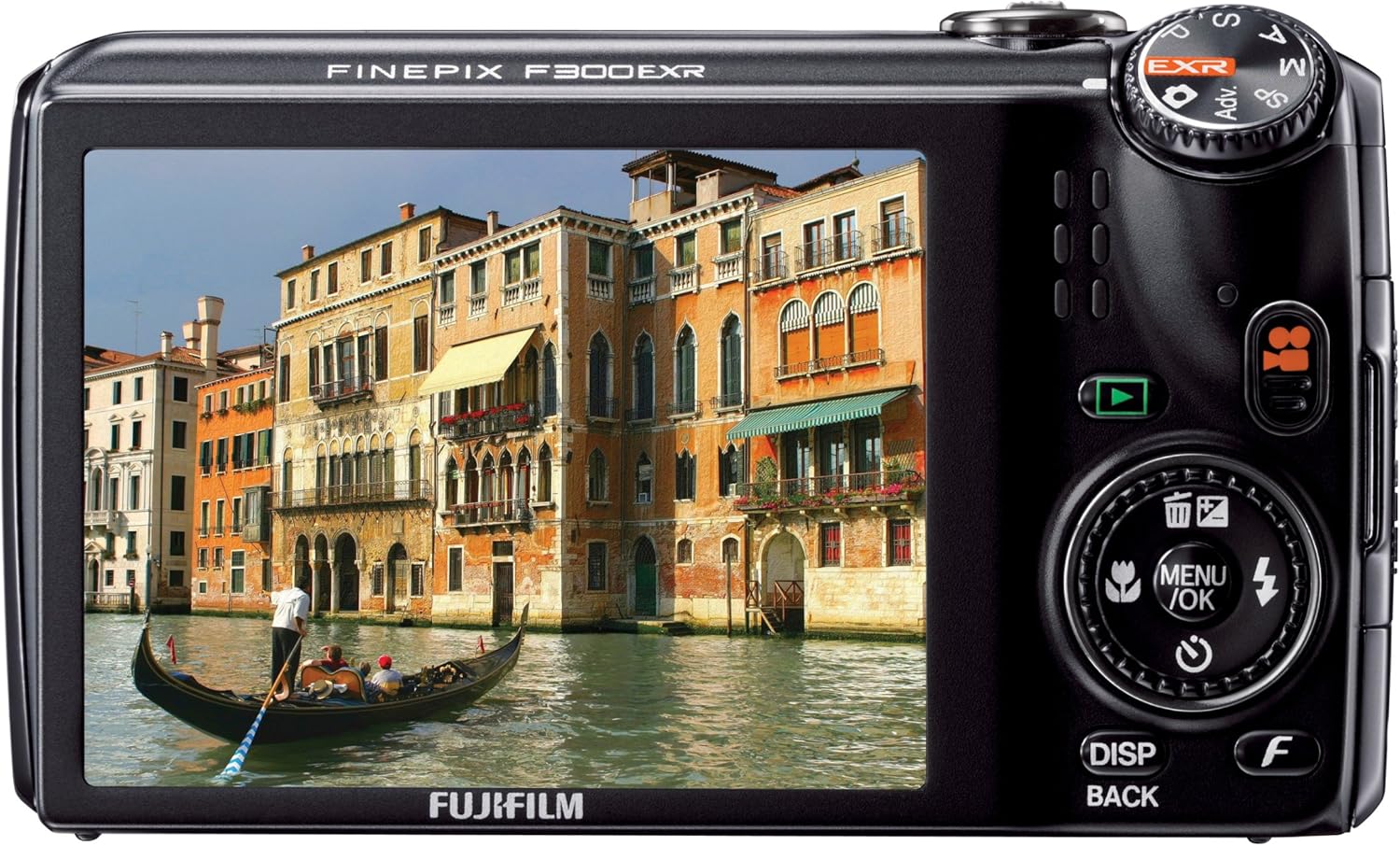
Figure 3.3.1: Angled view of the Fujifilm FinePix F300EXR with its 15x optical zoom lens extended.
3.4. Flash Modes
The camera features a built-in flash. Press the flash button (often marked with a lightning bolt icon) to cycle through modes such as Auto, Fill-in (forced flash), Slow Sync, and Red-eye Reduction. The flash unit will pop up automatically in Auto mode when needed, or manually when selected.
3.5. EXR Modes
The EXR sensor offers three priority modes for different shooting conditions:
- HR (High Resolution) Priority: Maximizes image detail.
- DR (Dynamic Range) Priority: Captures detail in both highlights and shadows.
- SN (High Sensitivity & Low Noise) Priority: Reduces noise in low-light conditions.
You can select these modes via the camera's menu or by setting the mode dial to EXR and letting the camera automatically choose the best setting (EXR AUTO).
3.6. Special Features
- Pro Focus Mode: Creates a shallow depth of field effect, blurring the background to emphasize the subject.
- Motion Panorama 360: Allows you to capture sweeping panoramic images by simply panning the camera.
- Face Recognition: Registers up to eight faces, prioritizing focus and exposure for recognized individuals.
- Tracking Auto Focus: Maintains focus on a moving subject for sharp action shots.
- HD Movie Capture: Records video in 720p resolution. Access this mode via the mode dial.
3.7. Image Playback
Press the playback button (often marked with a play icon) to view your captured photos and videos. Use the directional buttons to navigate through images and the zoom lever to zoom in on photos.
4. Maintenance
4.1. Cleaning the Camera
- Lens: Use a soft, lint-free cloth specifically designed for camera lenses. Avoid touching the lens directly with your fingers.
- LCD Screen: Gently wipe with a soft, dry cloth. For stubborn smudges, use a screen cleaner designed for electronics.
- Camera Body: Wipe with a soft, dry cloth. Do not use harsh chemicals or solvents.
4.2. Battery Care
- Store batteries in a cool, dry place when not in use.
- Avoid fully discharging the battery frequently to prolong its lifespan.
- Do not expose batteries to extreme temperatures.
4.3. Storage
When storing the camera for extended periods, remove the battery and memory card. Store the camera in a dry, dust-free environment, ideally in a camera bag or case to protect it from impacts.
5. Troubleshooting
| Problem | Possible Cause / Solution |
|---|---|
| Camera does not power on. | Battery is depleted or incorrectly inserted. Ensure battery is charged and properly seated. |
| Cannot take pictures. | Memory card is full, locked, or not inserted. Check card status. Battery may be too low. |
| Images are blurry. | Camera shake (use Intelligent Image Stabilization or tripod), subject movement, or incorrect focus. Ensure proper focus before shooting. |
| Flash does not fire. | Flash mode is set to OFF or Auto mode determined flash is not needed. Check flash settings. |
| Poor image quality in low light. | Use EXR SN (High Sensitivity & Low Noise) priority mode or Pro Low Light mode. Increase ISO sensitivity if necessary, but be aware of potential noise. |
| Camera freezes or malfunctions. | Remove and reinsert the battery to reset the camera. If the problem persists, contact customer support. |
6. Specifications
| Feature | Detail |
|---|---|
| Model Name | FinePix F300EXR |
| Effective Still Resolution | 12 MP |
| Photo Sensor Technology | CCD (EXR Super CCD) |
| Optical Zoom | 15x |
| Minimum Focal Length | 24 mm (equivalent) |
| Maximum Focal Length | 360 mm (equivalent) |
| Digital Zoom | 4x |
| Image Stabilization | Sensor-shift (Intelligent Image Stabilization) |
| Screen Size | 3.0 Inches |
| Display Resolution | 460,000 dots |
| Video Resolution | 1280 x 720 (24 fps), 640 x 480 (30 fps) |
| Supported File Format | JPEG (Stills), MP4 (Video) |
| Flash Memory Type | SD/SDHC |
| Connectivity Technology | HDMI, USB |
| Battery Type | Lithium-ion NP-50 |
| Item Weight | 7.6 Ounces |
| Color | Black |
7. Warranty and Support
7.1. Warranty Information
Your Fujifilm FinePix F300EXR camera comes with a 1-year warranty covering parts and labor. Please retain your proof of purchase for warranty claims. For detailed terms and conditions, refer to the warranty card included with your product or visit the official Fujifilm website.
7.2. Customer Support
For technical assistance, troubleshooting beyond this manual, or service inquiries, please contact Fujifilm customer support. You can find contact information on the official Fujifilm website or through the Fujifilm Store on Amazon.


