Introduction
This manual provides comprehensive instructions for the setup, operation, maintenance, and troubleshooting of your La Crosse Technology WS-9057U-IT Forecast Station. Please read this manual thoroughly before using your device to ensure proper function and longevity.
Product Overview
Key Features
- Wireless outdoor temperature and humidity monitoring.
- Indoor temperature and humidity display.
- Weather forecast with three distinct icons and tendency arrows.
- WWVB radio-controlled time and date with automatic daily reset.
- Moon phase display.
- Barometric pressure history for the past 24 hours (bar graph).
- 12/24-hour time display with alarm and 10-minute snooze function.
- Indoor comfort level icon.
- Fahrenheit or Celsius temperature selection.
- Min/Max temperature and humidity records.
- Wall-mountable or free-standing receiver with wood-grain frame.
Package Contents
- WS-9057U-IT Forecast Station Receiver
- TX29UDTH-IT Wireless Thermo-Hygro Sensor
- Instruction Manual
Display Layout
The main display unit features a clear LCD screen showing various weather and time information. Refer to the image below for a visual guide to the display segments.
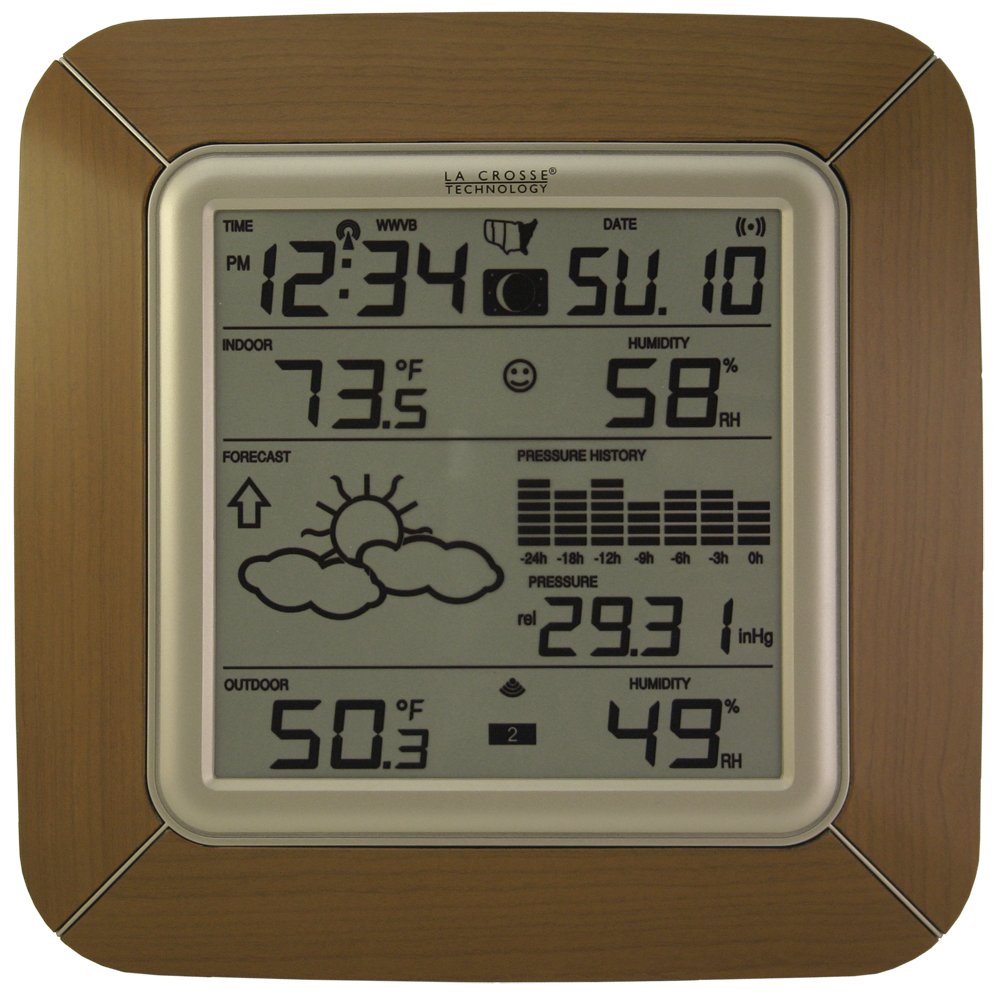
Figure 1: Front view of the La Crosse Technology WS-9057U-IT Forecast Station receiver, displaying time, date, indoor/outdoor temperature, humidity, forecast icons, moon phase, and barometric pressure history.
Setup
Battery Installation
- Receiver: Open the battery compartment on the back of the forecast station receiver. Insert two (2) "C" size alkaline batteries (not included) according to the polarity markings (+ and -). Close the battery compartment.
- Sensor: Open the battery compartment on the back of the wireless thermo-hygro sensor. Insert two (2) "AA" size alkaline batteries (not included) according to the polarity markings (+ and -). Close the battery compartment.
- Ensure batteries are inserted correctly. It is recommended to use fresh alkaline batteries for optimal performance.
Sensor Placement
For accurate outdoor readings, the wireless sensor (TX29UDTH-IT) should be mounted in a location that is:
- Out of direct sunlight to prevent inaccurate temperature readings.
- Protected from direct rain or heavy precipitation.
- Within 330 feet (100 meters) of the main forecast station receiver.
- Away from large metallic objects, electrical appliances, or other sources of interference.

Figure 2: The La Crosse Technology WS-9057U-IT Forecast Station positioned on a surface, demonstrating its compact design suitable for various indoor environments.
Initial Power-up and Synchronization
After installing batteries in both the sensor and the receiver, the receiver will automatically begin searching for the outdoor sensor signal and the WWVB atomic time signal. This process may take several minutes. Ensure both units are within range of each other during initial setup.
Operating Instructions
The forecast station features five function buttons located below the LCD screen. These buttons allow for various settings and display adjustments.
Time and Date Setting
- The time and date are automatically set by the WWVB radio signal from the US Atomic Clock. An icon on the display indicates signal reception.
- To manually set time zone or disable auto DST, refer to the specific button functions described in the full manual (not detailed here due to brevity).
- The display can show time in 12-hour or 24-hour format.
Alarm Function
- The forecast station includes an alarm function. Press the designated button to set the alarm time.
- When the alarm sounds, pressing the snooze button will temporarily silence it for 10 minutes.
Temperature and Humidity Display
- The LCD displays both indoor and outdoor temperatures, as well as indoor and outdoor humidity levels.
- Press the appropriate button to switch between Fahrenheit (℉) and Celsius (℃) units.
- An indoor comfort level icon provides a quick reference to current indoor conditions.
Barometric Pressure and History
- The station displays current barometric pressure.
- A bar graph illustrates the barometric pressure history over the past 24 hours, aiding in weather trend analysis.
Moon Phase
- The display includes an icon representing the current moon phase.
Min/Max Temperature Check
- The unit records minimum and maximum temperature and humidity readings. Use the designated button to view these records.
Maintenance
Battery Replacement
Replace batteries in both the receiver and sensor when the low battery indicator appears on the display or when performance degrades. Always replace with fresh alkaline batteries of the specified size (2 "C" for receiver, 2 "AA" for sensor).
Cleaning
Wipe the display and unit casing with a soft, damp cloth. Do not use abrasive cleaners or solvents, as these may damage the display or finish.
Troubleshooting
- No outdoor temperature/humidity reading:
- Ensure batteries are correctly installed in the sensor and receiver.
- Check that the sensor is within range (330 feet) of the receiver.
- Relocate the sensor or receiver to minimize interference from other electronic devices or large metal objects.
- Perform a full reset by removing batteries from both units, waiting 1 minute, then reinserting batteries first into the sensor, then the receiver.
- Incorrect time display:
- Ensure the unit is receiving the WWVB atomic time signal (check for signal icon).
- Verify the correct time zone is selected.
- Move the receiver closer to a window or away from electronic interference to improve signal reception.
- Inaccurate temperature/humidity:
- Ensure the outdoor sensor is not in direct sunlight or exposed to direct rain.
- Allow sufficient time for the sensor to acclimate to new environmental conditions.
Specifications
| Model Number | WS-9057U-IT-LC |
| Indoor Temperature Range | 14.2℉ to 139.8℉ ( -9.9℃ to 59.9℃) |
| Outdoor Temperature Range | -39.8℉ to 139.8℉ ( -39.9℃ to 59.9℃) |
| Relative Humidity Range | 1% to 99% RH |
| Transmission Frequency | 915 MHz |
| Transmission Range | Up to 330 feet (100 meters) in open air |
| Receiver Power | 2 "C" Alkaline batteries (not included) |
| Sensor Power | 2 "AA" Alkaline batteries (not included) |
| Receiver Dimensions (LxWxH) | 19.3 x 3.81 x 19.3 cm (7.6 x 1.5 x 7.6 inches) |
| Sensor Dimensions (LxWxH) | 3.81 x 2.12 x 12.7 cm (1.5 x 0.83 x 5 inches) |
| Material | Wood frame, LCD display |
Warranty and Support
This La Crosse Technology WS-9057U-IT Forecast Station is covered by a limited one-year warranty from the date of purchase. This warranty covers manufacturing defects and workmanship. For warranty claims, technical support, or further assistance, please refer to the contact information provided with your product packaging or visit the official La Crosse Technology website.


