Introduction
This manual provides detailed instructions for the operation and maintenance of your Casio Pathfinder PAG240-1CR Digital Watch. This timepiece is equipped with Tough Solar power and a Triple Sensor, offering advanced features for outdoor enthusiasts.
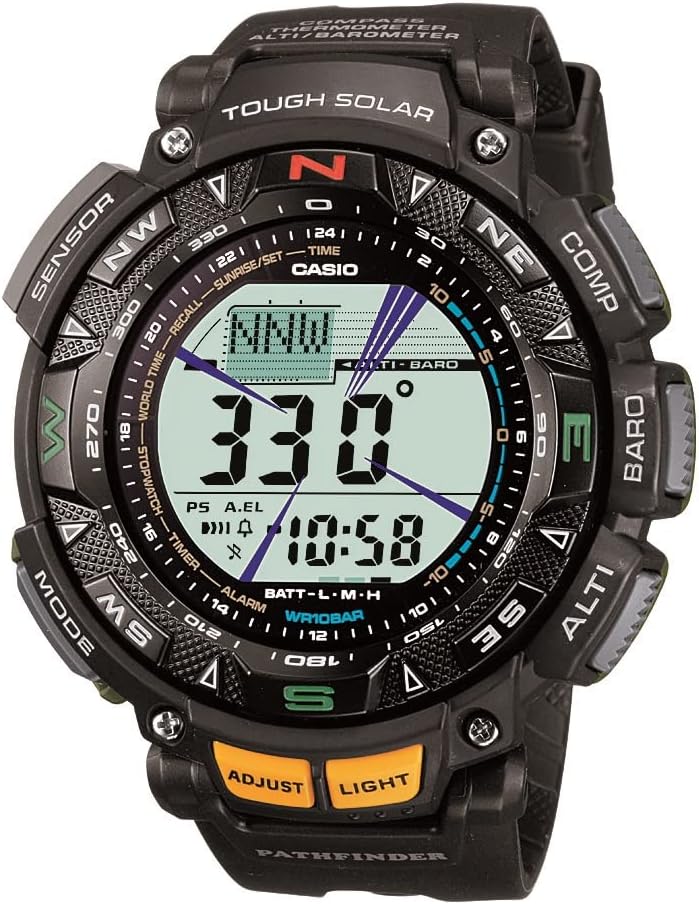
Image: Front view of the Casio Pathfinder PAG240-1CR Digital Watch, showcasing its robust design and digital display.
The Casio Pathfinder PAG240-1CR is a robust, solar-powered digital watch designed for durability and functionality. It features a black resin band and a neutral digital face. Key functionalities include a digital compass, altimeter/barometer, thermometer, and world time. It is also water-resistant up to 100 meters (330 feet).
Setup
Initial Charge
Your Casio Pathfinder PAG240-1CR is equipped with Tough Solar power. Upon receiving your watch, ensure it is exposed to light to charge the internal battery. The watch will indicate its charge level on the display.
Setting Time and Date
To set the time and date on your watch, follow these steps:
- Ensure the watch is in the main timekeeping mode. This is the display that shows the current time and date without any additional sensor readings or mode indicators. If you are in another mode, repeatedly press the MODE button (bottom left) until you return to the main timekeeping screen. You will hear a beep when you cycle back to this mode.
- Press and hold the ADJUST button (bottom left, yellow) until "SET" appears and the city code starts blinking.
- Select your City Code:
- Use the COMPASS button (top right) to move through city codes to the west.
- Use the ALTI button (bottom right) to move through city codes to the east.
- Choose the city code that is closest to your location and in the correct time zone.
- Press the MODE button once. The Daylight Saving Time (DST) setting will begin to blink. Use the ALTI button to toggle DST ON or OFF as required.
- Press the MODE button again. The 12/24-hour format setting will blink. Use the ALTI button to toggle between 12-hour and 24-hour display formats.
- Press the MODE button again. The seconds will begin to blink. You can reset the seconds to zero by pressing the ALTI button.
- Press the MODE button again. The hour setting will begin to blink. Use the COMPASS button to decrease the hour and the ALTI button to increase the hour.
- Press the MODE button again. The minute setting will begin to blink. Adjust the minutes using the COMPASS and ALTI buttons.
- Press the MODE button again. The year setting will begin to blink. Adjust the year using the COMPASS and ALTI buttons.
- Press the MODE button again. The month setting will begin to blink. Adjust the month using the COMPASS and ALTI buttons.
- Press the MODE button again. The day setting will begin to blink. Adjust the day using the COMPASS and ALTI buttons.
- Once all settings are adjusted, press the ADJUST button twice to exit the setting mode and save your changes.
City Code Reference
For a complete list of city codes and their corresponding UTC/GMT offsets, please refer to the comprehensive user manual or the official Casio website. This table is essential for setting the correct time zone on your watch.
Operating Functions
Mode Navigation
Press the MODE button (bottom left) to cycle through the different operational modes of the watch. The modes include:
- Timekeeping Mode (main display)
- Sunrise & Sunset Data Mode
- Recall Mode (for stored sensor data)
- World Time Mode
- Stopwatch Mode
- Countdown Timer Mode
- Alarm Mode (up to five daily alarms)
Triple Sensor Functions
Your Pathfinder watch is equipped with a Triple Sensor for environmental data:
- Digital Compass: Press the COMPASS button (top right) to activate the digital compass, which displays your current bearing.
- Altimeter/Barometer: Press the ALTI button (bottom right) to display altitude and atmospheric pressure readings. The watch can also graph barometric pressure changes.
- Thermometer: The watch includes a thermometer for temperature readings. For accurate readings, remove the watch from your wrist for at least 20-30 minutes to avoid body heat interference.
Other Features
- World Time: Displays the current time in 48 cities across 31 time zones.
- Stopwatch: 1/100-second stopwatch with measuring modes for elapsed time, split time, and 1st-2nd place times.
- Countdown Timer: Set a countdown from 1 minute up to 24 hours.
- Alarms: Five daily alarms and an hourly time signal.
- EL Backlight: Electro-luminescent backlight with afterglow for visibility in low light conditions. Activated by the LIGHT button (bottom right, yellow).

Image: The Casio Pathfinder PAG240-1CR watch worn on a wrist, demonstrating its size and fit.
Maintenance
Charging
As a Tough Solar watch, it charges using light. To maintain optimal performance, ensure the watch is regularly exposed to light. Avoid prolonged storage in dark places, which can lead to battery depletion.
Water Resistance
The watch is water-resistant up to 100 meters (330 feet). This makes it suitable for swimming and snorkeling, but not for scuba diving. Avoid operating buttons while the watch is submerged in water.
Cleaning
Wipe the watch regularly with a soft, dry cloth to remove dirt and moisture. For stubborn dirt, use a soft cloth dampened with water and a mild neutral detergent, then wipe dry. Avoid using volatile agents like thinner or benzine.
Troubleshooting
- Incorrect Time/Date: Refer to the "Setting Time and Date" section under Setup to re-adjust. Ensure the correct city code and DST setting are selected.
- Sensor Readings Inaccurate:
- For thermometer readings, remove the watch from your wrist for 20-30 minutes.
- For altimeter, ensure you calibrate it regularly at known altitudes.
- For compass, perform a bidirectional calibration if readings are inconsistent.
- Low Battery Indicator: If the battery indicator shows low, expose the watch to bright light for an extended period to charge. Avoid letting the battery fully deplete.
- Buttons Not Responding: Ensure the watch is not in a locked mode. If submerged, avoid pressing buttons. If issues persist, a full reset (refer to the comprehensive user manual) might be necessary.
Specifications
| Feature | Detail |
|---|---|
| Model Number | PAG240-1CR |
| Brand | Casio |
| Power Source | Tough Solar (Solar Powered) |
| Sensors | Digital Compass, Altimeter/Barometer, Thermometer |
| Water Resistance | 100 meters (330 feet) |
| Display Type | Digital |
| Dimensions | 4.7 x 4.3 x 3.8 inches; 8 ounces |
| Features | Black solar-powered sport watch with multiple features including digital compass, altimeter, barometer, thermometer, low temperature resistance (-10 C/14 F), EL backlight, world time (31 time zones, 48 cities), city code display, five daily alarms, 1/100-second stopwatch, full auto calendar (pre-programmed until 2099), countdown timer, 12/24-hour formats, battery power indicator, and power-saving function. |

Image: A visual guide illustrating various watch sizes in millimeters, providing a reference for the 51mm case of the PAG240-1CR.
Warranty and Support
Your Casio Pathfinder PAG240-1CR Digital Watch is covered by Casio's standard manufacturer's warranty. For specific warranty terms, service, or additional support, please refer to the official Casio website or the full user manual provided with your product.
A comprehensive User Manual (PDF) is available for download: Download User Manual (PDF)


