
OLFA 1090486
OLFA PC-L Plastic Laminate Cutter Instruction Manual
Model: 1090486
1. Introduction
The OLFA PC-L Plastic Laminate Cutter is a heavy-duty scoring tool designed for precise cutting of various materials including laminates, plastics, and plexiglass. This manual provides essential information for the safe and effective use, setup, and maintenance of your OLFA PC-L cutter.
Key features include a durable handle, a high-quality tungsten steel PB-800 Dual Edge Blade, and a custom ratchet lock mechanism for adjustable cutting depths.
2. Safety Instructions
WARNING: Blades are extremely sharp. Handle with extreme care.
- Always keep fingers and other body parts away from the blade during use and when changing blades.
- Wear appropriate safety glasses to protect your eyes from potential debris.
- Store the tool with the blade fully retracted or in a safe, secure location, out of reach of children.
- Ensure your work surface is stable, clean, and clear of obstructions.
- Do not attempt to cut materials beyond the intended use of this tool.
3. Product Components
Familiarize yourself with the parts of your OLFA PC-L cutter:
- Handle: Molded, textured grip for comfort and stability.
- Blade Slider: Aluminum die-cast mechanism that holds and guides the blade.
- Ratchet Lock Knob: Used to secure the blade at the desired cutting depth.
- PB-800 Dual Edge Laminate Cutter Blade: The primary cutting component.
- Spare Blade Compartment: Located within the handle, stores two replacement blades.
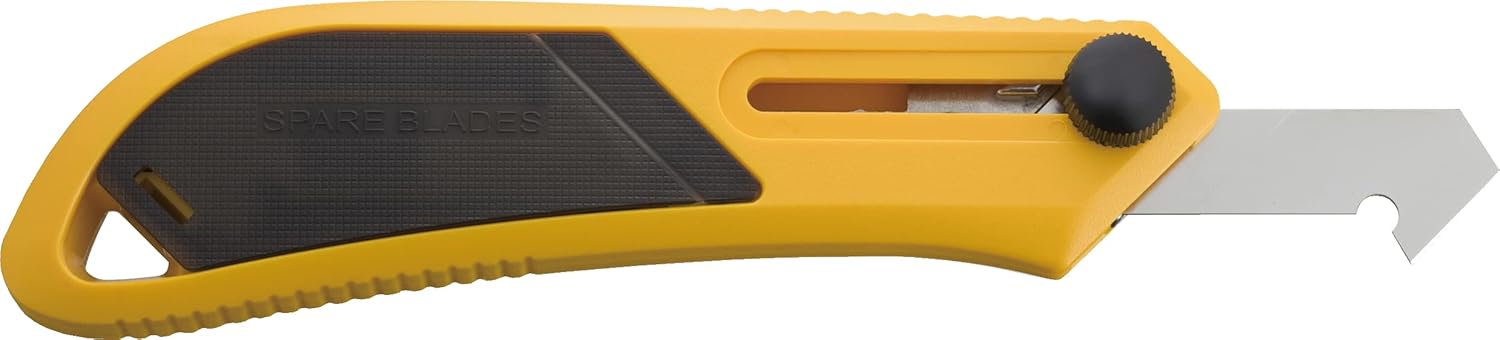
Figure 3.1: Front view of the OLFA PC-L Cutter with blade extended.

Figure 3.2: Back view of the OLFA PC-L Cutter.

Figure 3.3: The spare blade compartment located in the handle.
4. Setup and Blade Adjustment
Before using the cutter, ensure the blade is properly installed and adjusted to the desired depth.
- Blade Installation (if not pre-installed): If a blade is not already in place, refer to the "Blade Replacement" section for instructions on how to insert a new blade.
- Adjusting Blade Depth:
- Unscrew the black ratchet lock knob counter-clockwise to loosen the blade slider.
- Carefully slide the blade to expose the desired length for your cutting task. For scoring, only a small portion of the blade tip is typically needed.
- Once the blade is at the correct depth, tighten the ratchet lock knob clockwise securely. Ensure the blade is firmly held and does not move during use.

Figure 4.1: The cutter with the blade retracted, showing the ratchet lock knob.
5. Operating Instructions
The OLFA PC-L cutter is designed for scoring and snapping materials, not for cutting all the way through in a single pass. This method ensures clean, precise breaks.
- Prepare Your Material: Place the material (laminate, plastic, plexiglass) on a stable, flat, and protected work surface. For straight cuts, use a sturdy straight edge or ruler as a guide.
- Scoring the Material:
- Hold the cutter firmly against your guide, applying consistent downward pressure.
- Make multiple passes along the desired cut line. Each pass deepens the score. For materials like plexiglass, 5-10 firm passes may be required, or more for thicker materials, until a deep groove is formed.
- Ensure the blade reaches the embossed or patterned side of the material if applicable, to prevent chipping.
- Breaking the Material:
- Once a sufficient score line is achieved, position the scored line over the edge of a workbench or use a metal ruler as a fulcrum directly under the score.
- Apply gentle, even pressure to both sides of the material to snap it cleanly along the score line.
- For best results and to prevent scratches, keep any protective film on the material until after cutting.

Figure 5.1: Demonstrating the scoring action on a clear plastic sheet.

Figure 5.2: Scoring an orange plastic sheet with the OLFA PC-L cutter.
6. Maintenance
Proper maintenance ensures the longevity and performance of your OLFA PC-L cutter.
- Cleaning: Clean the blade and the tool body after each use to remove any accumulated debris or dust. Use a dry cloth.
- Storage: Always retract the blade fully into the handle when the tool is not in use. Store the cutter in a dry, safe place, away from moisture and extreme temperatures.
7. Blade Replacement
Replace the blade when it becomes dull to maintain optimal cutting performance and safety.
- Accessing Spare Blades: The handle of your cutter contains a compartment for two spare PB-800 blades. Gently open the textured panel on the handle to access them. Avoid opening the panel beyond a 90-degree angle to prevent damage to the hinge.
- Removing the Old Blade:
- Fully retract the old blade into the handle.
- Unscrew the ratchet lock knob completely and carefully remove the blade slider assembly from the handle.
- Carefully remove the dull PB-800 blade from the slider.
- Installing a New Blade:
- Insert a new PB-800 blade into the blade slider, ensuring it is correctly oriented with the cutting edges facing outwards.
- Reassemble the blade slider into the handle.
- Tighten the ratchet lock knob securely to fix the new blade in place.
- Blade Disposal: Dispose of used blades safely in a designated blade disposal container or wrapped securely to prevent injury.

Figure 7.1: Close-up view of the blade and ratchet lock mechanism.
8. Troubleshooting
| Problem | Possible Cause | Solution |
|---|---|---|
| Blade loosens during use. | Ratchet lock knob not tightened sufficiently. | Ensure the ratchet lock knob is tightened securely. Check for any debris obstructing the slider mechanism. |
| Jagged or uneven cuts. | Insufficient scoring depth; improper use of a guide; dull blade. | Make more passes with consistent pressure. Always use a sturdy straight edge. Replace the blade if dull. |
| Material shatters or cracks when breaking. | Score line not deep enough; uneven pressure during breaking. | Increase the number of scoring passes to create a deeper groove. Apply gentle, even pressure when snapping the material. |
9. Specifications
- Brand: OLFA
- Model Number: 1090486
- Material (Handle): Plastic, Polycarbonate, Alloy Steel, Aluminum
- Material (Blade): Stainless Steel (PB-800 Tungsten Steel)
- Color: Black, Yellow
- Item Length: 4 Inches
- Item Weight: 2.47 ounces (70 Grams)
- UPC: 091511400946
10. Warranty and Support
Warranty: OLFA products are guaranteed forever, reflecting the brand's commitment to quality and durability.
Customer Support: For further assistance, product inquiries, or to learn more about OLFA products, please visit the official OLFA website or contact their customer service department directly.
Ask a question about this manual
Ask about setup, troubleshooting, compatibility, parts, safety, or missing instructions. Manuals+ will review the question and use this page’s manual context to help answer it.