
Introduction
This manual provides essential information for the safe and effective use of your Kastar 12V 6A 72W AC Power Adapter. This adapter is designed to provide stable power to a variety of electronic devices requiring 12V DC input, including LCD monitors, LCD TVs, LED strip lights, wireless routers, ADSL modems, and security cameras. Please read these instructions thoroughly before use and retain them for future reference.

Image: Kastar 12V 6A 72W AC Power Adapter. This image shows the compact black power adapter with its attached DC output cable and barrel connector.
Safety Information
To ensure safe operation and prevent damage to the adapter or connected devices, observe the following safety precautions:
- Voltage Compatibility: Ensure the input voltage of your device matches the adapter's output (12V DC).
- Amperage Requirements: The adapter provides up to 6 Amps. Do not connect devices that require more than 6 Amps, as this can overload the adapter.
- Connector Tip Size: Verify that the adapter's 5.5mm x 2.5mm barrel connector tip matches your device's power input port. Incorrect tip size can lead to poor connection or damage.
- Indoor Use Only: This adapter is designed for indoor use. Do not expose it to moisture, rain, or extreme temperatures.
- Proper Grounding: Always use the provided 3-prong power cord to ensure proper grounding, which helps prevent electrical shock and fire hazards.
- Ventilation: Ensure adequate ventilation around the adapter during operation to prevent overheating. Do not cover the adapter.
- Handling: Do not drop, disassemble, or attempt to repair the adapter. Refer servicing to qualified personnel.
- Unplug When Not in Use: Disconnect the adapter from the power outlet when not in use for extended periods.

Image: Illustration of a 3-prong power plug. This image highlights the importance of a grounded 3-prong plug for safety, contrasting it with 2-prong plugs.
Package Contents
Carefully unpack the box and ensure all items are present and in good condition. If any items are missing or damaged, please contact customer support.
- 1 x Kastar AC Adapter (12V 6A 72W)
- 1 x Connector (Barrel to Screw Terminal Adapter)
- 1 x 3-Prong Extended Power Cord
- 1 x Kastar Feedback Card
- 1 x Retail Package

Image: Kastar AC Adapter retail packaging. This image displays the brown cardboard box in which the product is packaged.
Setup
- Verify Device Compatibility: Before connecting, confirm that your electronic device requires a 12V DC power input and draws no more than 6 Amps. Also, ensure the power input port on your device is compatible with a 5.5mm outer diameter and 2.5mm inner diameter barrel connector.
- Connect Power Cord: Plug the 3-prong extended power cord into the AC input port on the Kastar AC Adapter.
- Connect to Device: Insert the barrel connector of the AC adapter into the DC input port of your electronic device. If your device uses screw terminals, use the included barrel to screw terminal connector.
- Plug into Outlet: Plug the 3-prong power cord into a standard AC wall outlet (110-240V).
- Power On: Turn on your electronic device. The adapter should provide power immediately.
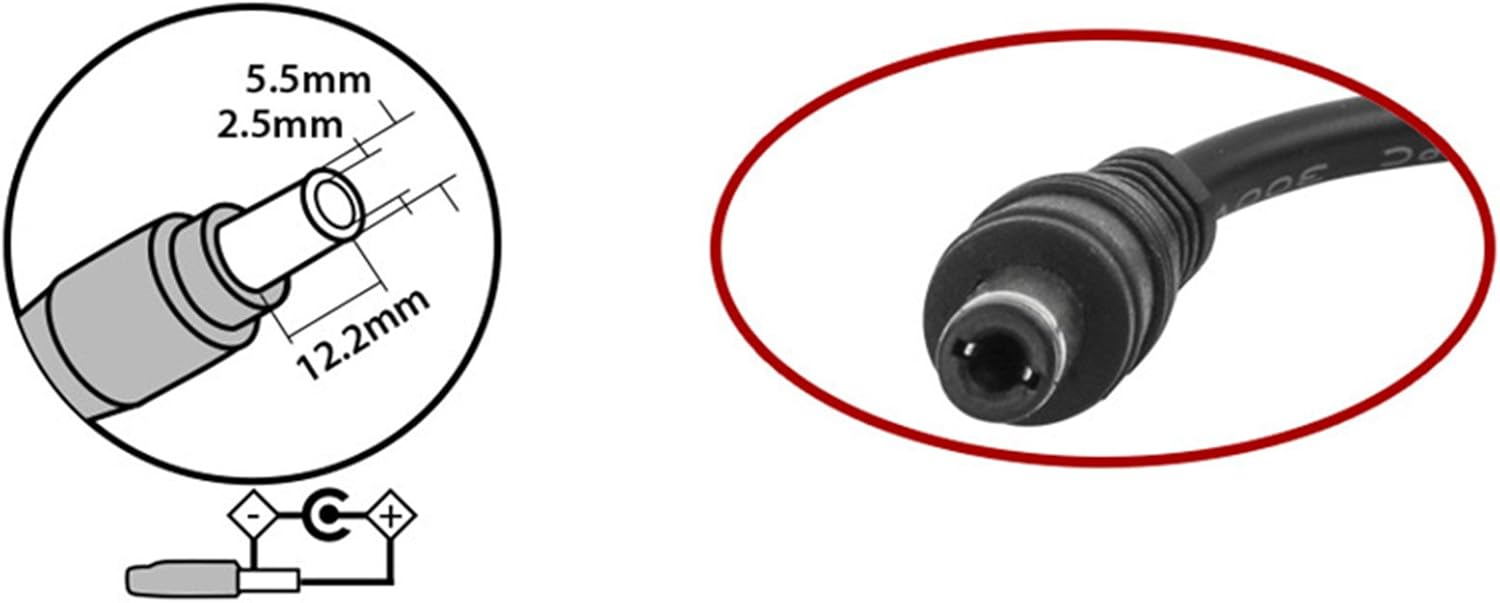
Image: Diagram illustrating the 5.5mm x 2.5mm barrel connector tip size. This image shows the precise dimensions of the adapter's output connector.

Image: Barrel connector with screw terminals. This image displays the included adapter for connecting to devices with screw-type power inputs, such as LED strip lights.
Operating Instructions
The Kastar AC Adapter is designed for continuous operation within its specified limits. It features built-in protection mechanisms to safeguard your devices.
- Automatic Protection: The adapter is equipped with protection against overcharging, short circuits, and electronic shock, ensuring reliable power delivery.
- Worldwide Compatibility: The adapter accepts an input voltage range of AC110-240V, making it suitable for use in various regions with appropriate power cords.
- Energy Efficiency: Designed for high energy efficiency, contributing to reduced power consumption.
For optimal performance, avoid exceeding the maximum rated output of 12V 6A (72W). If the adapter feels excessively hot, disconnect it and check for potential overloads or ventilation issues.
Maintenance
Proper maintenance ensures the longevity and reliable operation of your AC adapter.
- Cleaning: Use a soft, dry cloth to clean the adapter. Do not use liquid cleaners or solvents.
- Storage: Store the adapter in a cool, dry place away from direct sunlight and moisture when not in use.
- Cable Care: Avoid bending or crimping the power cord and output cable excessively. Do not place heavy objects on the cables.
- Inspection: Periodically inspect the adapter and cables for any signs of damage, such as frayed wires or cracked casing. Discontinue use if damage is observed.
Troubleshooting
If you encounter issues with your Kastar AC Adapter, refer to the following common troubleshooting steps:
| Problem | Possible Cause | Solution |
|---|---|---|
| No power to device |
|
|
| Adapter gets hot during use |
|
|
| Intermittent power |
|
|
If the issue persists after following these steps, please contact Kastar customer support.
Specifications
| Feature | Detail |
|---|---|
| Model Number | 12V6A-5525 |
| Input Voltage | AC 110-240V |
| Output Voltage | DC 12V |
| Output Amperage | 6 Amps |
| Output Wattage | 72 Watts |
| Connector Type | Barrel Connector (5.5mm Outer Diameter, 2.5mm Inner Diameter) |
| Product Dimensions | 5.98 x 8.2 x 0.39 inches |
| Item Weight | 7 ounces |
| Special Features | Overcharge Protection, Short Circuit Protection, Electronic Shock Protection, High Energy Efficiency |
| Compatible Devices | LCD Monitors, LCD TVs, 5050/3528/5630 LED Strip Lights, Tape Lights, Rope Lights, Wireless Routers, ADSL Modems, HUBs, Switches, Security Cameras, Audio/Video Power Supply, and more. |
Warranty and Support
Kastar stands behind the quality of its products. Your Kastar AC Adapter comes with the following:
- 30-Day Money Back Guarantee: If you are not satisfied with your purchase, you may return it within 30 days for a full refund.
- 18-Month Manufacturer Warranty: This product is covered by an 18-month warranty against defects in materials and workmanship. This warranty does not cover damage caused by misuse, accident, unauthorized modification, or external causes.
For technical assistance, warranty claims, or general inquiries, please refer to the contact information provided on the Kastar Feedback Card included in your package or visit the official Kastar website.
We value your satisfaction and are committed to providing reliable products and support.