
Introduction
This instruction manual provides comprehensive guidance for the safe and effective use of your Dremel 7300-PT 4.8V Cordless Pet Nail Grooming Tool. Please read all instructions carefully before operation to ensure proper use and to maintain the longevity of your device.
Safety Information
- Always wear appropriate eye protection when operating the tool.
- Keep the tool away from water or damp conditions.
- Ensure the pet is calm and restrained to prevent injury to the pet or handler.
- Do not use the tool if any part is damaged. Contact customer support for assistance.
- Keep out of reach of children and pets when not in use.
Package Contents
Your Dremel 7300-PT kit includes the following items:
- Dremel 7300-PT 4.8V Cordless Rotary Tool
- Rechargeable NiCAD Battery Pack
- 3-Hour Battery Charger with LED Indicator
- Sanding Drum Mandrel
- Multiple 60-Grit Sanding Bands (accessories)
- Wrench for accessory changes
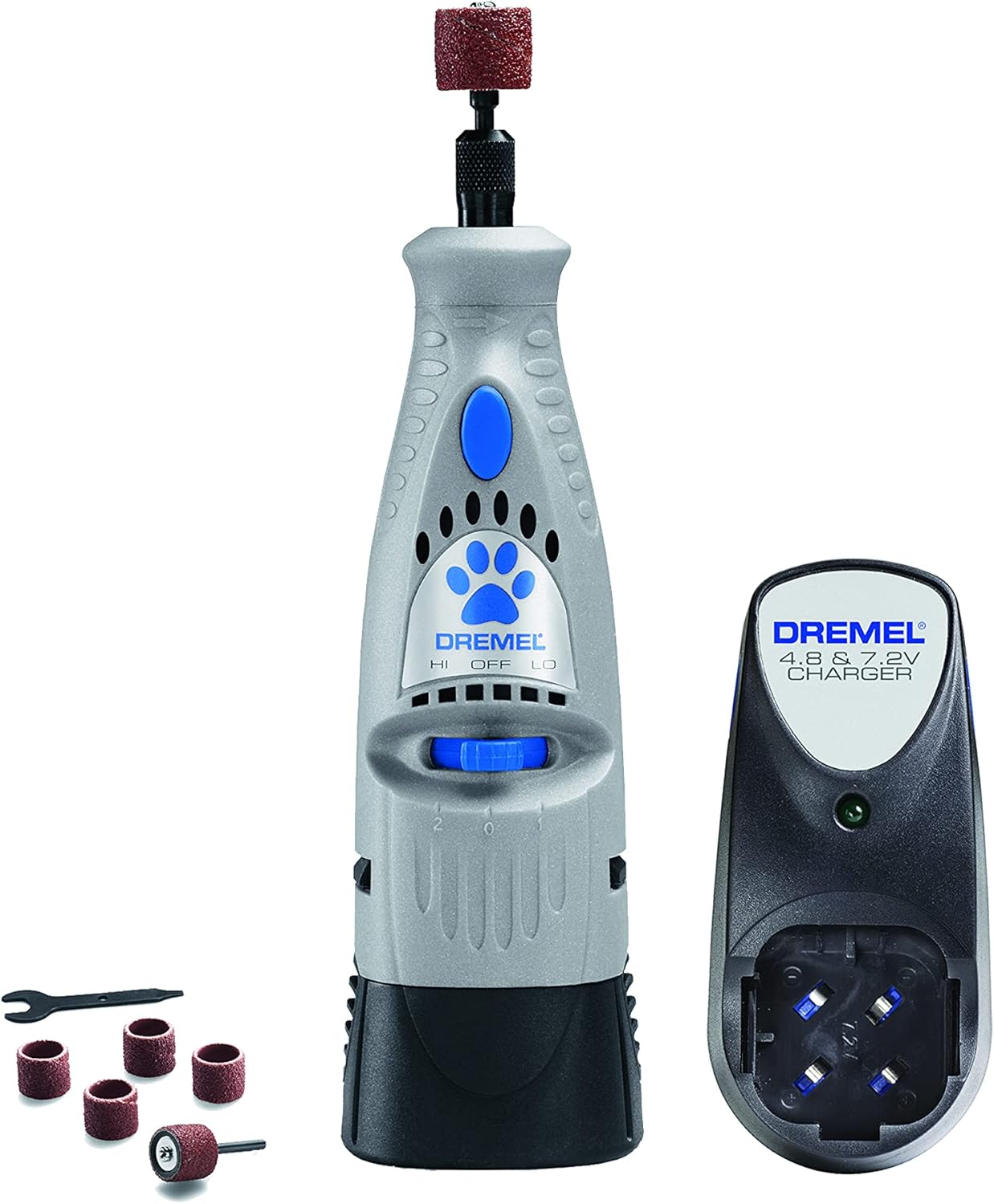
Image: The Dremel 7300-PT kit, showing the gray cordless rotary tool with a blue paw print logo, a black battery charger, and several sanding bands with a small wrench.
Setup
1. Charging the Battery
- Detach the battery pack from the bottom of the Dremel tool.
- Insert the battery pack into the 3-hour charger.
- Plug the charger into a standard wall outlet. The LED indicator on the charger will illuminate to show charging status.
- Allow approximately 3 hours for a full charge.
2. Attaching/Replacing Sanding Drum
- Ensure the tool is turned OFF.
- Unscrew the top collet nut of the tool to expand the collet.
- Insert the sanding drum mandrel with a sanding band into the collet.
- Tighten the collet nut securely to hold the sanding drum in place. Use the provided wrench if necessary.

Image: A diagram illustrating the Dremel 7300-PT tool, highlighting its two-speed settings (LO and HI), the removable 4.8V NiCad battery pack, and the 3-hour charger with an LED indicator.
Operating Instructions
1. Pet Familiarization
- Before first use, allow your pet to become accustomed to the tool's sound and vibration. Turn the tool on (without touching nails) near your pet for short periods, offering praise and treats.
- Gradually introduce the tool to your pet's paws, allowing them to sniff and investigate.
2. Speed Settings
The Dremel 7300-PT features two speed settings:
- LO (6,500 RPM): Suitable for initial familiarization or for pets sensitive to higher speeds.
- HI (13,000 RPM): Provides faster grinding for more efficient nail trimming.
3. Nail Grinding Technique
- Gently hold your pet's paw, ensuring their fur is clear of the rotating sanding drum.
- Support the toe you are working on, exposing the nail.
- Turn the tool ON to your desired speed setting.
- Lightly touch the rotating sanding drum to the tip of the nail. Use short, gentle strokes, moving the tool from the bottom of the nail upwards.
- Avoid applying excessive pressure or grinding for extended periods on one nail, as this can cause heat buildup and discomfort for your pet.
- Periodically check the nail for heat by touching it with your finger.
- For pets with light-colored nails, the 'quick' (the pink area containing blood vessels and nerves) is visible. Grind only the white tip, avoiding the quick.
- For pets with dark-colored nails, grind in short bursts and observe the center of the nail. A small dark dot appearing in the center indicates you are approaching the quick; stop grinding immediately.
- Repeat the process for all nails, rewarding your pet with praise and treats throughout the session.

Image: A person gently holding a dog's paw and using the Dremel 7300-PT tool to carefully grind the dog's nail, demonstrating proper technique.
Maintenance
1. Cleaning the Tool
- After each use, turn the tool OFF and remove the battery.
- Use a soft, dry cloth to wipe down the tool's exterior.
- Remove any accumulated nail dust from the sanding drum and surrounding areas.
2. Replacing Sanding Bands
- When a sanding band becomes worn or less effective, replace it with a new one.
- Follow the instructions in the 'Attaching/Replacing Sanding Drum' section to change the sanding band.
Troubleshooting
| Problem | Possible Cause | Solution |
|---|---|---|
| Tool does not turn on. | Battery is not charged or not properly inserted. | Ensure battery is fully charged and securely inserted into the tool. |
| Sanding is ineffective. | Sanding band is worn or loose. | Replace the sanding band or tighten the collet nut. |
| Tool gets hot during use. | Excessive pressure or prolonged use on one nail. | Use lighter pressure and shorter grinding intervals. Allow the tool and nail to cool. |
| Pet shows discomfort. | Noise/vibration, heat, or quick contact. | Re-familiarize pet with the tool, use lower speed, ensure light touches, and avoid the quick. |
Specifications
- Brand: Dremel
- Model: 7300-PT
- Voltage: 4.8 Volts
- Power Source: Cordless-electric
- Battery Chemistry: Nickel-Cadmium (NiCAD)
- Speed Settings: Two (6,500 RPM and 13,000 RPM)
- Item Weight: Approximately 1.19 pounds
- Product Dimensions: 3.1 x 1.7 x 1 inches
- Included Components: Rotary tool, charger, battery, sanding accessories
Warranty
The Dremel 7300-PT 4.8V rotary tool is backed by a two-year limited warranty. Please refer to the warranty card included with your product for full terms and conditions.
Support
For further assistance, technical support, or to inquire about replacement parts, please visit the official Dremel website or contact Dremel customer service. Contact information can typically be found on the product packaging or the Dremel website.


