Introduction
This manual provides comprehensive instructions for the setup, operation, maintenance, and troubleshooting of your Intercomp SW650 Quick Weigh Wireless Scale System, model 170126-W. Please read this manual thoroughly before using the system to ensure proper function and longevity.
Product Overview
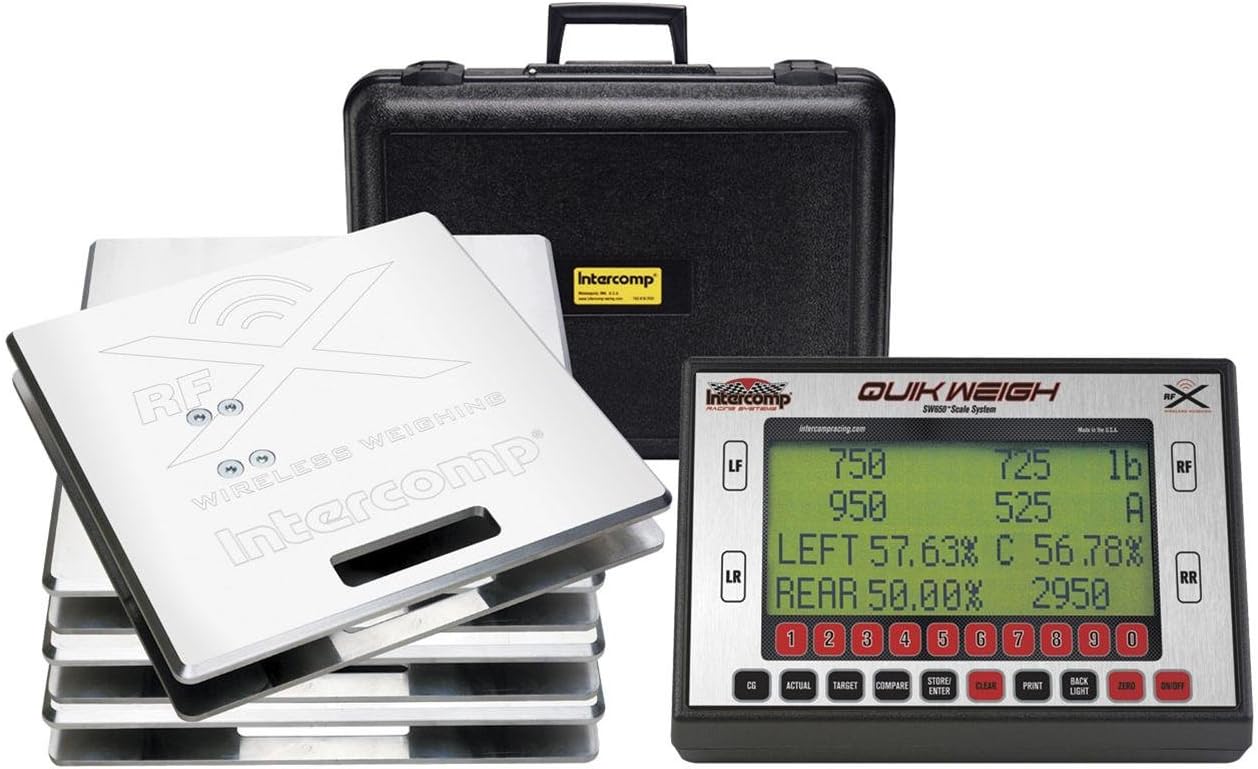
This image displays the complete Intercomp SW650 Quick Weigh Wireless Scale System. It features four wireless weighing pads, designed for precise vehicle weight measurement. Adjacent to the pads is the digital control unit, which shows weight readings for each corner (LF, LR, RF, RR) and calculates percentages like Left and Rear weight distribution. The display also includes numerical input buttons and function keys such as CG, Actual, Target, Compare, Store/Enter, Clear, Print, Backlight, Zero, and On/Off. A durable black carrying case is visible in the background, designed to protect the system components during transport and storage. The system is marked with 'RF Wireless Weighing' and 'QUIK WEIGH SW650 Scale System' branding.
Setup
- Unpacking and Inspection: Carefully remove all components from the packaging. Verify that all items listed in the packing list are present and undamaged. The system typically includes four wireless weighing pads, a digital control unit, and a carrying case.
- Powering the Control Unit: Ensure the control unit has sufficient power. If battery-operated, install fresh batteries according to the polarity markings. For units with rechargeable batteries, ensure it is fully charged before first use.
- Pad Placement: Place the four wireless weighing pads on a flat, level, and stable surface. Ensure the surface can support the maximum weight capacity of the scales. Position them to align with the vehicle's wheel base.
- Wireless Connection: The system is designed for wireless communication. Power on the control unit and each weighing pad. The control unit should automatically detect and connect to the pads. Refer to the display for connection indicators (e.g., RF signal strength).
- Initial Zeroing: Before placing any weight on the pads, ensure they are clear of debris and stable. Press the ZERO button on the control unit to tare the scales and establish a baseline reading of zero.
Operating Instructions
Taking Measurements:
- Position Vehicle: Carefully drive or push the vehicle onto the weighing pads, ensuring each wheel is centered on its respective pad.
- Stabilize Readings: Allow a few moments for the readings on the control unit to stabilize. The display will show individual wheel weights (LF, LR, RF, RR) and calculated percentages (e.g., Left, Rear).
- Understanding Display:
- LF, LR, RF, RR: Individual weight readings for Left Front, Left Rear, Right Front, and Right Rear wheels.
- LEFT %: Percentage of total weight on the left side of the vehicle.
- REAR %: Percentage of total weight on the rear of the vehicle.
- Total Weight: The sum of all four wheel weights.
- Using Function Buttons:
- CG: Calculates and displays the Center of Gravity.
- ACTUAL: Displays current weight readings.
- TARGET: Allows input of target weights for comparison.
- COMPARE: Compares actual readings to target readings.
- STORE/ENTER: Saves current readings or confirms input.
- CLEAR: Clears current data or input.
- PRINT: Sends data to a connected printer (if applicable).
- BACKLIGHT: Toggles display backlight.
- ON/OFF: Powers the unit on or off.
Maintenance
- Cleaning: Use a soft, damp cloth to clean the weighing pads and control unit. Avoid abrasive cleaners or solvents that could damage the finish or electronic components. Ensure no moisture enters the internal components.
- Storage: When not in use, store the scale system in its protective carrying case in a dry, temperature-controlled environment. Avoid extreme temperatures or high humidity, which can affect accuracy and component lifespan.
- Battery Care: If the unit uses removable batteries, remove them if the system will not be used for an extended period to prevent leakage. For rechargeable units, follow manufacturer guidelines for charging cycles to maintain battery health.
- Calibration: While Intercomp scales are known for their accuracy, periodic calibration by a certified technician may be required for professional applications or if accuracy is suspected to have drifted. Refer to Intercomp's official support for calibration services.
Troubleshooting
| Problem | Possible Cause | Solution |
|---|---|---|
| No display on control unit. | Low or dead batteries; unit not powered on. | Replace or recharge batteries. Press the ON/OFF button. |
| Inaccurate or fluctuating readings. | Uneven surface; debris under pads; wireless interference; pads not zeroed. | Ensure pads are on a flat, level surface. Clear any debris. Minimize wireless interference. Press ZERO before weighing. |
| Pads not connecting wirelessly. | Pads or control unit not powered on; out of range; interference. | Ensure all components are powered on. Move pads closer to the control unit. Check for strong RF interference sources. |
| Error message on display. | Specific system error. | Note the error code and consult the full Intercomp technical manual or contact Intercomp support for specific error code interpretations. |
Specifications
- Model Number: INT-170126-W
- Product Dimensions: 40.89 x 41.4 x 52.58 cm (16.1 x 16.3 x 20.7 inches)
- Product Weight: 47.9 kg (105.6 lbs)
- Manufacturer: Intercomp
- ASIN: B003TQ2WOY
- UPC: 099998201551
- Connectivity: Wireless (RF)
- System Type: Quick Weigh Scale System
Warranty and Support
For warranty information, technical support, or service inquiries regarding your Intercomp SW650 Quick Weigh Wireless Scale System, please contact Intercomp directly through their official website or customer service channels. Keep your purchase receipt and model number (170126-W) readily available when contacting support.
Official Intercomp Website: www.intercompcompany.com


