
High Tech Pet PX-2
Power Pet Large Electronic Pet Door PX-2 User Manual
Brand: High Tech Pet | Model: PX-2
Product Overview
The High Tech Pet Power Pet Large Electronic Pet Door PX-2 is a motor-driven, vertically-sliding pet door designed to provide secure and convenient access for your pet. It is activated by an MS-4 ultrasonic collar, ensuring that the door opens only when your pet intends to pass through. This system offers enhanced security and weather sealing compared to traditional pet doors. It features a 4-way access control system, allowing you to select from In Only, Out Only, Full Access, or Closed & Locked modes. The door is wind and weatherproof with an airtight seal and includes automatic deadbolt locking for superior security.

Image: The Power Pet Large Electronic Pet Door PX-2, showing its sleek white design and brown pet panel.
Setup and Installation
Proper installation is crucial for the optimal performance and security of your Power Pet door. The door can be installed as a door mount or a wall mount, depending on your specific needs. Ensure you have the necessary tools and follow all instructions carefully.
Pre-Installation Considerations
- The panel size is 12-1/4 by 16 inches, suitable for pets up to 100 pounds.
- Ensure the installation location allows for proper clearance for the vertically-sliding door.
- For wall installations, consider purchasing an optional wall tunnel attachment.

Image: Technical drawing showing the dimensions of the pet door, including the 12-1/4 inch by 16 inch panel opening.
Installation Steps (General)
- Carefully measure and mark the opening for the pet door according to the provided template in your physical manual.
- Cut the opening in your door or wall. For wall installations, ensure proper framing and sealing.
- Install the pet door frame into the prepared opening.
- Secure the door using the provided fasteners. Ensure the door is level and securely mounted.
- Connect the power adapter to the pet door. The door features dual access power ports on both the left and right sides for flexible installation.
- Place the MS-4 ultrasonic collar on your pet.

Image: A dog wearing the MS-4 ultrasonic collar, which activates the pet door.

Image: A detailed view of the control panel, showing the power, battery, sensor, and range adjustment knobs.
Operating Instructions
The Power Pet door operates using a directional sensing system that detects your pet's approach via the MS-4 ultrasonic collar. This ensures the door opens only when your pet intends to pass through, not when they are merely nearby.
Access Control Modes
Use the control panel to select one of the four access modes:
- In Only: Allows pets to enter but not exit.
- Out Only: Allows pets to exit but not enter.
- Full Access: Allows pets to enter and exit freely.
- Closed & Locked: The door remains closed and securely locked, preventing any passage.
Adjusting Sensor Range
The control panel features knobs to adjust the sensor range for both inside and outside detection. Adjust these to suit your pet's movement patterns and your desired activation distance.
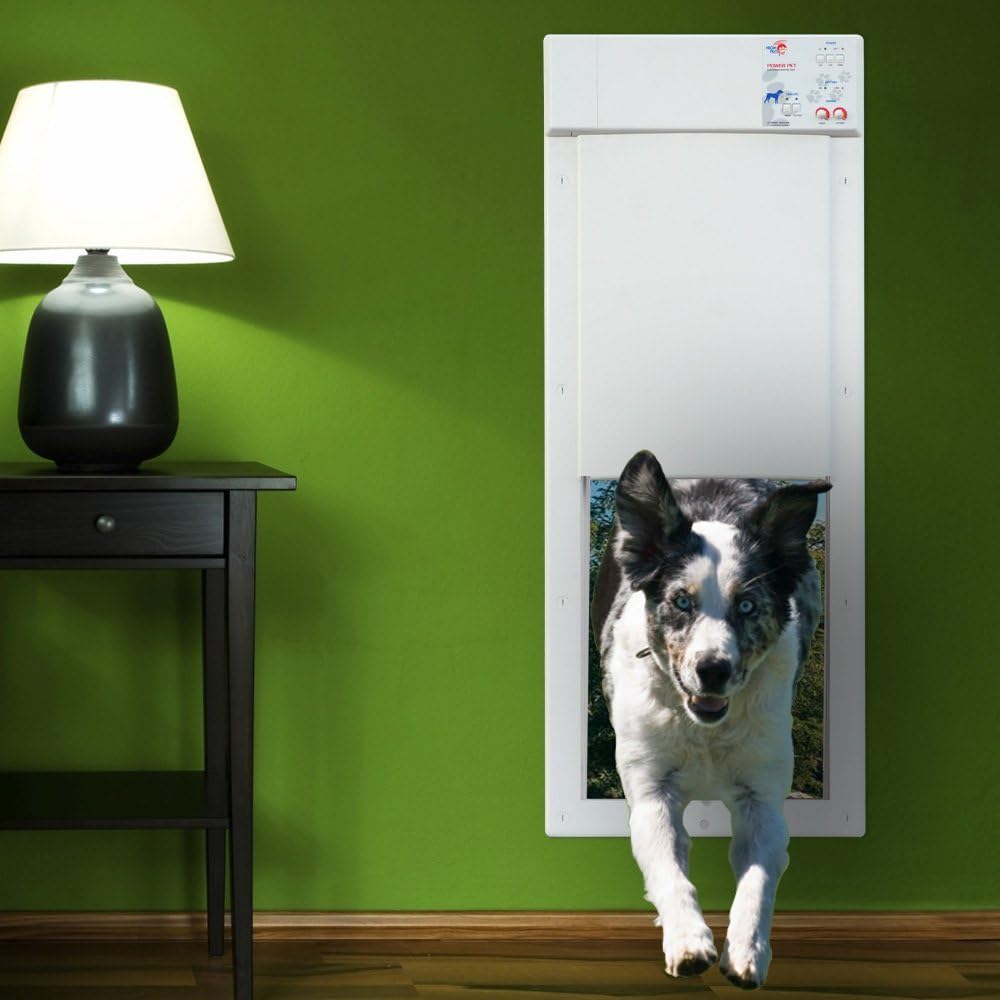
Image: A dog demonstrating the use of the electronic pet door, showing the door opening as the pet approaches.
Video: An official product video from High Tech Pet demonstrating the features and operation of the Power Pet Door.
Maintenance
Regular maintenance ensures the longevity and proper functioning of your Power Pet door.
- Keep the door panel and tracks clean from dirt, pet hair, and debris to ensure smooth operation.
- Periodically check the power adapter and cable for any signs of wear or damage.
- Ensure the MS-4 ultrasonic collar is clean and its battery is functioning correctly.
- Inspect the door's weather seals for any damage and replace if necessary to maintain airtightness.
Troubleshooting
If you encounter issues with your Power Pet door, refer to the following common problems and solutions:
| Problem | Possible Cause & Solution |
|---|---|
| Door does not open or close. |
|
| Door opens/closes continuously or erratically. |
|
| Door does not close completely. |
|
Specifications
| Feature | Detail |
|---|---|
| Model Number | PX-2 |
| Brand | High Tech Pet |
| Panel Size | 12-1/4 by 16 inches |
| Weight Limit | Up to 100 Pounds |
| Frame Material | Plastic |
| Color | White & Brown |
| Item Weight | 8 Pounds |
| Product Dimensions (LxWxH) | 18 x 6 x 47 inches |
| Power Source | AC Power (Battery option available, not included with base unit) |
| Included Components | Collar (MS-4 ultrasonic) |
Warranty and Support
The Power Pet Large Electronic Pet Door PX-2 comes with a full one-year manufacturer's warranty. For technical assistance, troubleshooting beyond this manual, or warranty claims, please contact High Tech Pet Products, Inc. customer service. Refer to the contact information provided in your product packaging or on the official High Tech Pet website.
Related documentsPX-2


Ask a question about this manual
Ask about setup, troubleshooting, compatibility, parts, safety, or missing instructions. Manuals+ will review the question and use this page’s manual context to help answer it.