
1. Introduction
This user manual provides comprehensive instructions for the safe installation, operation, and maintenance of your Xpelair DX100PC 4" (100mm) Bathroom Extractor Fan. Designed for use in bathrooms, shower rooms, and toilets, this fan is compact, stylish, and easy to install, ensuring effective ventilation. Please read this manual thoroughly before installation and use, and retain it for future reference.

Figure 1: Xpelair DX100PC 4" (100mm) Bathroom Extractor Fan. This image shows the front view of the white square-shaped fan with horizontal grilles covering the fan blades.
2. Safety Information
Always observe the following safety precautions to reduce the risk of injury or damage:
- Electrical Safety: Installation and electrical connection must be carried out by a qualified electrician in accordance with national wiring regulations and local building codes. Ensure the power supply is disconnected at the mains before commencing any installation or maintenance work.
- Intended Use: This appliance is designed for extracting air from bathrooms, shower rooms, and toilets. Do not use it for any other purpose.
- Ventilation: Ensure adequate ventilation is provided in the room when the fan is in operation to prevent backflow of gases from open-flued appliances.
- Children and Vulnerable Persons: This appliance can be used by children aged from 8 years and above and persons with reduced physical, sensory or mental capabilities or lack of experience and knowledge if they have been given supervision or instruction concerning use of the appliance in a safe way and understand the hazards involved. Children shall not play with the appliance. Cleaning and user maintenance shall not be made by children without supervision.
- Damage: Do not operate the fan if it is damaged. Contact Xpelair customer support for assistance.
- Water: The fan is IPX5 rated, making it suitable for use in zones 1 and 2 of a bathroom. However, do not immerse the fan in water or spray directly with high-pressure water jets.
3. Package Contents
The Xpelair DX100PC fan is supplied with everything required for a complete installation:
- 4" (100mm) Extractor Fan (DX100PC)
- 300mm Telescopic Ducting (100mm diameter)
- External Grille (155mm x 155mm square)
- Window gaskets and seals
- Window spacer
- Raw plugs and screws
- Instruction manual (this document)
4. Installation
The DX100PC fan is versatile and can be installed into walls, ceilings, or windows. Always ensure the power supply is isolated before beginning installation.
4.1 General Considerations
- The fan is designed for continuous or intermittent operation.
- Ensure the chosen location allows for proper air extraction and access for future maintenance.
- Refer to the dimensions diagram below for precise measurements.
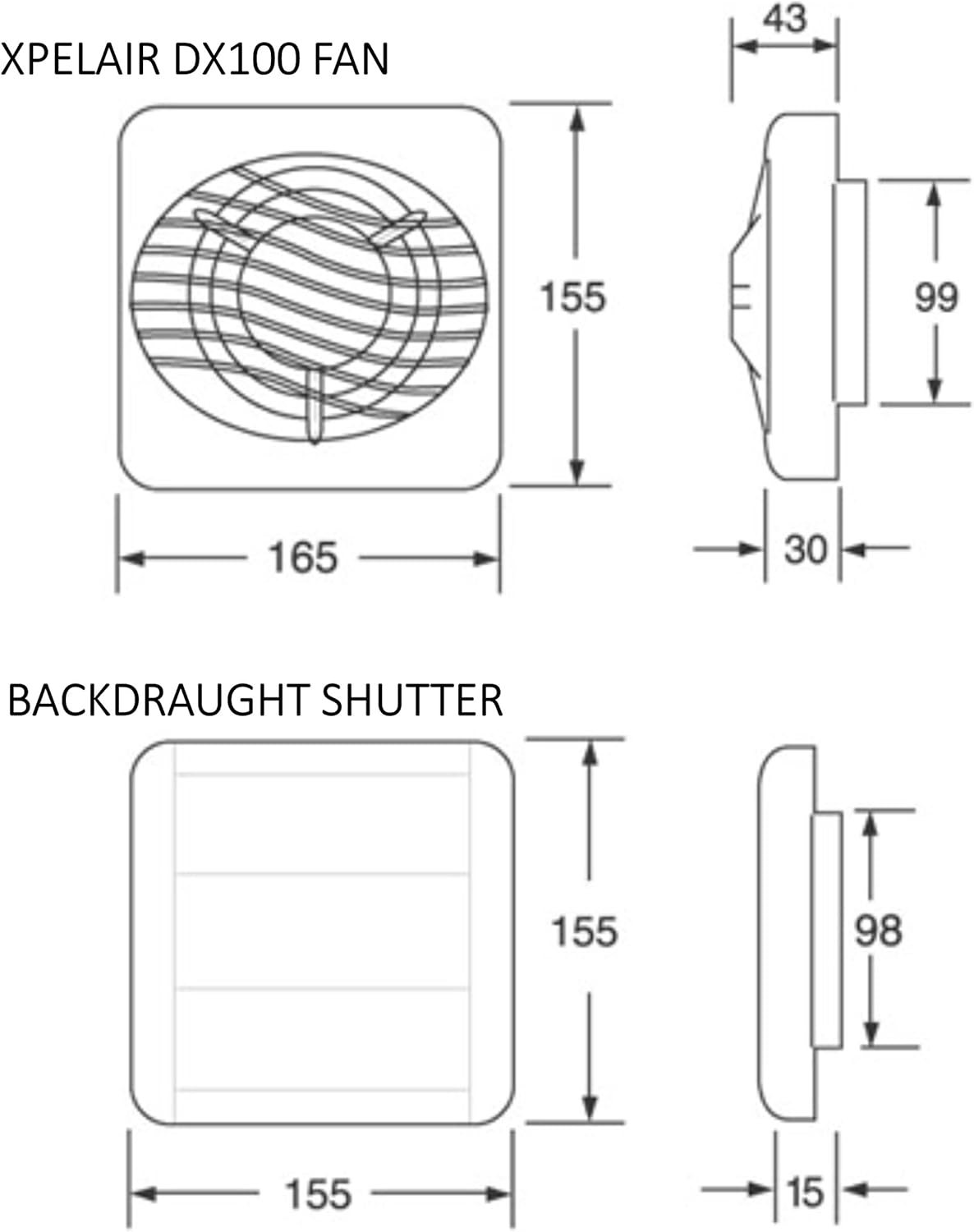
Figure 2: Technical drawing showing the dimensions of the Xpelair DX100 fan (165mm width, 155mm height, 43mm depth) and the backdraught shutter (155mm width, 155mm height, 15mm depth).
4.2 Wall/Ceiling Installation
- Hole Diameter: The recommended hole diameter for wall or ceiling installation is 117mm.
- Telescopic Wall Tube: The supplied round plastic telescopic wall tube can be adjusted up to 300mm in length, eliminating the need for cutting. It has a 100mm diameter.
- External Grille: The black external grille measures 155mm x 155mm square with a projection of just 15mm.
- Fixings: Use the provided wall fixings and raw plugs to secure the fan and grille.
4.3 Window Installation
- Hole Diameter: For single glazed windows, the required hole diameter is 125mm.
- Window Fittings: A window spacer and gaskets are provided for installation into single glazed windows up to a maximum thickness of 6mm.
4.4 Electrical Connection
The DX100PC is a Pull Cord variant. It is designed to be turned on/off by pulling a cord. For electrical connection, it is crucial to consult a qualified electrician to ensure compliance with all relevant wiring regulations and safety standards. The fan operates on 220-240V 50Hz mains power.
5. Operation
The Xpelair DX100PC is a manual fan designed for straightforward operation:
- Turning On: To activate the fan, gently pull the integrated pull cord downwards.
- Turning Off: To switch off the fan, pull the cord again.
This model provides direct manual control over the ventilation in your bathroom, shower room, or toilet.
6. Maintenance
Regular cleaning will ensure optimal performance and longevity of your Xpelair DX100PC fan. Always disconnect the power supply before performing any maintenance.
- Front Cover Cleaning: The front cover of the fan is designed to clip off easily for convenient cleaning. Gently unclip the cover.
- Cleaning Procedure: Use a soft, damp cloth to wipe down the fan's exterior and the removed front cover. For the fan blades, use a soft brush or vacuum cleaner to remove dust and debris. Do not use abrasive cleaners or solvents.
- Reassembly: Once clean and dry, reattach the front cover by clipping it back into place.
- Motor: The motor is lubricated for life and features thermal cut-out protection, requiring no user maintenance.
7. Troubleshooting
If you encounter issues with your Xpelair DX100PC fan, refer to the following common troubleshooting steps:
| Problem | Possible Cause | Solution |
|---|---|---|
| Fan does not turn on. | No power supply. Faulty pull cord. Internal wiring issue. | Check the mains power supply. Ensure the pull cord is fully engaged. Contact a qualified electrician. |
| Fan runs but extraction is poor. | Blocked grille or ducting. Fan blades are dirty. | Clean the external grille and fan blades (refer to Section 6). Check for obstructions in the ducting. |
| Fan is unusually noisy. | Loose mounting. Debris in fan. Motor issue. | Ensure the fan is securely mounted. Clean fan blades and housing. If noise persists, contact customer support. |
If the problem persists after attempting these solutions, please contact Xpelair customer support or a qualified electrician.
8. Specifications
| Feature | Detail |
|---|---|
| Model | DX100PC (90840AW) |
| Fan Type | 4" (100mm) Bathroom Extractor Fan with Pull Cord |
| Extract Performance | 76 m³ per hour |
| Noise Level | 35 dBA @ 3 meters |
| Electrical Power Rating | 12 watts |
| Mains Operation | 220-240V 50Hz |
| Fan Dimensions (H x W x D) | 155mm x 165mm x 43mm |
| External Grille Dimensions | 155mm x 155mm (square, 15mm projection) |
| Telescopic Ducting Diameter | 100mm |
| Ingress Protection (IP) Rating | IPX5 |
| Approvals | BEAB Approved, Conforms to Building Regulation Part F1 |
| Insulation | Class B for operation up to 40°C |
| Motor | Lubricated for life with thermal cut out protection |
9. Warranty & Support
Your Xpelair DX100PC fan comes with a 2-year guarantee from the date of purchase.
For technical assistance, warranty claims, or to purchase replacement parts, please contact Xpelair customer support. Ensure you have your proof of purchase and the product model number (DX100PC or 90840AW) ready when contacting support.
Please note: Any unauthorized repairs or modifications may void the product warranty.


