
1. Introduction
The Crown XLS1000 is a lightweight, high-performance Class-D power amplifier designed for portable PA systems. It offers flexible input options and system setup configurations, making it suitable for various audio applications. Key features include an integrated PureBand™ Crossover System for enhanced performance and control, and PeakX™ Limiters to protect connected speakers.
2. Safety Information
Please read and understand all safety instructions before operating the amplifier. Retain this manual for future reference.
- Power Source: Connect the amplifier only to the type of power source indicated on the unit. Ensure the voltage matches your region's requirements (100 VAC, 120 VAC, 220 VAC, or 240 VAC, 50/60 Hz).
- Ventilation: Do not block ventilation openings. Ensure adequate airflow around the unit to prevent overheating.
- Water and Moisture: Do not expose the amplifier to rain or moisture. Do not place objects filled with liquids on the unit.
- Servicing: Do not attempt to service this product yourself. Refer all servicing to qualified service personnel.
- Grounding: The amplifier must be properly grounded to prevent electric shock.
3. Package Contents
Verify that your package contains the following items:
- Crown XLS1000 Power Amplifier
- AC Power Cord
- User Manual (this document)

Figure 3.1: Included AC Power Cord.
4. Amplifier Overview
4.1 Front Panel
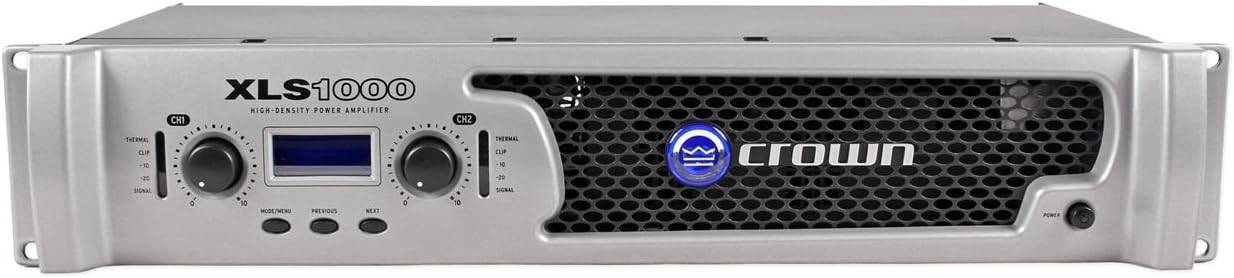
Figure 4.1: Front Panel Controls and Indicators.
The front panel provides access to essential controls and indicators for monitoring and adjusting the amplifier's operation.
- Level Controls: Rotary knobs for adjusting the output level of each channel.
- LCD Display: Shows operational status, menu options, and settings.
- Navigation Buttons: Used to navigate through menu options on the LCD display.
- Signal Indicators: LEDs to show signal presence, clip, and thermal status for each channel.
- Power Switch: Turns the amplifier on or off.
4.2 Rear Panel
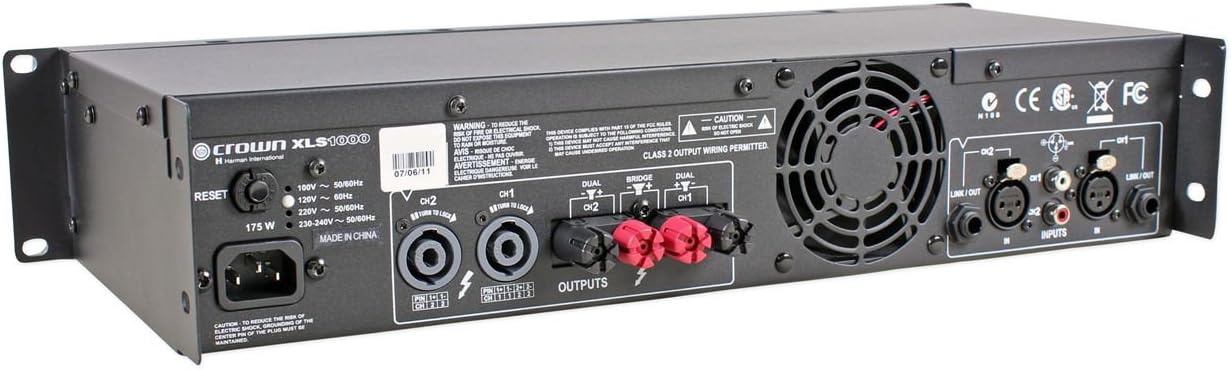
Figure 4.2: Rear Panel Connections.
The rear panel houses all input and output connections, along with configuration switches.
- AC Power Inlet: For connecting the supplied AC power cord.
- Input Connectors: XLR, 1/4-inch (TRS), and RCA inputs for connecting audio sources.
- Output Connectors: Speakon and binding post outputs for connecting loudspeakers.
- Mode Switches: Switches for selecting operating modes (Dual, Bridge, Parallel).
- Link/Out Connectors: XLR outputs for linking to additional amplifiers.
5. Setup
5.1 Unpacking and Inspection
Carefully remove the amplifier from its packaging. Inspect the unit for any signs of damage that may have occurred during shipping. If damage is found, contact your dealer immediately.
5.2 Placement and Ventilation
Place the amplifier in a location that allows for proper ventilation. Avoid placing it in enclosed spaces or directly on carpeted surfaces that could obstruct airflow. The XLS1000 is designed for rack mounting and should be installed in a standard 19-inch equipment rack, ensuring adequate space around the unit for cooling.
5.3 Connecting Audio Inputs
Connect your audio source (mixer, preamplifier, etc.) to the amplifier's input connectors on the rear panel. The XLS1000 supports XLR, 1/4-inch (TRS), and RCA input connections.
- For balanced connections, use XLR or 1/4-inch TRS cables.
- For unbalanced connections, use RCA cables.
5.4 Connecting Speakers
Connect your loudspeakers to the amplifier's output connectors. The XLS1000 features both Speakon and binding post outputs.
- Stereo Mode: Connect one speaker to Channel 1 output and another speaker to Channel 2 output.
- Bridge-Mono Mode: For higher power output into a single speaker, connect the speaker to the designated bridge output (typically using both positive terminals of the binding posts or a specific Speakon wiring). Ensure the amplifier is set to Bridge-Mono mode via the rear panel switch.
- Parallel Mode: Both channels receive the same input signal, but operate independently into separate speaker loads.
Ensure speaker cables are of appropriate gauge for the power and distance, and that connections are secure.
5.5 Power Connection
After all audio and speaker connections are made, connect the supplied AC power cord to the amplifier's AC inlet and then to a suitable power outlet. Ensure the power outlet provides the correct voltage for your unit.
6. Operation
6.1 Powering On/Off
To power on the amplifier, press the power switch on the front panel. The LCD display will illuminate, and the amplifier will initialize. To power off, press the power switch again.
6.2 Adjusting Levels
Use the level controls on the front panel to adjust the output volume for each channel. Start with the level controls at their minimum setting before powering on, then slowly increase to the desired listening level.
6.3 Using PureBand™ Crossover System
The integrated PureBand™ Crossover System allows you to optimize the amplifier's output for specific speaker configurations. Access the crossover settings via the front panel LCD display and navigation buttons. You can configure low-pass, high-pass, or band-pass filters for each channel to ensure efficient power delivery to your speakers.
6.4 Understanding PeakX™ Limiters
The PeakX™ Limiters are designed to protect your speakers from excessive signal levels. When the input signal approaches clipping, the limiters automatically reduce the gain to prevent distortion and potential speaker damage. The clip indicator LEDs on the front panel will illuminate when the limiters are active.
6.5 Operating Modes
The XLS1000 supports multiple operating modes, selectable via switches on the rear panel:
- Dual (Stereo) Mode: Each channel operates independently, providing two separate amplifier channels.
- Bridge-Mono Mode: Combines the power of both channels into a single, higher-power output for a single speaker.
- Parallel Mode: Both channels receive the same input signal, but operate independently into separate speaker loads.
Always ensure the correct operating mode is selected for your speaker configuration.
7. Maintenance
Regular maintenance ensures the longevity and optimal performance of your amplifier.
- Cleaning: Use a soft, dry cloth to clean the exterior of the amplifier. Do not use liquid cleaners or solvents.
- Ventilation: Periodically check that the ventilation openings are free from dust and debris. Use a vacuum cleaner with a brush attachment to gently remove any accumulated dust.
- Connections: Ensure all input and output connections remain secure. Loose connections can lead to signal loss or intermittent performance.
8. Troubleshooting
If you experience issues with your Crown XLS1000 amplifier, refer to the following common problems and solutions:
| Problem | Possible Cause | Solution |
|---|---|---|
| No power | Power cord not connected; Power outlet not active; Amplifier fuse blown. | Check power cord connection; Test power outlet; Consult qualified service personnel for fuse replacement. |
| No sound output | Input cables not connected; Speaker cables not connected; Level controls set to minimum; Incorrect operating mode. | Verify all cable connections; Increase level controls; Check operating mode settings. |
| Distorted sound | Input signal too high; Speaker impedance mismatch; Damaged speaker. | Reduce input signal level; Verify speaker impedance matches amplifier's capabilities; Test with different speakers. |
| Amplifier overheats | Blocked ventilation; Excessive load; Prolonged high-level operation. | Ensure clear ventilation paths; Check speaker impedance; Reduce output level or allow cooling time. |
If the problem persists after attempting these solutions, contact Crown customer support or a qualified service technician.
9. Specifications
| Feature | Detail |
|---|---|
| Model | XLS1000 |
| Output Power (Stereo, 8 ohms) | 215 watts per channel |
| Output Power (Stereo, 4 ohms) | 350 watts per channel |
| Output Power (Bridged-Mono, 4 ohms) | 1100 watts |
| Number of Channels | 2 |
| Amplifier Type | Class-D |
| Inputs | XLR, 1/4-inch (TRS), RCA |
| Outputs | Speakon, Binding Post |
| Dimensions (L x W x H) | 7.7 x 19 x 3.5 inches (19.56 x 48.26 x 8.89 cm) |
| Weight | 8.6 pounds (3.9 kg) |
| Voltage Configurations | 100 VAC 50/60 Hz, 120 VAC 60 Hz, 220 VAC 50 Hz, 240 VAC 50 Hz |
| Crossover System | Integrated PureBand™ |
| Limiters | PeakX™ |
10. Warranty and Support
The Crown XLS1000 Power Amplifier is covered by Crown's Three-year Warranty. For detailed warranty terms and conditions, please refer to the official Crown website or contact Crown customer support.
For technical support, service, or further inquiries, please visit the official Crown website or contact their customer service department. Ensure you have your product model number (XLS1000) and serial number ready when seeking support.


