
Mohawk Home STT300220
Strathmore 25% Cotton Business Stationery User Manual
Model: STT300220
Manufactured by Mohawk Fine Papers
Introduction
Welcome to the user manual for your Strathmore 25% Cotton Business Stationery. This premium paper is designed to convey professionalism and integrity in all your communications. It is watermarked, acid-free for archival quality, and durable for various printing methods including embossing, engraving, and letterpress.
This manual provides essential information on setting up, using, maintaining, and troubleshooting your Strathmore paper to ensure superior performance in all office equipment.
Setup and Storage
Proper handling and storage are crucial for maintaining the quality and performance of your Strathmore 25% Cotton Business Stationery.
Unpacking the Paper
Carefully open the outer packaging of your Strathmore paper. The paper reams are typically protected by a sturdy box.

The Strathmore 25% Cotton Business Stationery comes packaged in a durable box designed to protect the paper during transit and storage. The box features the Strathmore brand logo and product details.
Once the box is open, you will find individually wrapped reams of paper. Each ream is sealed to protect against moisture and dust.
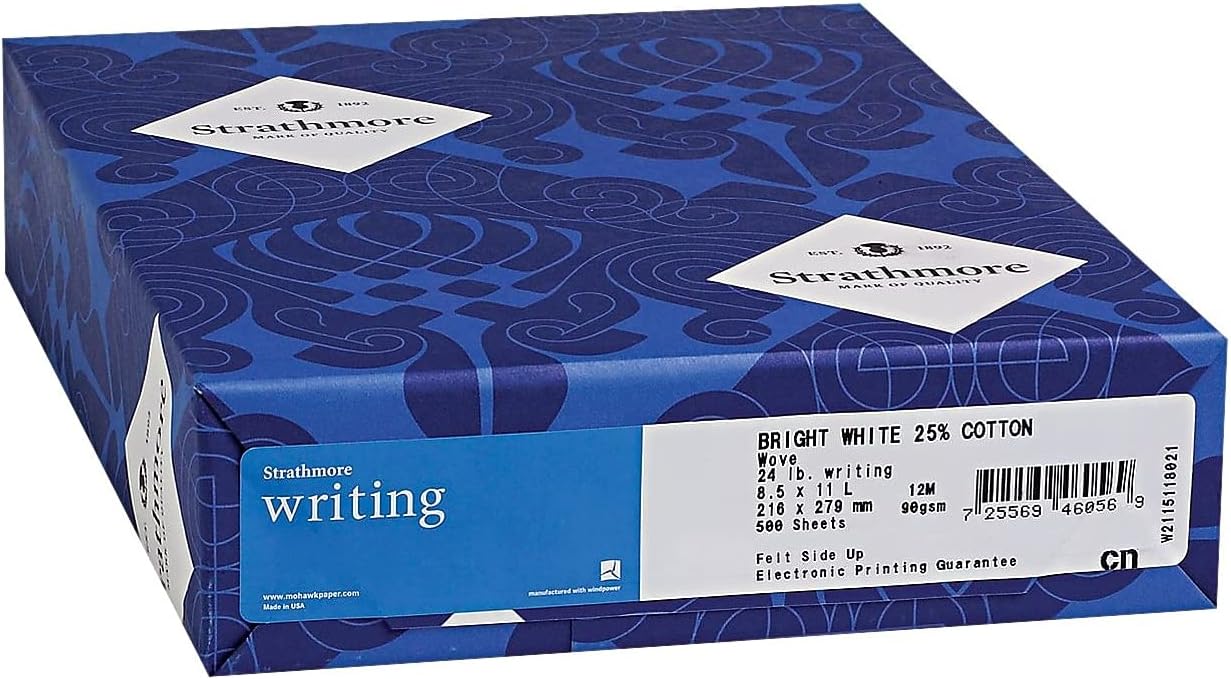
Each ream of Strathmore paper is individually wrapped, displaying key product information such as paper weight (24 lb), sheet size (8.5 x 11 inches), cotton content (25%), and sheet count (500 sheets). This label also confirms the electronic printing guarantee.
Loading into Equipment
Before loading the paper into your printer, copier, or other office equipment, ensure the paper is flat and free from curled edges. Fan the edges of the paper stack to separate sheets and prevent misfeeds. Load the paper according to your equipment's specific instructions, paying attention to the correct orientation for printing on the watermarked side if desired.
Storage Recommendations
- Store paper in its original packaging until ready for use to protect it from dust and moisture.
- Keep paper in a cool, dry environment, away from direct sunlight, extreme temperatures, and high humidity.
- Avoid storing paper on the floor or near windows where it might be exposed to environmental fluctuations.
Operating Instructions
Strathmore 25% Cotton Business Stationery is engineered for superior performance across a wide range of office equipment and specialized printing techniques.
Electronic Printing (Printers & Copiers)
This paper is guaranteed for electronic printing, ensuring excellent results with laser printers, inkjet printers, and photocopiers.
- Printer Settings: For best results, select the appropriate paper type setting on your printer (e.g., "Heavyweight", "Cardstock", or "Specialty Paper") if available, to match the 24lb paper weight. This helps optimize toner/ink adhesion and feed mechanisms.
- Orientation: Ensure the paper is loaded correctly according to your printer's manual. If you wish to utilize the watermarked side, verify the feed direction.
- Print Quality: The smooth finish of Strathmore paper enhances print clarity and color vibrancy, making it ideal for professional documents.
Specialized Printing Techniques
The durable nature of Strathmore 25% Cotton Business Stationery makes it suitable for advanced printing methods:
- Embossing: The paper's strength and composition allow for crisp, raised designs without tearing or cracking.
- Engraving: It holds fine details and rich ink impressions characteristic of engraved stationery.
- Letterpress: The paper's surface accepts deep impressions, providing the tactile quality desired in letterpress printing.
For these specialized techniques, consult with your printing professional for optimal machine settings and handling.
Maintenance
Maintaining the quality of your Strathmore paper primarily involves proper storage and handling to prevent degradation.
Paper Care
- Environmental Control: Store paper in a climate-controlled environment. Avoid areas with high humidity, which can cause paper to curl or stick, and very dry conditions, which can make it brittle.
- Protection from Light: Keep paper away from direct sunlight or strong artificial light sources, which can cause yellowing over time.
- Dust and Dirt: Always keep unused paper in its original wrapper or in a clean, closed container to protect it from dust and dirt particles that can affect print quality or damage equipment.
- Handling: Handle paper by the edges to avoid transferring oils or dirt from your hands onto the paper surface.
By following these simple maintenance guidelines, you can ensure your Strathmore paper remains in pristine condition, ready for your most important documents.
Troubleshooting
While Strathmore paper is designed for superior performance, occasional issues may arise, often related to equipment settings or environmental factors.
Common Issues and Solutions
| Issue | Possible Cause | Solution |
|---|---|---|
| Paper Jams | Improper loading, curled paper, dust/debris in printer. | Ensure paper is fanned and loaded correctly. Check for curled sheets and replace if necessary. Clean printer rollers as per printer manual. |
| Poor Print Quality (Smudges, Fading) | Incorrect printer settings, low ink/toner, dirty print heads. | Verify printer settings match paper type (e.g., "Heavyweight"). Check ink/toner levels. Perform print head cleaning or calibration as per printer manual. |
| Paper Not Feeding | Paper stuck together, worn feed rollers, humidity. | Fan paper thoroughly before loading. Ensure paper is stored in a dry environment. Consult printer manual for feed roller maintenance. |
| Paper Curling After Printing | High humidity, printer heat, improper storage. | Store paper in a controlled environment. Allow printed documents to cool and flatten. Consider using a de-curler if available on your printer. |
For issues specific to your printing equipment, always refer to your printer's user manual or contact the printer manufacturer's support.
Specifications
Detailed specifications for Strathmore 25% Cotton Business Stationery, Model STT300220:
| Attribute | Detail |
|---|---|
| Brand | Mohawk Home (Strathmore) |
| Manufacturer | MOHAWK FINE PAPERS |
| Model Number | STT300220 |
| Item Weight | 6 pounds |
| Color | Bright White |
| Sheet Size | 8.5 x 11 inches |
| Paper Weight | 24 lb |
| Paper Finish | Wove |
| Sheet Count | 500 sheets per ream |
| Cotton Content | 25% |
| Archival Quality | Acid-free |
| Environmental Certifications | Manufactured with 100% Renewable Energy Credits (RECs) from Green-e certified wind power projects; thermal energy offset with Verified Emission Reduction credits (VERs). |
Warranty Information
Specific warranty details for Strathmore 25% Cotton Business Stationery are typically provided by the retailer at the time of purchase or by the manufacturer, Mohawk Fine Papers.
Please retain your proof of purchase for any warranty claims. For detailed warranty terms and conditions, refer to the documentation included with your product or visit the official Mohawk Fine Papers website.
Customer Support
For further assistance, questions, or support regarding your Strathmore 25% Cotton Business Stationery, please contact the manufacturer or your point of purchase.
You can find more information and contact details on the official Mohawk Home store page: Mohawk Home Store.
Ask a question about this manual
Ask about setup, troubleshooting, compatibility, parts, safety, or missing instructions. Manuals+ will review the question and use this page’s manual context to help answer it.