
Introduction
This manual provides essential information for the safe and efficient operation of your Singing Machine STVG-519 CDG Karaoke Player. Please read it thoroughly before use and retain it for future reference.
The Singing Machine STVG-519 is a tray-loading CDG player featuring a 5.5-inch black and white monitor, dual microphone jacks with volume control, and various audio adjustments for an enhanced karaoke experience. It operates on AC power and includes a built-in speaker, along with audio and video outputs for external connections.
Setup
1. Unpacking
Carefully remove all components from the packaging. Ensure you have the main karaoke unit, at least one microphone, and the user manual.
2. Power Connection
Connect the provided AC power adapter to the DC IN jack on the back of the unit and then to a standard 127 Volts (AC) wall outlet. The unit is designed for AC operation.
3. Microphone Connection
The STVG-519 features two microphone jacks. Plug your microphone(s) into either the MIC 1 or MIC 2 jacks located on the front panel. Adjust the microphone volume using the 'MIC VOLUME' control knob.

Image: Front view of the Singing Machine STVG-519 CDG Karaoke Player, showing the 5.5-inch black and white monitor, control panel, speaker, and a connected microphone.
4. Audio and Video Output
To display lyrics on an external screen or output audio to an external sound system, use the 'AUDIO OUT' and 'VIDEO OUT' ports on the rear of the unit. Connect appropriate cables (not included) from these ports to your television or audio receiver.

Image: Rear view of the Singing Machine STVG-519 CDG Karaoke Player, highlighting the audio and video output jacks, power input, and model information.
Operating Instructions
1. Loading a CDG Disc
Open the CDG tray located on the front of the unit. Carefully place a CDG disc onto the tray with the label side facing up. Close the tray securely.
2. Using the Monitor
The unit features a built-in 5.5-inch black and white monitor to display CDG lyrics. Ensure the monitor is powered on and adjust brightness/contrast if available.

Image: Close-up front view of the Singing Machine STVG-519 CDG Karaoke Player, showing the 5.5-inch black and white screen displaying song lyrics.
3. Adjusting Audio Controls
- MIC VOLUME: Controls the volume of the connected microphones.
- KEY: Adjusts the musical key of the song to match your vocal range.
- BALANCE: Adjusts the balance between the pre-recorded vocals and the music on the CDG track.
- ECHO: Adds an echo effect to your vocals for a richer sound.
- AUTO VOICE CONTROL (AVC): Automatically reduces the main vocal track volume when you sing into the microphone, and restores it when you stop.

Image: Top view of the Singing Machine STVG-519 CDG Karaoke Player, highlighting the various control knobs for microphone volume, key, balance, and echo.
4. Playing and Pausing
Use the 'PLAY/PAUSE' button to start or temporarily stop disc playback. The 2-digit LED display will show the current track number.

Image: Side view of the Singing Machine STVG-519 CDG Karaoke Player, showing the integrated microphone holder for convenient storage.
Maintenance
To ensure the longevity and optimal performance of your karaoke player, follow these simple maintenance guidelines:
- Keep the unit clean by wiping it with a soft, dry cloth.
- Avoid exposing the unit to excessive moisture or direct sunlight.
- Handle CDG discs carefully to prevent scratches or warping.
- If the lens gets dirty, use a CD lens cleaner specifically designed for optical disc players.
Troubleshooting
If you encounter issues with your Singing Machine STVG-519, refer to the following table for common problems and solutions:
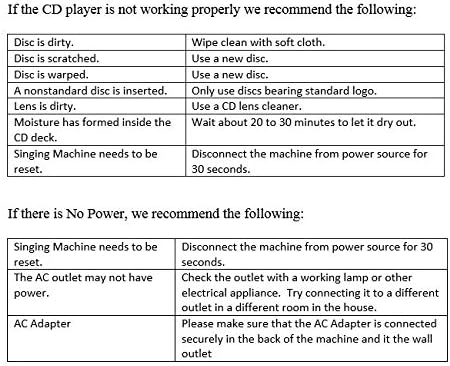
Image: A troubleshooting table detailing solutions for common CD player malfunctions and power-related issues.
CD Player Not Working Properly:
- Disc is dirty: Wipe clean with a soft cloth.
- Disc is scratched: Use a new disc.
- Disc is warped: Use a new disc.
- Nonstandard disc is inserted: Only use discs bearing standard logo.
- Lens is dirty: Use a CD lens cleaner.
- Moisture has formed inside the CD deck: Wait about 20 to 30 minutes to let it dry out.
- Singing Machine needs to be reset: Disconnect the machine from the power source for 30 seconds.
No Power:
- Singing Machine needs to be reset: Disconnect the machine from the power source for 30 seconds.
- The AC outlet may not have power: Check the outlet with a working lamp or other electrical appliance. Try connecting it to a different outlet in a different room in the house.
- AC Adapter: Please make sure that the AC Adapter is connected securely in the back of the machine and it the wall outlet.
Specifications
| Feature | Detail |
|---|---|
| Brand | Singing Machine |
| Model Name | STVG519 |
| Special Feature | LED Display |
| Color | Black |
| Included Components | Manual, Microphone, User Guide |
| Power Source | AC Operation (127 Volts) |
| Number of Speakers | 1 |
| Connector Type | 3.5 mm Jack (Auxiliary) |
| Connectivity Technology | Auxiliary |
| Media Type | CD+G |
| Item Weight | 11.7 Pounds |
| Global Trade Identification Number (GTIN) | 00047237005194 |
| ASIN | B003H3EC1A |
Warranty and Support
Warranty Information
This Singing Machine STVG-519 CDG Karaoke Player comes with a 90-day warranty covering parts and labor from the date of purchase. Please retain your proof of purchase for warranty claims.
Customer Support
For further assistance, technical support, or warranty service, please refer to the contact information provided in the full user guide included with your product. You may also visit the official Singing Machine website for FAQs and additional resources.


