
Behringer PMP4000
Behringer Europower PMP4000 Powered Mixer User Manual
Model: PMP4000
1. Introduction
The Behringer Europower PMP4000 is a powerful and versatile 16-channel powered mixer designed for various audio applications, from live sound reinforcement to studio recording. It integrates a high-efficiency Class-D amplifier, a comprehensive 24-bit Multi-FX processor, and a precise FBQ Feedback Detection System to deliver exceptional sound quality and performance.
This manual provides essential information for setting up, operating, maintaining, and troubleshooting your PMP4000 mixer. Please read it thoroughly before use to ensure safe and optimal performance.
2. Important Safety Instructions
Always observe the following basic precautions when using this product:
- Read these instructions.
- Keep these instructions.
- Heed all warnings.
- Follow all instructions.
- Do not use this apparatus near water.
- Clean only with dry cloth.
- Do not block any ventilation openings. Install in accordance with the manufacturer’s instructions.
- Do not install near any heat sources such as radiators, heat registers, stoves, or other apparatus (including amplifiers) that produce heat.
- Do not defeat the safety purpose of the polarized or grounding-type plug. A polarized plug has two blades with one wider than the other. A grounding type plug has two blades and a third grounding prong. The wide blade or the third prong are provided for your safety. If the provided plug does not fit into your outlet, consult an electrician for replacement of the obsolete outlet.
- Protect the power cord from being walked on or pinched particularly at plugs, convenience receptacles, and the point where they exit from the apparatus.
- Only use attachments/accessories specified by the manufacturer.
- Use only with the cart, stand, tripod, bracket, or table specified by the manufacturer, or sold with the apparatus. When a cart is used, use caution when moving the cart/apparatus combination to avoid injury from tip-over.
- Unplug this apparatus during lightning storms or when unused for long periods of time.
- Refer all servicing to qualified service personnel. Servicing is required when the apparatus has been damaged in any way, such as power-supply cord or plug is damaged, liquid has been spilled or objects have fallen into the apparatus, the apparatus has been exposed to rain or moisture, does not operate normally, or has been dropped.
3. Package Contents
Upon unpacking your Behringer Europower PMP4000, please ensure all components are present and in good condition:
- Behringer Europower PMP4000 Powered Mixer
- Power Cable
- User Manual (this document)
- Multi-FX Processor and FBQ Feedback Detection System (integrated)
If any items are missing or damaged, please contact your dealer immediately.
4. Setup Guide
Follow these steps to set up your PMP4000 mixer:
4.1 Unpacking and Inspection
Carefully remove the mixer from its packaging. Inspect the unit for any signs of physical damage that may have occurred during transit. Retain the original packaging for future transport or storage.
4.2 Power Connection
Connect the supplied power cable to the mixer's power inlet on the rear panel and then to a suitable AC power outlet. Ensure the mixer's power switch is in the OFF position before connecting to power.
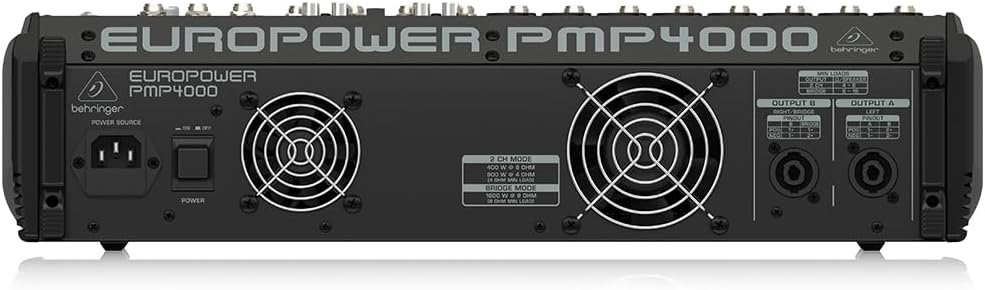
Figure 4.1: Rear panel of the PMP4000, highlighting the power input and speaker outputs.
4.3 Connecting Inputs
The PMP4000 features 8 mono channels with XENYX mic preamps and 4 stereo channels. Connect your microphones, instruments, and line-level sources to the appropriate input jacks.
- Microphones: Use XLR cables for condenser or dynamic microphones. Activate +48V phantom power for condenser microphones using the dedicated switch.
- Instruments/Line-Level: Use 1/4" TRS or TS cables for instruments (e.g., keyboards, guitars with DI boxes) or other line-level devices.
- CD/Tape Input: Use the dedicated stereo RCA input for connecting external signal sources like CD players or media devices.

Figure 4.2: Top view of the PMP4000, showing input channels and main controls.
4.4 Connecting Outputs
The PMP4000 offers various output options for connecting to speakers and monitors.
- Main Outputs: Connect your main PA speakers to the main L/R speaker outputs using speakON or 1/4" TS cables.
- Monitor Outputs: Connect stage monitors to the monitor outputs.
- Preamp Outputs: Use the multi-functional stereo Preamp outputs for connecting to external power amplifiers or recording devices.
4.5 Initial Power-On
Once all connections are secure, switch the power ON. The power LED will illuminate. Gradually raise the main fader and individual channel faders to a comfortable listening level.
5. Operating the PMP4000
This section details the primary controls and functions of your mixer.
5.1 Channel Controls (Mono Channels 1-8)
- GAIN: Adjusts the input sensitivity for each channel. Set this to achieve a healthy signal level without clipping.
- EQ (HIGH, MID, LOW): 3-band equalizer for shaping the tone of each channel.
- LOW CUT: Activates a high-pass filter to remove unwanted low-frequency rumble.
- FX SEND: Controls the amount of signal sent to the internal effects processor.
- MON SEND: Controls the amount of signal sent to the monitor mix.
- PAN: Positions the channel's signal within the stereo field (left to right).
- MUTE: Silences the channel.
- PFL (Pre-Fader Listen): Sends the channel's signal to the headphones for monitoring before the fader.
- CHANNEL FADER: Adjusts the output level of the individual channel to the main mix.
- CLIP LED: Illuminates when the input signal is too high, indicating potential distortion. Reduce the GAIN if this LED lights up frequently.
5.2 Channel Controls (Stereo Channels 9/10 - 15/16)
These channels are designed for stereo line-level sources and feature simplified controls suitable for stereo instruments or playback devices.
5.3 Master Section
- MAIN MIX FADER: Controls the overall output level of the main stereo mix.
- MONITOR FADERS: Adjust the output level for the monitor mixes.
- FX RETURN: Controls the overall level of the effects processor's output returning to the main mix.
- 7-BAND GRAPHIC EQ: Allows precise frequency correction for the monitor or main outputs. Use the EQ switch to select which output is affected.
- FBQ Feedback Detection System: This system instantly reveals critical frequencies that are causing feedback, allowing you to cut them using the graphic EQ.
5.4 24-bit Multi-FX Processor
The PMP4000 includes a studio-grade 24-bit stereo FX processor with 100 awesome presets. These include various reverbs, delays, chorus, flanger, pitch shifter, and multi-effects. Use the PROGRAM knob to select the desired effect and the FX SEND controls on individual channels to apply the effect.
5.5 Amplifier Operation Modes
The PMP4000 offers selectable amplifier operation modes:
- STEREO (MAIN L/R): Delivers 2 x 800 Watts to separate left and right main speakers.
- DOUBLE MONO (MAIN/MONITOR): Provides 800 Watts to the main output and 800 Watts to the monitor output, allowing for separate mixes.
- BRIDGED MONO: Combines the power to deliver 1600 Watts into a single, powerful mono output.
5.6 Special Features
- Voice Canceller: Removes the singer's voice from recordings for karaoke applications.
- XPQ 3D Stereo Surround Effect: Enhances the stereo image and adds vitality to the sound.
6. Maintenance
Proper care and maintenance will extend the life of your PMP4000 mixer.
6.1 Cleaning
Clean the unit regularly with a soft, dry cloth. Do not use liquid cleaners or solvents. Ensure no dust or debris accumulates in the ventilation openings.
6.2 Storage and Handling
Store the mixer in a cool, dry place away from direct sunlight and extreme temperatures. When transporting the unit, use appropriate protective cases to prevent damage.
7. Troubleshooting
If you encounter issues with your PMP4000, refer to the following common problems and solutions:
| Problem | Possible Cause | Solution |
|---|---|---|
| No sound output | Power off; cables disconnected; faders down; MUTE engaged; incorrect amplifier mode. | Check power, all cable connections, raise faders, disengage MUTE, verify amplifier mode. |
| Distorted sound | Input GAIN too high; output level too high; faulty cable. | Reduce input GAIN and output levels. Check and replace cables if necessary. |
| Feedback (howling sound) | Microphone too close to speakers; high frequencies boosted; room acoustics. | Use FBQ Feedback Detection to identify and cut problematic frequencies on the graphic EQ. Reposition microphones or speakers. |
| No phantom power (+48V) | Phantom power switch off. | Ensure the +48V phantom power switch is engaged. |
If the problem persists after attempting these solutions, please contact qualified service personnel.
8. Technical Specifications
- Model: PMP4000
- Channels: 16 (8 mono, 4 stereo)
- Amplifier Power: 2 x 800 Watts stereo / 1600 Watts bridged mode
- Wattage: 1050 watts
- Voltage: 48 Volts
- Power Source: Corded Electric
- Mic Preamps: 8 x XENYX with +48V phantom power
- Effects Processor: 24-bit Multi-FX with 100 presets
- EQ: 3-band per channel, 7-band stereo graphic EQ with FBQ Feedback Detection
- Connectivity Technology: XLR, TRS, RCA
- Color: Black
- Item Weight: 28.3 pounds (12.84 kg)
- Product Dimensions: 18.74 x 18.11 x 4.8 inches (47.6 x 46 x 12.2 cm)
- Country of Origin: China
- Date First Available: April 30, 2010
9. Warranty and Support
Behringer products are built to high standards and come with a limited warranty. For detailed warranty terms and conditions, please refer to the warranty information provided with your purchase or visit the official Behringer website.
For technical support, service, or spare parts, please contact your authorized Behringer dealer or visit the support section of the Behringer website. Ensure you have your product model number (PMP4000) and serial number ready when seeking support.
Related documentsPMP4000


Ask a question about this manual
Ask about setup, troubleshooting, compatibility, parts, safety, or missing instructions. Manuals+ will review the question and use this page’s manual context to help answer it.