
Introduction
The Brookstone Cool It Personal Fan is a portable, battery-powered device designed to provide personal cooling. Its compact size and flexible blades make it suitable for various environments, offering an adjustable airflow for comfort.
Key features include:
- Portable design for personal use anywhere.
- Adjustable fan speed for customized airflow.
- Flexible, finger-safe blades for enhanced safety.
- Includes a lanyard for hands-free carrying.
- Operates on 4 AA batteries (not included).
Setup
1. Battery Installation
The Brookstone Cool It Personal Fan requires 4 AA batteries for operation. Batteries are not included with the product.
- Locate the battery compartment cover on the back of the fan handle.
- Gently slide or unclip the cover to open the compartment.
- Insert 4 AA batteries, ensuring correct polarity (+ and -) as indicated inside the compartment.
- Replace the battery compartment cover, ensuring it is securely closed.

Image: Side view of the fan, illustrating the general area for battery access.
2. Lanyard Attachment
A lanyard is included for convenient, hands-free carrying.
- Locate the small loop or attachment point at the top of the fan handle.
- Thread the lanyard through this loop and secure it according to the lanyard's design.
Operating Instructions
Power On/Off and Speed Adjustment
The fan features a variable speed control for customized airflow.
- To turn the fan on, rotate the control dial, typically located on the handle, clockwise.
- Continue rotating the dial clockwise to increase the fan speed.
- To decrease the fan speed, rotate the dial counter-clockwise.
- To turn the fan off, rotate the dial fully counter-clockwise until it clicks into the 'off' position.

Image: Front view of the fan, highlighting the fan blades and the control dial on the handle.
Using the Integrated Stand
The fan includes a small integrated stand for tabletop use.
- Locate the stand mechanism on the bottom or side of the fan handle.
- Extend or unfold the stand until it locks into position, allowing the fan to sit upright on a flat surface.
- Ensure the fan is stable before use.
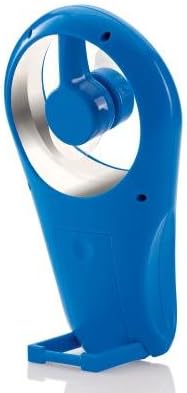
Image: Side view of the fan with its integrated stand extended for tabletop use.
Maintenance
Cleaning
To maintain optimal performance and appearance, clean the fan periodically.
- Ensure the fan is turned off and batteries are removed before cleaning.
- Wipe the exterior surfaces with a soft, damp cloth. Do not use abrasive cleaners or solvents.
- The flexible blades can be gently wiped if dust accumulates. Avoid bending them excessively.
- Do not immerse the fan in water or any other liquid.
Battery Replacement
Replace batteries when the fan's performance diminishes or it stops working.
- Follow the battery installation steps outlined in the Setup section.
- Always replace all 4 AA batteries at the same time with new ones.
- Do not mix old and new batteries, or different types of batteries.
- Dispose of used batteries responsibly according to local regulations.
Troubleshooting
| Problem | Possible Cause | Solution |
|---|---|---|
| Fan does not turn on. | Batteries are depleted or incorrectly installed. | Check battery polarity. Replace with fresh AA batteries. |
| Low airflow or weak fan speed. | Batteries are low. Speed dial is set too low. | Replace batteries. Rotate the control dial clockwise to increase speed. |
| Fan makes unusual noise. | Obstruction near blades. Loose battery cover. | Ensure no foreign objects are near the blades. Check if battery cover is secure. |
Specifications
- Brand: Brookstone
- Model Name: Cool It
- Item Model Number: 883594041181
- Power Source: Battery Powered
- Batteries: 4 x AA (not included)
- Control Method: Variable Dial Control
- Special Features: Portable, Flexible Blades, Integrated Stand
- Included Components: Lanyard
- Product Dimensions: 4 x 2 x 7 inches (L x W x H)
- Item Weight: 8 ounces (without batteries)
- Indoor/Outdoor Usage: Outdoor
Warranty and Support
Warranty information for the Brookstone Cool It Personal Fan is not provided within this manual. For details regarding warranty coverage, product support, or service inquiries, please refer to the official Brookstone website or contact their customer service directly.
You may find additional information and contact options on the Brookstone Store on Amazon.
