
Uniden DECT 1580-4WXT
Uniden DECT 6.0 Cordless Phone System User Manual
Model: DECT 1580-4WXT
1. Introduction
This manual provides detailed instructions for the setup, operation, and maintenance of your Uniden DECT 6.0 Interference-Free Expandable Digital Cordless Phone System, Model DECT 1580-4WXT. This system is designed to provide clear, interference-free communication with its DECT 6.0 digital technology, operating on the 1.9 GHz frequency band. It includes multiple handsets, a digital answering system, and a unique submersible waterproof handset for versatile use.
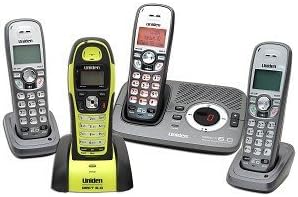
Image: The Uniden DECT 6.0 phone system, showing the main base unit with one handset, three additional standard handsets with their charging cradles, and one distinct yellow/black waterproof handset with its charging cradle.
2. Setup Guide
2.1 Package Contents
Verify that your package contains the following items:
- One (1) Main Base Unit with Digital Answering System
- Three (3) Standard Cordless Handsets
- One (1) Submersible Waterproof Handset
- Four (4) Handset Charging Cradles
- Four (4) Rechargeable Battery Packs (one for each handset)
- Power Adapters for Base Unit and Charging Cradles
- Telephone Line Cord
2.2 Base Unit Installation
- Place the main base unit on a flat, stable surface near a standard telephone wall jack and an electrical outlet.
- Connect one end of the telephone line cord to the TEL LINE jack on the base unit and the other end to the telephone wall jack.
- Plug the base unit's power adapter into the DC IN 9V jack on the base unit and then into an electrical outlet.
2.3 Handset Battery Installation and Charging
- Open the battery compartment cover on the back of each handset.
- Connect the battery pack connector to the jack inside the compartment, ensuring correct polarity.
- Place the battery pack inside the compartment and close the cover.
- Place each handset into its respective charging cradle (including the waterproof handset in its specific cradle). Ensure the charging contacts align.
- Allow handsets to charge for at least 15-20 hours before initial use to ensure full battery capacity. The charge indicator on the handset will illuminate.
2.4 Initial Setup
After charging, your phone system is ready for basic operation. Refer to the operating section for details on setting the date/time, answering machine greetings, and other personalized settings.
3. Operating Your Phone System
3.1 Making and Receiving Calls
- To Make a Call: Press the TALK button, then dial the phone number.
- To Receive a Call: When the phone rings, press the TALK button.
- To End a Call: Press the END button or place the handset back in its cradle.
- Volume Adjustment: Use the VOLUME UP/DOWN buttons during a call.
3.2 Using the Answering System
The digital answering system is integrated into the main base unit.
- Turning On/Off: Use the dedicated button on the base unit or through the handset menu.
- Recording Greeting: Access the answering system menu from any handset or the base unit to record a personalized outgoing message.
- Playing Messages: Press the PLAY button on the base unit or access messages via the handset menu.
- Message Capacity: The system can store multiple messages, up to a total recording time specified in the specifications section.
3.3 Caller ID/Call Waiting
This system supports Caller ID and Call Waiting features, provided you subscribe to these services from your telephone service provider.
- Incoming call information (name and number) will display on the handset screen.
- During a call, a tone will indicate an incoming call if Call Waiting is active. Press the FLASH or TALK button to switch between calls.
- The system can store up to 70 Caller ID entries.
3.4 Waterproof Handset Usage
The submersible waterproof handset is designed for use in environments where it may be exposed to water, such as by a pool or in a kitchen. Ensure the battery compartment is securely sealed before exposing it to water.
- This handset functions identically to other handsets for calls and menu navigation.
- Always ensure the charging contacts are dry before placing the handset in its charging cradle.
- Do not intentionally submerge the handset beyond its specified depth or for extended periods. Refer to specifications for water resistance rating.
4. Maintenance
4.1 Cleaning
- Wipe the phone system components with a soft, damp cloth.
- Do not use abrasive cleaners or solvents.
- For the waterproof handset, rinse with fresh water after exposure to chlorinated or saltwater, then dry thoroughly.
4.2 Battery Care
- Always use the original or approved replacement battery packs.
- If a handset will not be used for an extended period, remove the battery pack to prevent leakage.
- Dispose of old batteries according to local regulations. Do not dispose of in household waste.
5. Troubleshooting
If you encounter issues with your phone system, please refer to the table below for common problems and solutions.
| Problem | Possible Cause | Solution |
|---|---|---|
| No dial tone | Telephone line cord is disconnected. | Ensure the telephone line cord is securely plugged into the base unit and the wall jack. |
| Handset not charging | Handset not properly seated in cradle; dirty charging contacts. | Reseat the handset. Clean charging contacts on both handset and cradle with a dry cloth. |
| Poor sound quality/interference | Handset is too far from the base unit; interference from other electronic devices (e.g., Wi-Fi router). | Move closer to the base unit. Relocate the base unit away from other electronic devices. |
| Answering system not recording messages | Answering system is off; memory is full. | Ensure the answering system is turned on. Delete old messages to free up memory. |
| Waterproof handset not working after exposure to water | Battery compartment not sealed; excessive submersion. | Ensure battery compartment is tightly sealed. If damage occurred, contact support. |
6. Technical Specifications
| Feature | Specification |
|---|---|
| Model Number | DECT 1580-4WXT |
| Technology | DECT 6.0 Digital |
| Frequency | 1.9 GHz |
| Handsets Included | 3 Standard, 1 Waterproof |
| Answering System Type | Digital |
| Caller Identification | Yes |
| Phone Talk Time | Up to 10 Hours |
| Conference Call Capability | 3-Way |
| Multiline Operation | Multi-Line Operation |
| Power Source | Battery Powered |
| Compatible Devices | PSTN network |
| Item Weight | 4.7 pounds |
| Package Dimensions | 12 x 11 x 5.5 inches |
7. Warranty and Support
For detailed warranty information and customer support, please refer to the warranty card included with your product or visit the official Uniden website. You may also find additional support resources, FAQs, and contact information there.
Please retain your proof of purchase for warranty claims.
Related documentsDECT 1580-4WXT

Ask a question about this manual
Ask about setup, troubleshooting, compatibility, parts, safety, or missing instructions. Manuals+ will review the question and use this page’s manual context to help answer it.