
Introduction
This manual provides essential instructions for the safe and efficient operation of your Sharper Image Super Wave Oven, Model 8217. This versatile appliance utilizes halogen, infrared, and convection technologies to cook a variety of foods. Please read this manual thoroughly before first use and retain it for future reference.
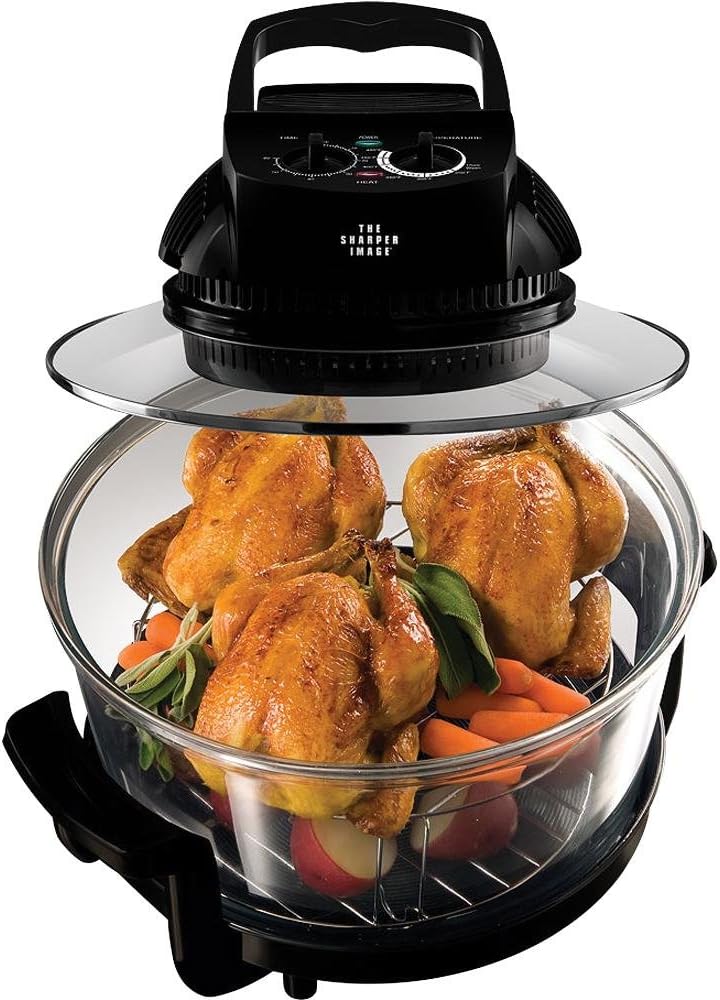
Image: The Sharper Image Super Wave Oven, Model 8217, showcasing its transparent cooking bowl with three roasted chickens, carrots, and herbs. The control panel is visible on top.
Important Safety Instructions
When using electrical appliances, basic safety precautions should always be followed to reduce the risk of fire, electric shock, and injury to persons.
- Read all instructions before operating the appliance.
- Do not touch hot surfaces. Use handles or knobs.
- To protect against electrical shock, do not immerse cord, plugs, or the main unit in water or other liquid.
- Close supervision is necessary when any appliance is used by or near children.
- Unplug from outlet when not in use and before cleaning. Allow to cool before putting on or taking off parts.
- Do not operate any appliance with a damaged cord or plug, or after the appliance malfunctions or has been damaged in any manner.
- The use of accessory attachments not recommended by the appliance manufacturer may cause injuries.
- Do not use outdoors.
- Do not let cord hang over edge of table or counter, or touch hot surfaces.
- Do not place on or near a hot gas or electric burner, or in a heated oven.
- Extreme caution must be used when moving an appliance containing hot oil or other hot liquids.
- Always attach plug to appliance first, then plug cord into the wall outlet. To disconnect, turn any control to "off", then remove plug from wall outlet.
- Do not use appliance for other than intended use.
Product Components
Familiarize yourself with the parts of your Super Wave Oven:
- Power Head: Contains the heating elements (halogen, infrared) and convection fan, along with control knobs for temperature and timer.
- Glass Cooking Bowl: The main cooking chamber, made of heat-resistant glass.
- Base: Supports the glass cooking bowl.
- High Rack: Stainless steel rack for cooking items closer to the heating element.
- Low Rack: Stainless steel rack for cooking items further from the heating element or for larger items.
- Lid Holder: (If included) For safely resting the hot power head.
- Tongs: (If included) For handling hot food and racks.
Setup and First Use
- Unpacking: Carefully remove all components from the packaging. Retain packaging for storage or shipping if needed.
- Cleaning: Before first use, wash the glass cooking bowl, racks, and any accessories (tongs, lid holder) in warm, soapy water. Rinse thoroughly and dry completely. Wipe the power head with a damp cloth; do not immerse it in water.
- Placement: Place the oven on a stable, heat-resistant surface, ensuring adequate ventilation around the unit. Do not place it near walls or under cabinets that could be damaged by heat or steam.
- Assembly:
- Place the base on your chosen surface.
- Carefully place the glass cooking bowl into the base.
- Insert the desired cooking rack (high or low) into the glass bowl.
- Place the power head securely on top of the glass cooking bowl. Ensure it sits flush.
- Initial Burn-off: It is recommended to run the oven empty for about 10-15 minutes at maximum temperature (e.g., 250°C / 480°F) to burn off any manufacturing residues. A slight odor or smoke may be present during this process; ensure good ventilation.
Operating Instructions
The Sharper Image Super Wave Oven combines halogen, infrared, and convection heating for efficient cooking.
- Prepare Food: Place your food on the appropriate cooking rack within the glass bowl. For best results, ensure food is not overcrowded to allow for proper air circulation.
- Secure Power Head: Place the power head firmly on top of the glass cooking bowl.
- Set Temperature: Turn the temperature control knob to your desired cooking temperature. The oven can reach temperatures up to 250°C (480°F).
- Set Timer: Turn the timer knob to the desired cooking time. The oven will only begin heating once the timer is set. The power indicator light will illuminate.
- Cooking Process: The oven will begin cooking. The halogen light will cycle on and off as the oven maintains the set temperature. The convection fan will continuously circulate hot air.
- Monitoring: You can observe the cooking process through the transparent glass bowl. Avoid lifting the power head frequently, as this will release heat and prolong cooking time.
- Completion: Once the set time elapses, the timer will chime, and the oven will automatically shut off. The power indicator light will turn off.
- Remove Food: Carefully lift the power head using its handle and place it securely on a heat-resistant surface or the lid holder (if applicable). Use oven mitts and the provided tongs to remove the hot food and racks from the glass bowl.
- Cool Down: Allow the oven components to cool completely before cleaning or storing.
Cooking Functions:
- Baking: Ideal for cakes, pastries, and casseroles.
- Roasting: Perfect for meats like chicken, beef, and pork, ensuring a crispy exterior and moist interior.
- Grilling/Broiling: Use the high rack for items requiring direct heat for browning, such as steaks or fish.
- Air Frying: Achieves crispy results for items like fries or chicken wings with minimal oil.
- Steaming: Can be used with a heat-resistant dish and a small amount of water for steaming vegetables.
- Defrosting: The oven can cook foods directly from frozen, eliminating the need for prior defrosting. Adjust cooking times accordingly.
Care and Maintenance
Proper cleaning and maintenance will extend the life of your Super Wave Oven.
- Always Unplug: Ensure the oven is unplugged from the power outlet and completely cooled before cleaning.
- Glass Cooking Bowl: The glass bowl can be washed by hand with warm, soapy water or placed in a dishwasher. For stubborn food residues, soak the bowl in warm, soapy water before cleaning.
- Cooking Racks and Accessories: Wash stainless steel racks and other accessories in warm, soapy water. They are typically dishwasher safe.
- Power Head: Wipe the exterior of the power head with a damp cloth. Do not use abrasive cleaners. Never immerse the power head in water or any other liquid. Ensure no water enters the electrical components.
- Storage: Store the assembled oven in a clean, dry place. If disassembling for storage, ensure all parts are clean and dry.
Troubleshooting Guide
Refer to this section for common issues and their solutions.
| Problem | Possible Cause | Solution |
|---|---|---|
| Oven does not turn on. | Not plugged in; timer not set; power outage. | Ensure power cord is securely plugged into a working outlet. Set the timer knob to the desired cooking duration. Check household circuit breaker. |
| Food is not cooking evenly. | Overcrowding; incorrect rack placement; power head not seated properly. | Avoid overcrowding the cooking bowl. Ensure the power head is seated flush on the glass bowl. Consider rotating food halfway through cooking for very large items. |
| Smoke or unusual odor during operation. | Food residue on heating element; initial burn-off. | For first use, this is normal (initial burn-off). For subsequent uses, ensure the oven is clean and free of food debris. If excessive, unplug and contact support. |
| Halogen light not illuminating. | Light cycles on/off to maintain temperature; bulb failure. | The halogen light cycles during operation; this is normal. If it never illuminates when the oven is heating, contact customer support. |
Product Specifications
| Brand | Sharper Image |
| Model Number | 8217 |
| Power | 1300 watts |
| Capacity | 16 Quarts (approx. 15.1 liters) |
| Heating Technology | Halogen, Infrared, Convection |
| Control Type | Knob and Push Button |
| Special Features | Broiler Option, Steam Feature, Temperature Control, 60-minute timer, Stay-cool handles |
| Material | Stainless Steel (racks), Glass (bowl) |
| Product Dimensions | Approximately 40.01 x 33.35 x 31.75 cm (15.75 x 13.13 x 12.5 inches) |
| Item Weight | Approximately 6.39 kg (14.08 lbs) |
| Included Components | 2 Stainless Steel Cooking Racks (High and Low), Grill |
Warranty and Support
Limited Warranty:
This Sharper Image Super Wave Oven, Model 8217, typically comes with a 1-year limited warranty from the date of purchase. This warranty covers manufacturing defects under normal household use. It does not cover damage resulting from misuse, accident, alteration, neglect, or commercial use. Please retain your proof of purchase for warranty claims.
Customer Support:
For technical assistance, warranty inquiries, or to order replacement parts, please contact Sharper Image customer support. Refer to the product packaging or the official Sharper Image website for the most current contact information.


