
Introduction
The Oral-B Pulsar Pro-Health Expert Clean battery electric toothbrush is designed to provide a thorough clean by combining the control of a manual brush with the deep cleaning power of vibrating bristles. Its unique Micro-Pulse bristles penetrate between teeth to break up and sweep away plaque, reaching up to 90% of plaque in hard-to-reach areas. This manual aims to guide you through the proper use and care of your new toothbrush.

Image: Two Oral-B Pulsar Expert Clean toothbrushes, packaged together, showcasing the product design and branding.
Setup
Battery Installation
Your Oral-B Pulsar toothbrush comes with a pre-installed AAA battery. To activate the toothbrush, simply remove it from the packaging. If the battery needs replacement, twist the bottom of the handle counter-clockwise to open the battery compartment. Insert a new AAA battery, ensuring correct polarity, then twist the bottom clockwise to secure the compartment.

Image: The toothbrush handle with a battery icon, illustrating its battery-powered nature.
Video: This video demonstrates the Oral-B Pulsar Expert Clean battery toothbrush in use, highlighting its features and brushing effectiveness.
Operation
Brushing Technique
- Wet the brush head and apply a small amount of toothpaste.
- Press the 'On' button located on the handle to activate the vibrating bristles.
- Place the brush head against your teeth at a slight angle towards the gumline.
- Gently move the brush in small, circular motions, allowing the vibrating bristles to do the work. Do not scrub aggressively.
- Brush each quadrant of your mouth (upper right, upper left, lower right, lower left) for approximately 30 seconds each, ensuring you cover all tooth surfaces.
- After brushing, press the 'Off' button to stop the vibrations.

Image: An illustration demonstrating how the micro-pulse bristles work to remove plaque from tooth surfaces.

Image: A diagram showing the vibrating bristles in action, designed to dislodge plaque between teeth.
Power On/Off
The Oral-B Pulsar toothbrush features a simple push-button operation. Press the upper button to turn the toothbrush on and activate the vibrations. Press the lower button to turn the toothbrush off.

Image: A close-up view of the toothbrush handle, highlighting the 'On' and 'Off' buttons.
Video: This video demonstrates the Oral-B Pulsar Expert Clean battery toothbrush in use, highlighting its features and brushing effectiveness.
Maintenance
Cleaning Your Toothbrush
After each use, rinse the brush head thoroughly under running water to remove any toothpaste residue and debris. Do not submerge the entire handle in water. Wipe the handle with a damp cloth if necessary.
Brush Head Replacement
Dentists recommend replacing your toothbrush every 3 months, or sooner if the bristles become frayed or worn. The Oral-B Pulsar is designed for optimal performance with its original brush head. While the brush head is not designed to be replaceable, regular replacement of the entire toothbrush ensures continued effectiveness and hygiene.
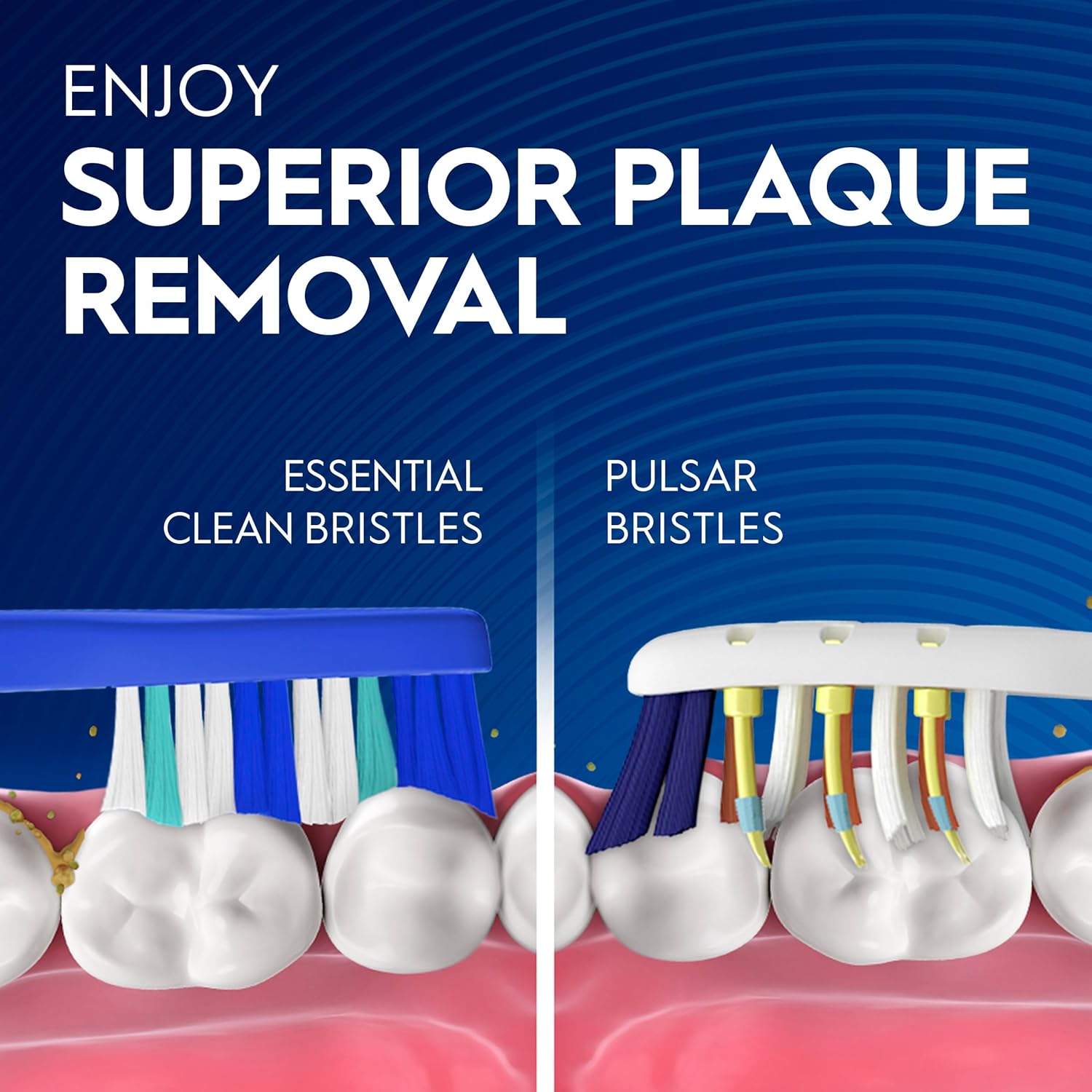
Image: A detailed view of the toothbrush head, showcasing the arrangement of its power tip bristles.
Troubleshooting
- No Vibration or Weak Vibration: This typically indicates a low or depleted battery. Replace the AAA battery as described in the 'Battery Installation' section.
- Bristles Appear Worn: For optimal cleaning performance and hygiene, replace the entire toothbrush every 3 months.
- Difficulty Turning On/Off: Ensure the buttons are pressed firmly. If issues persist after battery replacement, the unit may be faulty.
Video: A detailed close-up video showcasing the design and bristle technology of the Oral-B Pulsar toothbrush.
Specifications
| Feature | Detail |
|---|---|
| Product Dimensions | 6 x 5 x 4 inches |
| Item Weight | 2.4 ounces |
| Power Source | Battery Powered (AAA batteries required) |
| Bristle Material | Nylon |
| Item Firmness | Medium |
| Operation Mode | Manual with Vibrations |
| Model Number | 300416683027 |
Safety Information
- Not intended for children 3 years and under.
- Replace brush every 3 months.
- The bristles do not kill bacteria in the mouth or protect against disease. Always clean the product thoroughly after use.
Warranty and Support
Oral-B offers a satisfaction guarantee. If you are not satisfied with your Oral-B Pulsar toothbrush within 90 days of purchase, you may call 1-877-593-6199 with your UPC and original receipt to receive a pre-paid card in the amount of the purchase. For further assistance or inquiries, please contact Oral-B customer service at 1-800-56-ORALB or visit www.oralb.com.

Image: The back of the product packaging, detailing warranty and support information.
Video: An in-depth review and demonstration of the Oral-B Pulsar Expert Clean battery toothbrush, covering its functionality and benefits.

