
Introduction
This manual provides detailed instructions for the operation and maintenance of your Calypso K5558/2 Digital Quartz Watch. Please read this manual thoroughly to ensure proper use and to maximize the lifespan of your watch. This watch features a digital display, backlight, stopwatch, intermediate times, and an alarm function, all housed in a durable plastic case with a multicolored rubber strap.
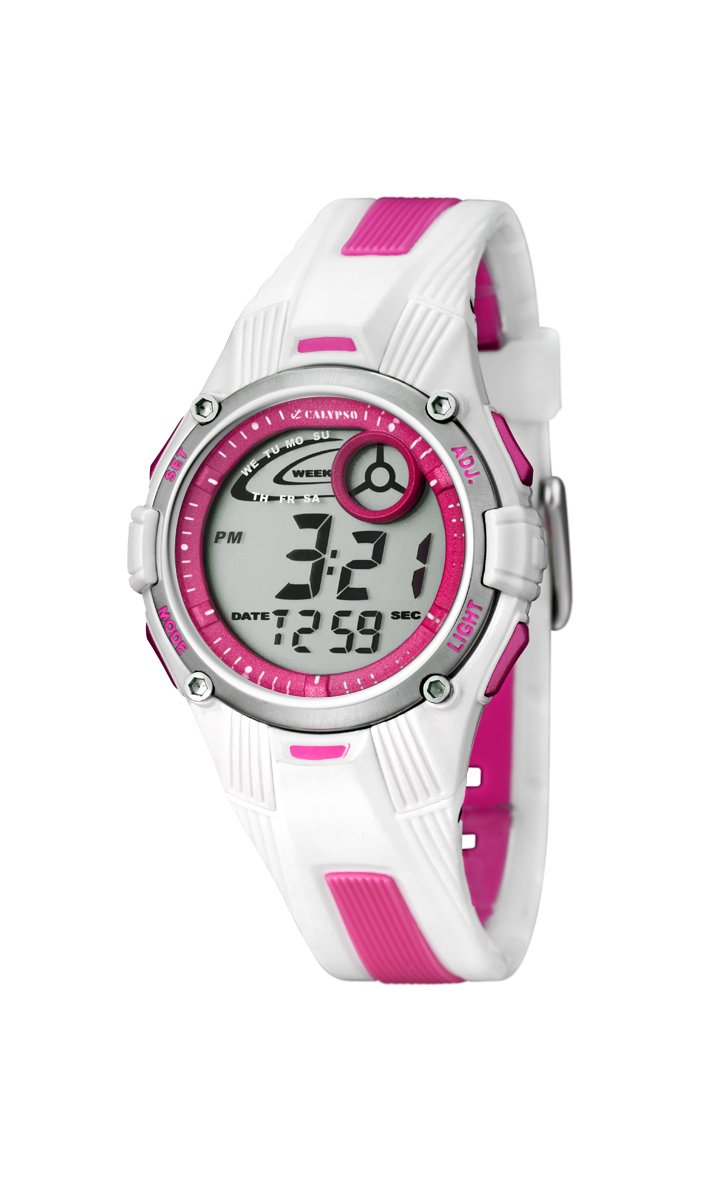
Image: Front view of the Calypso K5558/2 Digital Quartz Watch. This image shows the watch's digital display and the overall design.
Setup
Initial Activation
Your Calypso K5558/2 watch comes with a battery pre-installed. If the display is not active, gently press any button to activate it. If the watch remains inactive, the battery may need to be replaced (refer to the Maintenance section).
Setting Time and Date
- Enter Setting Mode: Press and hold the MODE button (usually located on the bottom left) until the seconds start flashing.
- Adjust Seconds: Press the RESET button (usually top right) to reset the seconds to zero.
- Select Next Item: Press the MODE button again to move to the next setting item (e.g., hours, minutes, month, date, day).
- Adjust Value: Use the START button (usually top left) to increase the value of the flashing item.
- Confirm Settings: Continue pressing MODE to cycle through all settings. Once all adjustments are made, press MODE one last time to exit the setting mode.

Image: Angled view of the Calypso K5558/2 Digital Quartz Watch, showing the watch face and side buttons.
Operating Instructions
Time Display Modes
Press the MODE button to cycle through different display modes: Time, Stopwatch, and Alarm.
Using the Backlight
To illuminate the display in low-light conditions, press the LIGHT button (usually located on the top right). The backlight will remain active for a few seconds.
Stopwatch Function (Chronometer and Intermediate Times)
- Enter Stopwatch Mode: Press the MODE button until "00:00:00" appears on the display.
- Start/Stop: Press the START button to begin timing. Press it again to pause.
- Lap/Split Time: While the stopwatch is running, press the RESET button to record an intermediate (lap/split) time. The display will show the lap time for a few seconds before returning to the running total.
- Reset: When the stopwatch is paused, press the RESET button to clear the time to "00:00:00".
Setting and Using the Alarm
- Enter Alarm Mode: Press the MODE button until the alarm time is displayed (e.g., "AL").
- Set Alarm Time: Press and hold the RESET button until the alarm hours start flashing. Use the START button to adjust the hours. Press MODE to move to minutes and adjust with START.
- Activate/Deactivate Alarm: In alarm mode, press the START button to toggle the alarm ON/OFF. An alarm icon (e.g., a bell) will appear on the display when activated.
- Stop Alarm Sound: When the alarm sounds, press any button to stop it.
Water Resistance
This watch is water-resistant up to 100 meters (10 ATM). This means it is suitable for swimming and snorkeling. Do not press any buttons while the watch is submerged in water. Avoid exposing the watch to hot water or steam, as this can compromise the water resistance seals.
Maintenance
Cleaning Your Watch
Wipe the watch case and strap regularly with a soft, damp cloth. For stubborn dirt, a mild soap solution can be used, followed by rinsing with clean water and drying thoroughly. Avoid using harsh chemicals or abrasive cleaners, as these can damage the watch materials.
Strap Care
The rubber strap may show signs of discoloration over time, especially lighter colors, due to exposure to dirt, sweat, and UV light. Regular cleaning can help mitigate this. If discoloration becomes significant or the strap shows signs of wear, consider replacing it with an official Calypso replacement strap.
Battery Replacement
When the display becomes dim or the watch stops functioning, the battery may need replacement. This watch uses a "C" type battery. Battery replacement should ideally be performed by a qualified watch technician to ensure proper sealing and maintain water resistance. Attempting to replace the battery yourself may void any implied warranty and compromise the watch's water resistance.
Troubleshooting
| Problem | Possible Cause | Solution |
|---|---|---|
| Display is blank or dim. | Low or depleted battery. | Replace the battery (refer to Maintenance section). |
| Buttons are unresponsive. | Watch may be in a locked mode or internal malfunction. | Try pressing all buttons firmly. If issue persists, consult a technician. |
| Time is inaccurate. | Incorrect time setting or low battery. | Reset the time (refer to Setup section). If problem continues, replace battery. |
| Water inside the watch. | Water resistance compromised (e.g., buttons pressed underwater, seals damaged). | Immediately take the watch to a qualified technician for inspection and repair. Do not attempt to dry it yourself. |
Specifications
- Model Number: K5558/2
- Display Type: Digital
- Movement Type: Quartz
- Case Material: Plastic
- Strap Material: Rubber (Multicolored)
- Case Diameter: 36 Millimeters
- Case Thickness: 10 Millimeters
- Water Resistance Depth: 100 Meters (10 ATM)
- Special Features: Alarm, Stopwatch, Backlight, Intermediate Times
- Clasp Type: Buckle
- Power Source: Battery Powered (1 C battery included)
- Item Weight: 34 Grams
Warranty and Support
Warranty: This product is sold without a manufacturer's warranty ("Pas de garantie"). Please refer to your retailer's return policy for any initial defects.
Support: For further assistance or inquiries regarding your Calypso K5558/2 watch, please contact your point of purchase or visit the official Calypso website for customer service information.


