
VTech 80-109744
VTech Schulstart Laptop E Instruction Manual
Model: 80-109744
1. Introduction
This manual provides essential information for the safe and effective use of your VTech Schulstart Laptop E. This learning computer is designed for children aged 6 and up, offering 160 educational games in both German and English. It covers subjects such as letters, words, mathematics, nature, science, and creativity.
Please read this manual thoroughly before operating the device and retain it for future reference.
2. Safety Information
WARNING: Choking hazard due to small parts that can be swallowed. Not suitable for children under 36 months.
WARNING: Strangulation hazard. Keep packaging materials away from children.
- Always supervise children during use.
- Do not expose the device to extreme temperatures or direct sunlight.
- Keep the device dry. Do not immerse in water or other liquids.
- Clean the device with a soft, dry cloth. Do not use abrasive cleaners.
- Ensure batteries are inserted correctly according to polarity markings.
- Remove exhausted batteries promptly.
- Do not mix old and new batteries, or different types of batteries.
- Non-rechargeable batteries are not to be recharged.
- Rechargeable batteries are only to be charged under adult supervision.
- Remove rechargeable batteries from the toy before charging.
- The supply terminals are not to be short-circuited.
3. Package Contents
The VTech Schulstart Laptop E package includes:
- 1 x VTech Schulstart Laptop E
- 1 x Cursor Mouse
- 3 x AA Demonstration Batteries (for test purposes only)
Note: A VTech power adapter and VTech laptop bag are sold separately and are not included.
4. Setup
4.1 Battery Installation
The device requires 3 AA batteries. The included demonstration batteries are for testing purposes only and should be replaced with new batteries for regular use.
- Locate the battery compartment on the underside of the laptop.
- Using a screwdriver, open the battery compartment cover.
- Remove the old demonstration batteries (if present).
- Insert 3 new AA batteries, ensuring correct polarity (+/-) as indicated inside the compartment.
- Replace the battery compartment cover and secure it with the screw.

Figure 4.1: Battery installation guide. Replace demonstration batteries with new ones for extended play.
4.2 Connecting the Cursor Mouse
The VTech Schulstart Laptop E comes with a wired cursor mouse for interactive play.
- Locate the mouse port on the side of the laptop.
- Carefully insert the mouse connector into the port.
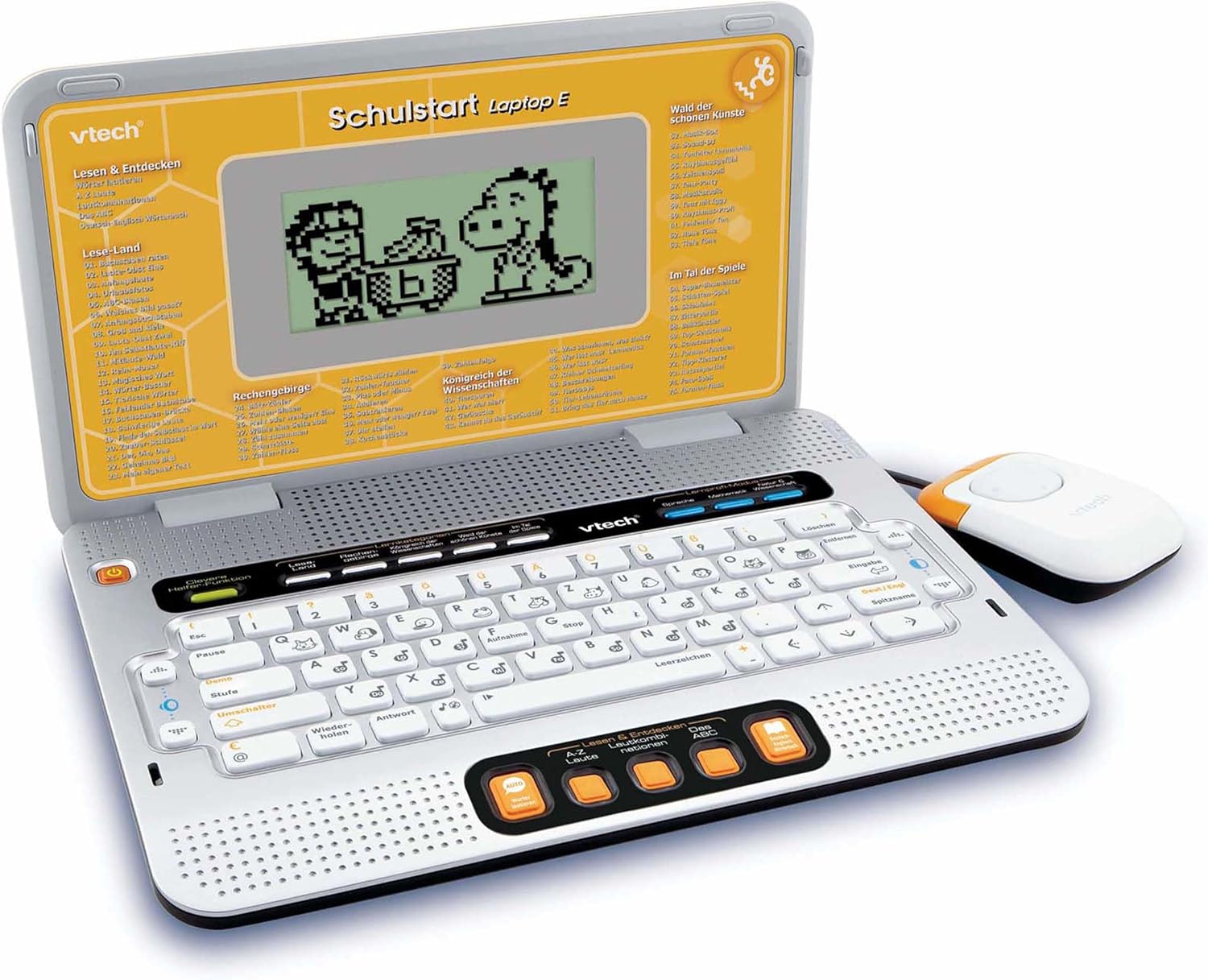
Figure 4.2: VTech Schulstart Laptop E with connected cursor mouse.
5. Operating Instructions
5.1 Power On/Off
To turn on the laptop, press the Power button, usually located on the top left of the keyboard area. To turn off, press the Power button again or the laptop will automatically shut down after a period of inactivity to conserve battery life.
5.2 Language Selection
The VTech Schulstart Laptop E supports both German and English. You can switch between languages using the dedicated language selection button or through the settings menu, if available. Refer to the on-screen prompts for initial setup.
5.3 Game Categories and Selection
The laptop features 160 educational games categorized as follows:
- Language Tools: 5 programs
- Letters & Words: 23 programs
- Mathematics: 16 programs
- Nature & Science: 12 programs
- Creativity: 12 programs
- Logic & Games: 12 programs
Use the arrow keys and the Enter button on the keyboard, or the cursor mouse, to navigate through the menu and select a game.

Figure 5.1: Navigating game categories on the VTech Schulstart Laptop E.
5.4 Tutor Function and Learning Modes
The laptop includes a Tutor function and a Learning Pro mode to enhance the learning experience:
- Tutor Function: Features 5 direct-dial keys for language tools (sounds, phonics, sound combinations, ABC with example words, German-English dictionary). These programs assist with letter pronunciation and reading.
- Learning Pro Mode: Offers progressive learning through increasing difficulty levels, adapting to the child's progress.
- Smart Helper Function: Provides additional hints and tips in many educational games upon request.

Figure 5.2: Child using the VTech Schulstart Laptop E's interactive learning features.
6. Maintenance
6.1 Cleaning
To clean the VTech Schulstart Laptop E, use a soft, slightly damp cloth. Do not use harsh chemicals or abrasive cleaners. Ensure the device is powered off and disconnected from any power source before cleaning.
6.2 Storage
Store the laptop in a cool, dry place away from direct sunlight and extreme temperatures. If the device will not be used for an extended period, remove the batteries to prevent leakage.

Figure 6.1: Optional VTech laptop bag for storage and transport (sold separately).
7. Troubleshooting
| Problem | Possible Cause | Solution |
|---|---|---|
| Device does not turn on. |
|
|
| Screen is blank or flickering. |
|
|
| Keys or mouse not responding. |
|
|
| Sound is distorted or absent. |
|
|
8. Specifications
- Model Number: 80-109744
- Dimensions (L x W x H): 4 x 28 x 20 cm (1.57 x 11.02 x 7.87 inches)
- Weight: 1.29 kg (2.84 lbs)
- Recommended Age: 6 years and up
- Batteries: 3 x AA (not included for regular use)
- Languages: German, English
- Number of Games: 160
- Release Date: July 31, 2010
9. Warranty and Support
For warranty information and customer support, please refer to the official VTech website or contact your local VTech distributor. Keep your purchase receipt as proof of purchase.
VTech Official Website: www.vtech.com
Related documents80-109744

Ask a question about this manual
Ask about setup, troubleshooting, compatibility, parts, safety, or missing instructions. Manuals+ will review the question and use this page’s manual context to help answer it.