
1. Introduction
The TP-Link TL-SG1024 is an unmanaged 24-Port Gigabit Ethernet Switch designed to expand your network capacity efficiently. It facilitates instant transfer of large files, making it suitable for home, office, workgroup, or creative production environments. This switch supports auto MDI/MDIX, eliminating the need for specific cable types, and features innovative energy-efficient technology to reduce power consumption.
This manual provides detailed instructions for setting up, operating, and maintaining your TL-SG1024 switch, along with troubleshooting tips and product specifications.
2. Package Contents
Verify that your package contains the following items:
- TL-SG1024 24-Port Gigabit Ethernet Switch
- Power Cord
- Installation Guide
- Rackmount Kits
- Rubber Feet

Image: The TP-Link TL-SG1024 switch shown alongside its retail packaging, illustrating the product and its box.
3. Product Overview
The TL-SG1024 is a sturdy metal switch designed for both desktop and rackmount installations. It features 24 Gigabit Ethernet ports on the front panel, along with LED indicators for power, link status, and activity for each port.

Front view of the TL-SG1024 switch, showing 24 RJ45 ports and LED indicators.

Angled perspective of the TL-SG1024 switch, highlighting its compact design.
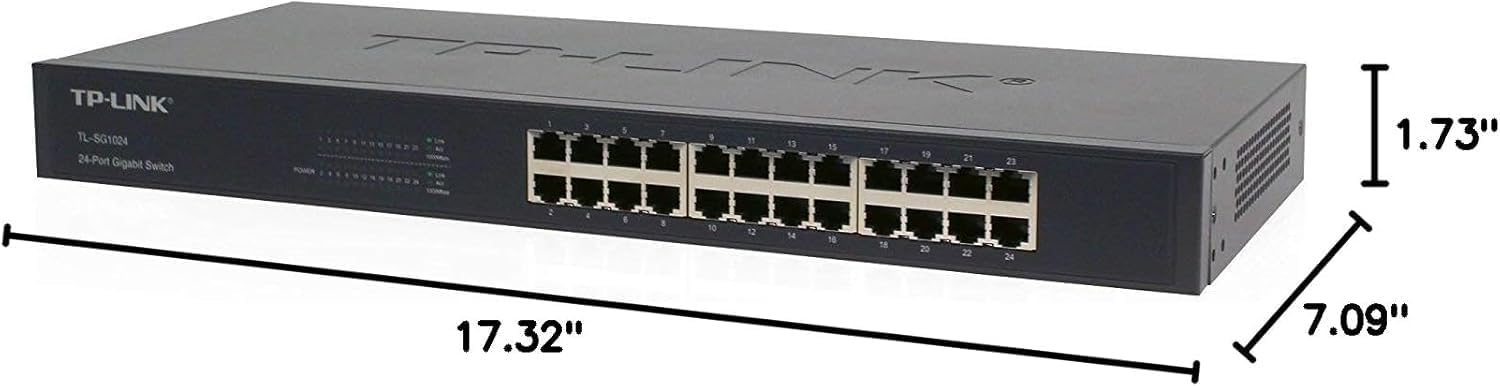
Diagram illustrating the physical dimensions of the TL-SG1024 switch: 17.32"L x 7.09"W x 1.73"H.

Rear view of the TL-SG1024 switch, displaying the power input port and ventilation.
4. Setup
The TL-SG1024 is a plug-and-play device, requiring no software configuration for basic operation.
4.1 Desktop Installation
- Place the switch on a flat, stable surface.
- Attach the included rubber feet to the bottom of the switch to prevent slipping and protect the surface.
4.2 Rackmount Installation
- Attach the provided rackmount brackets to the sides of the switch using the screws.
- Secure the switch into a standard 19-inch equipment rack using appropriate rack screws (not included).
4.3 Connecting the Switch
- Connect the power cord to the power inlet on the rear panel of the switch and then to a power outlet.
- Connect your network devices (computers, servers, network printers, etc.) to any of the 24 RJ45 ports on the front panel using standard Ethernet cables. The switch supports auto MDI/MDIX, so crossover cables are not necessary.
- Ensure the Power LED on the front panel illuminates, indicating the switch is receiving power.
- Verify that the Link/Act LEDs for connected ports are lit, indicating a successful connection and network activity.
5. Operating Instructions
The TL-SG1024 is an unmanaged switch, meaning it operates automatically without requiring user configuration. Once connected, it will facilitate network communication between connected devices.
5.1 LED Indicators
- Power LED:
- On: The switch is powered on.
- Off: The switch is powered off.
- Link/Act LEDs (for each port):
- Green (1000Mbps): Solid indicates a valid link at 1000Mbps. Flashing indicates data activity.
- Yellow (10/100Mbps): Solid indicates a valid link at 10/100Mbps. Flashing indicates data activity.
- Off: No device is connected to the corresponding port, or the connected device is powered off.
5.2 Key Features
- Gigabit Speed: All 24 ports support 10/100/1000Mbps speeds, enabling fast data transfer for bandwidth-intensive applications.
- Plug and Play: No configuration required, simplifying installation and use.
- Auto MDI/MDIX: Automatically detects the type of Ethernet cable (straight-through or crossover) and adjusts accordingly.
- Energy-Efficient Technology: Automatically adjusts power consumption based on link status and cable length, reducing operational costs.
- Flow Control: Supports IEEE 802.3X flow control for full-duplex mode and back pressure flow control for half-duplex mode to prevent data loss during congestion.
- Fanless Design: Ensures silent operation, suitable for quiet environments.
6. Maintenance
To ensure optimal performance and longevity of your TL-SG1024 switch, consider the following maintenance guidelines:
- Environment: Operate the switch within its specified temperature and humidity ranges. Avoid placing it in direct sunlight or near heat sources.
- Ventilation: Ensure adequate airflow around the switch. Do not block ventilation openings.
- Cleaning: Periodically clean the exterior of the switch with a soft, dry cloth. Do not use liquid or aerosol cleaners.
- Cable Management: Keep network cables organized and free from kinks or excessive bends to prevent signal degradation.
- Power Supply: Use only the power adapter provided with the device. In case of power fluctuations, consider using a surge protector.
7. Troubleshooting
If you encounter issues with your TL-SG1024 switch, refer to the following common troubleshooting steps:
- No Power:
- Ensure the power cord is securely connected to both the switch and a working power outlet.
- Check if the power outlet is functional by plugging in another device.
- No Link/Activity on a Port:
- Verify that the Ethernet cable is securely connected to both the switch port and the network device.
- Check the status of the connected network device (e.g., computer is powered on).
- Try a different Ethernet cable.
- Test with a different port on the switch.
- Ensure the network adapter on the connected device is enabled and functioning correctly.
- Slow Network Speed:
- Confirm that all connected devices and cables support Gigabit Ethernet (Cat5e or higher).
- Check for excessive network traffic or bottlenecks on other network devices.
- Ensure the switch is placed in a well-ventilated area to prevent overheating.
If problems persist, consult the TP-Link support website or contact their technical support for further assistance.
8. Specifications
| Attribute | Value |
|---|---|
| Model Number | TL-SG1024 |
| Number of Ports | 24 |
| Interface Type | 24 10/100/1000Mbps RJ45 Ports (Auto Negotiation/Auto MDI/MDIX) |
| Data Transfer Rate | 1000 Megabits Per Second |
| Product Dimensions | 17.32"L x 7.09"W x 1.73"H |
| Item Weight | 4.41 pounds (2000 Grams) |
| Case Material | Alloy Steel |
| Maximum Power Consumption | 6.59 Watts |
| On-mode Power Consumption | 13.1 watts |
| Voltage | 240 Volts |
| Current Rating | 1 Amps |
| Upper Temperature Rating | 40 Degrees Celsius |
| Manufacturer | TP-Link |
| Color | BLACK |
9. Warranty and Support
The TP-Link TL-SG1024 24-Port Gigabit Ethernet Switch comes with a 3-Year Manufacturer Warranty. For warranty claims, technical support, or further product information, please visit the official TP-Link website or contact their customer service department.
You can find additional resources and support at the TP-Link Store on Amazon.


