1. Introduction
This manual provides essential instructions for the safe and efficient operation, setup, and maintenance of your Nilfisk Attix 30-01 wet/dry vacuum cleaner. The Attix 30-01 is designed for high suction power in a compact and flexible unit, suitable for various cleaning tasks including wet and dry debris.
2. Safety Instructions
Always observe the following safety precautions to prevent personal injury or damage to the vacuum cleaner:
- Read all instructions before operating the appliance.
- Do not leave the appliance unattended when plugged in. Unplug from outlet when not in use and before servicing.
- Do not use with a damaged cord or plug. If appliance is not working as it should, has been dropped, damaged, left outdoors, or dropped into water, return it to a service center.
- Do not pull or carry by cord, use cord as a handle, close a door on cord, or pull cord around sharp edges or corners. Do not run appliance over cord. Keep cord away from heated surfaces.
- Do not unplug by pulling on cord. To unplug, grasp the plug, not the cord.
- Do not handle plug or appliance with wet hands.
- Do not put any object into openings. Do not use with any opening blocked; keep free of dust, lint, hair, and anything that may reduce air flow.
- Keep hair, loose clothing, fingers, and all parts of body away from openings and moving parts.
- Do not pick up anything that is burning or smoking, such as cigarettes, matches, or hot ashes.
- Use extra care when cleaning on stairs.
- Do not use to pick up flammable or combustible liquids, such as gasoline, or use in areas where they may be present.
- Do not use without dust bag and/or filters in place.
- Connect to a properly grounded outlet only. See grounding instructions.
3. Product Overview
The Nilfisk Attix 30-01 is a robust wet/dry vacuum cleaner designed for professional use. Key features include:
- 30-Liter Container Volume: Provides ample capacity for both wet and dry debris.
- Multifit Accessory System: Allows for the use of various accessories for diverse cleaning tasks.
- PET Filter Element: Washable and durable, reducing maintenance costs.
- Push&Clean Filter Cleaning: A semi-automatic filter cleaning system for consistent suction performance.
- SilentPower: Engineered for low noise operation (59 dB(A)), allowing use in noise-sensitive environments.
- Integrated Cable Holder: For convenient storage of the 7.5m power cable.
- Suction Power Regulation: Located on the hand tube for adjustable cleaning intensity.
- Power Tool Socket (on specific models): Allows direct connection of power tools, eliminating the need for additional extension cables.
- Automatic Switch-on (on specific models): For seamless operation with connected power tools.
4. Setup
Follow these steps for initial setup:
- Unpacking: Carefully remove all components from the packaging. Check for any damage.
- Wheel Assembly: Attach the wheels to the base of the vacuum cleaner as per the diagrams in the separate assembly guide (if provided).
- Filter Installation: Ensure the PET filter element is correctly installed for dry vacuuming. For wet vacuuming, the PET filter can remain in place, but a foam filter (if included) might be recommended for optimal performance and protection against fine mist.
- Hose Connection: Connect the suction hose securely to the inlet port on the vacuum cleaner.
- Accessory Attachment: Attach the desired nozzle or accessory to the end of the suction hose or extension tubes.
- Power Connection: Plug the power cable into a grounded electrical outlet.
5. Operating Instructions
5.1 Dry Vacuuming
For dry vacuuming, ensure the PET filter is clean and properly installed. A fleece filter bag can be used inside the container for easier disposal of dry debris and to protect the main filter from fine dust.
- Ensure the container is empty and a filter bag is installed if desired.
- Connect the appropriate dry vacuuming accessory.
- Turn on the vacuum cleaner using the power switch.
- Adjust suction power using the regulator on the hand tube as needed.
- After use, turn off the vacuum and unplug it.
5.2 Wet Vacuuming
When vacuuming liquids, remove any filter bags. The PET filter element is suitable for wet use, but for large volumes of liquid, a dedicated foam filter (if available) may offer better protection. The vacuum is equipped with a float system that automatically stops suction when the maximum liquid level is reached.
- Remove any filter bags from the container.
- Ensure the PET filter is clean or install a foam filter if preferred.
- Connect the appropriate wet vacuuming accessory, such as a floor squeegee.
- Turn on the vacuum cleaner.
- Proceed with vacuuming liquids. When the container is full, the motor sound will change, and suction will cease. Turn off the vacuum immediately.
- Empty the container as described in the Maintenance section.
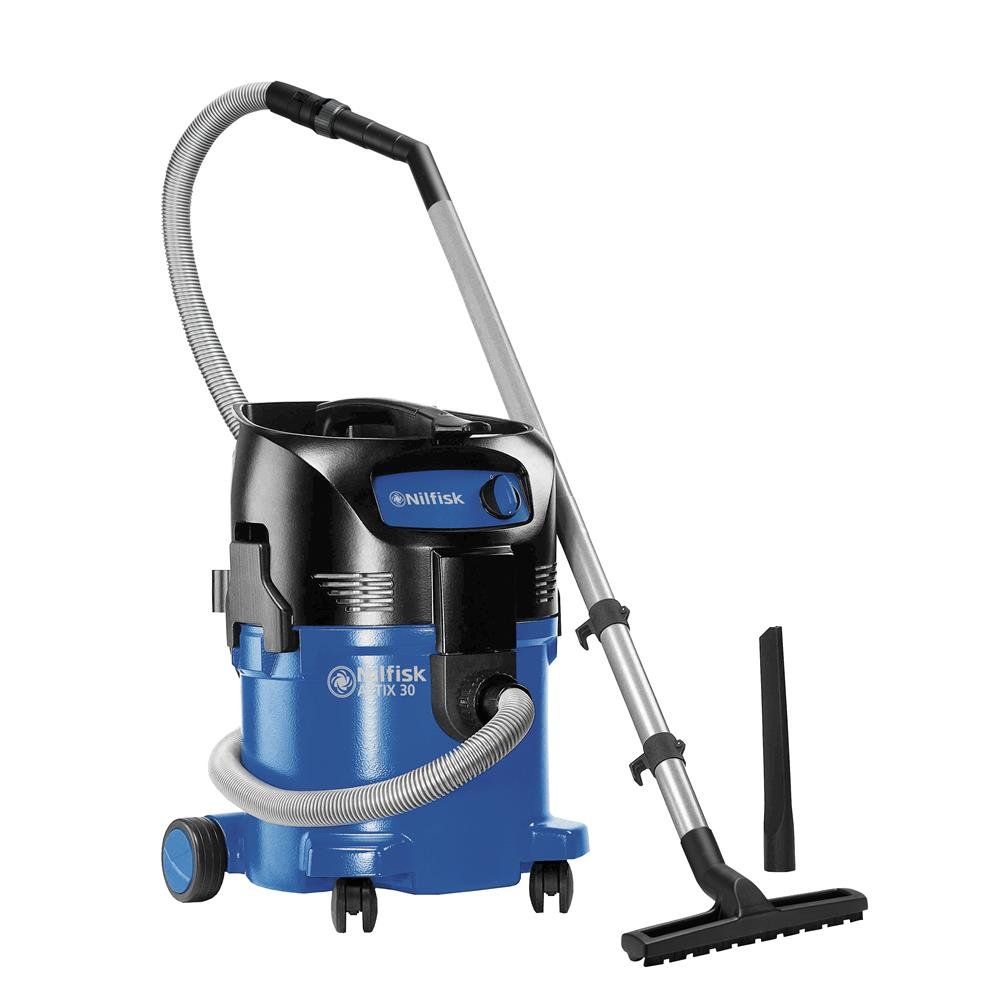
Image 1: Nilfisk Attix 30-01 in use for wet vacuuming.
This image illustrates the Nilfisk Attix 30-01 in use for wet vacuuming, effectively cleaning a liquid spill on a concrete floor in a workshop environment. The vacuum's hose and floor nozzle are visible, demonstrating its capability for liquid extraction.
5.3 Power Tool Connection (Models with Socket)
For models equipped with a power tool socket (e.g., 11-series and 21-series), you can connect your power tool directly to the vacuum cleaner. This feature allows the vacuum to automatically switch on or off in conjunction with your power tool.
- Plug your power tool into the integrated socket on the vacuum cleaner.
- Connect the vacuum hose to the dust extraction port of your power tool.
- Turn on the vacuum cleaner's power switch to the "Auto" position (if available).
- When you operate the power tool, the vacuum cleaner will automatically start. When the power tool is switched off, the vacuum will stop after a short delay to clear the hose.
6. Maintenance
Regular maintenance ensures optimal performance and extends the lifespan of your Nilfisk Attix 30-01.
6.1 Emptying the Container
- Dry Debris: If using a filter bag, simply remove and dispose of the full bag. If not using a bag, unclip the motor head, lift it off, and carefully empty the container into a waste receptacle.
- Liquids: Unclip the motor head and carefully pour out the collected liquid. Clean the container thoroughly after emptying, especially after vacuuming corrosive or sticky liquids.
6.2 Filter Cleaning (Push&Clean)
The Push&Clean system allows for quick and efficient semi-automatic cleaning of the PET filter element.
- Ensure the vacuum cleaner is running with the hose blocked (e.g., by placing your hand over the nozzle).
- Press and hold the "Push&Clean" button (if available) for approximately 3-5 seconds. This action reverses the airflow, dislodging dust from the filter.
- Repeat this process several times until suction power is restored.
- For thorough cleaning, the PET filter can be removed and washed under running water. Allow it to dry completely before reinstallation.
6.3 General Cleaning
Wipe down the exterior of the vacuum cleaner with a damp cloth. Do not use harsh chemicals or abrasive cleaners. Periodically check the hose and accessories for blockages or damage.
7. Troubleshooting
Refer to the table below for common issues and their solutions.
| Problem | Possible Cause | Solution |
|---|---|---|
| No power | Power cable unplugged, faulty outlet, tripped circuit breaker. | Check power connection, try another outlet, reset circuit breaker. |
| Low suction power | Clogged filter, full container/filter bag, blocked hose/nozzle. | Clean filter (use Push&Clean), empty container/replace filter bag, clear blockages. |
| Motor stops during wet vacuuming | Container is full (float system activated). | Turn off vacuum, empty container. |
| Unusual noise | Foreign object in impeller, motor issue. | Turn off and unplug. Inspect for foreign objects. If noise persists, contact service. |
8. Specifications
| Feature | Value |
|---|---|
| Brand | Nilfisk |
| Model Name | Nilfisk Attix 30-01 |
| Model Number | 107413590 |
| Capacity | 30 Liters |
| Wattage | 1500 watts (Pmax), 1200 watts (PieC) |
| Air Volume | 3700 l/min |
| Negative Pressure | 250 mbar / 25 kPa |
| Noise Level | 59 dB(A) |
| Hose Length | 72 Inches (approx. 1.83 meters) |
| Power Cable Length | 7.5 meters |
| Filter Type | PET Cartridge Filter |
| Product Dimensions (L x W x H) | 17.72"L x 14.96"W x 23.43"H (450 x 380 x 595 mm) |
| Item Weight | 22 pounds (approx. 10 kg) |
| Power Source | Corded Electric |
| Special Feature | Wheels |
| Indoor/Outdoor Usage | Indoor |
9. Warranty and Support
Nilfisk products are manufactured to high-quality standards. For specific warranty information, please refer to the warranty card included with your product or visit the official Nilfisk website. For technical support, spare parts, or service inquiries, please contact your authorized Nilfisk dealer or Nilfisk customer service.
Manufacturer: Nilfisk


