1. Safety Information
WARNING: Electrical shock hazard. This product must be installed and serviced by qualified personnel only. Failure to follow these instructions can result in serious injury or death.
- Always disconnect power at the main service panel before installing or servicing circuit breakers.
- Use appropriate personal protective equipment (PPE) when working with electrical systems.
- Verify that the circuit breaker rating matches the requirements of the electrical system and load.
- Ensure all connections are tight and secure to prevent overheating.
- Do not use "used" breakers. Siemens strongly recommends against the use of "used" breakers, as their installation in a Siemens panel will void the panel's warranty.
2. Product Overview
The Siemens B250 is a 50-Amp Double Pole 120/240-Volt 10KAIC Bolt-in Circuit Breaker designed for use in Siemens panel boards. It provides overcurrent protection for electrical circuits.
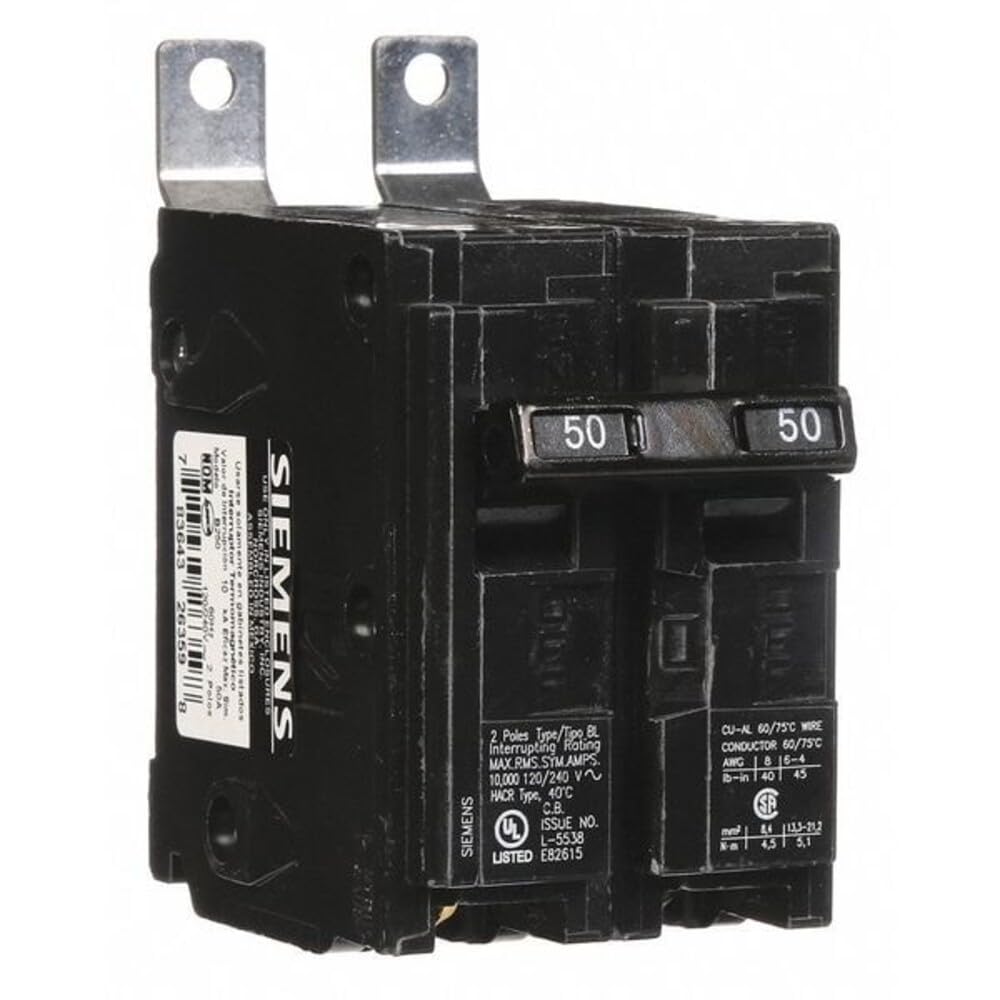
Figure 1: Siemens B250 50-Amp Double Pole Bolt-in Breaker. This image shows the front and side profile of the circuit breaker, highlighting its compact design and terminal connections.
Key Features:
- UL Listed for safety and compliance.
- Panel board mounting for secure installation.
- Double pole configuration for 120/240-Volt applications.
- Type BL design.
3. Specifications
| Brand | SIEMENS |
| Model | B250 |
| Current Rating | 50 Amps |
| Voltage | 120/240 Volts |
| Number of Poles | 2 |
| Interrupting Rating | 10KAIC |
| Mounting Type | Panel Mount (Bolt-in) |
| Product Dimensions (D x W x H) | 30"D x 8"W x 6"H (Note: These dimensions appear to be for packaging or a larger assembly, not the breaker itself. Refer to technical drawings for precise breaker dimensions.) |
| Item Weight | 8 ounces |
| Certifications | UL Listed |
| UPC | 783643263598 |
Note: Product dimensions provided may refer to packaging. Always consult technical drawings for precise device measurements.
4. Setup and Installation
Installation of the Siemens B250 circuit breaker requires adherence to all national and local electrical codes. This is a bolt-in type breaker, designed for specific Siemens panel boards.
Installation Steps:
- Power Disconnection: Ensure all power to the electrical panel is completely disconnected at the main service disconnect. Verify with a voltage tester.
- Panel Access: Carefully remove the cover of the electrical panel to expose the bus bar and breaker slots.
- Breaker Placement: Align the Siemens B250 breaker with the appropriate bolt-in terminals on the panel's bus bar. Ensure the breaker's lugs are properly seated over the bus bar studs.
- Secure Connection: Use the provided or appropriate fasteners to securely bolt the breaker to the bus bar. Tighten to the manufacturer's specified torque settings.
- Wire Connection: Connect the load wires to the breaker's terminals. For a double pole breaker, connect the two hot wires to the respective terminals. Ensure wires are stripped to the correct length and terminals are tightened securely.
- Panel Reassembly: Once all connections are secure and verified, replace the panel cover.
- Power Restoration: Restore power to the main service panel.

Figure 2: Side view of the Siemens B250 circuit breaker, illustrating the bolt-in mechanism and terminal design. This view helps in understanding how the breaker connects to the panel's bus bar.
Consult a qualified electrician if you are unsure about any part of the installation process.
5. Operation
The Siemens B250 circuit breaker is designed to automatically interrupt the flow of electricity when an overcurrent or short circuit condition occurs, protecting the circuit and connected equipment.
Normal Operation:
- In the "ON" position, the breaker allows electricity to flow through the circuit.
- In the "OFF" position, the breaker manually disconnects the circuit.
Tripped Breaker:
When an overload or short circuit occurs, the breaker will automatically move to a tripped position, typically indicated by the handle being in the center or fully "OFF" position, depending on the design.
Resetting a Tripped Breaker:
- Identify Cause: Before resetting, identify and correct the cause of the trip (e.g., unplug overloaded appliances).
- Full OFF: Move the breaker handle firmly to the full "OFF" position. You may hear a click.
- Full ON: Then, move the handle firmly to the full "ON" position.
- If the breaker immediately trips again, do not attempt to reset it further. There is likely a persistent fault that requires professional attention.
6. Maintenance
The Siemens B250 circuit breaker is a sealed unit and contains no user-serviceable parts. Proper maintenance primarily involves ensuring the surrounding environment is suitable and periodic visual inspection.
- Visual Inspection: Periodically inspect the breaker and its connections for any signs of damage, discoloration, loose wires, or excessive heat.
- Cleanliness: Keep the area around the electrical panel and breakers clean and free from dust, debris, and obstructions.
- Environmental Conditions: Ensure the operating environment is within the specified temperature and humidity ranges for electrical equipment.
Do not attempt to open or repair the circuit breaker. If damage is observed, replace the unit with a new, identical Siemens B250 breaker.
7. Troubleshooting
This section addresses common issues you might encounter with your Siemens B250 circuit breaker.
Breaker Trips Frequently:
- Overload: The circuit may be drawing more current than the breaker's rating. Reduce the load by unplugging appliances or redistributing them to other circuits.
- Short Circuit: A direct connection between hot and neutral/ground wires can cause an immediate trip. This requires immediate investigation by a qualified electrician.
- Ground Fault: If a ground fault circuit interrupter (GFCI) is part of the circuit, it may be tripping due to current leakage to ground.
- Faulty Appliance/Wiring: A defective appliance or damaged wiring can cause repeated trips. Disconnect appliances one by one to isolate the fault.
Breaker Does Not Fit in Panel:
- Incompatibility: Ensure the panel board is designed for Siemens Type BL bolt-in breakers. Not all bolt-in panels are universally compatible.
- Incorrect Model: Verify that you have the correct Siemens B250 model for your specific panel.
- Physical Obstruction: Check for any physical obstructions within the panel or on the bus bar that might prevent proper seating.
If troubleshooting steps do not resolve the issue, or if you suspect a serious electrical problem, contact a qualified electrician immediately. Do not attempt repairs beyond your expertise.
8. Warranty Information
Siemens provides a warranty for its products under normal use and service. For specific warranty terms and conditions, please refer to the official Siemens warranty documentation or contact Siemens customer support.
Important Warranty Note: Siemens strongly recommends against the use of "used" breakers. The installation of used breakers in a Siemens panel will void the warranty on the panel. Siemens does not sell used breakers and has not approved any 3rd party sellers to do so.
9. Support and Contact
For technical assistance, product inquiries, or warranty claims, please contact Siemens customer support through their official website or designated support channels.
Visit the official SIEMENS Store for more product information and resources.


