
Leviton 2323-B
Leviton 2323-B Industrial Grade Locking Connector User Manual
Model: 2323-B
1. Introduction
This manual provides comprehensive instructions for the safe and proper installation, operation, and maintenance of the Leviton 2323-B Industrial Grade Locking Connector. This device is designed for demanding industrial and commercial applications, ensuring secure and reliable electrical connections. Please read this manual thoroughly before proceeding with installation or use.
2. Safety Information
WARNING: Risk of electric shock or fire. Improper installation or use can result in serious injury or death. Always follow local electrical codes and regulations. Installation should be performed by a qualified electrician.
- Disconnect power at the circuit breaker or fuse box before installing or servicing the connector.
- Ensure all wiring connections are secure and properly insulated.
- Do not exceed the specified voltage and current ratings of the device.
- Use only appropriate tools and personal protective equipment (PPE).
- Verify that the NEMA configuration of the connector matches the receptacle.
3. Product Overview
The Leviton 2323-B is a 20 Amp, 250 Volt, NEMA L6-20R locking connector. It features a 2-pole, 3-wire grounding design, constructed from durable nylon material for abrasion, chemical, and impact resistance. The locking mechanism ensures a secure connection, preventing accidental disconnections in demanding environments.

Figure 3.1: Side view of the Leviton 2323-B Industrial Grade Locking Connector. This image shows the robust black nylon housing and the overall cylindrical shape of the connector.
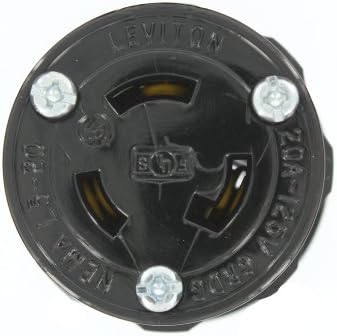
Figure 3.2: Face view of the Leviton 2323-B Locking Connector, illustrating the NEMA L6-20R configuration. The three blades are visible, designed for a secure, twist-lock connection.
4. Specifications
| Feature | Specification |
|---|---|
| Model Number | 2323-B |
| NEMA Configuration | L6-20R |
| Amperage | 20 Amps |
| Voltage | 250 Volts |
| Poles | 2 |
| Wires | 3 (2-Pole, 3-Wire Grounding) |
| Material | Nylon |
| Color | Black |
| Approvals | UL 498, CSA C22.2, NOM 057 |
| Dimensions (Product) | 2 x 1.75 x 4 inches |
| Item Weight | 0.01 ounces |
5. Installation Instructions (Setup)
Follow these steps to properly wire the Leviton 2323-B locking connector. Ensure power is disconnected before beginning.
- Prepare the Cable: Strip the outer jacket of the electrical cable to expose the insulated conductors. The length of the stripped jacket should be sufficient to allow conductors to reach the terminals without excessive slack or tension.
- Strip Conductors: Carefully strip approximately 1/2 inch (12-15 mm) of insulation from the end of each conductor (hot, neutral, ground).
- Disassemble Connector: Unscrew the housing of the 2323-B connector to access the terminal block.
- Insert Cable: Feed the prepared cable through the strain relief and into the connector housing.
- Wire Connections:
- Connect the green or bare copper wire to the grounding terminal (marked with a green screw or ground symbol).
- Connect the black or red wire (hot) to one of the brass terminals.
- Connect the white or other hot wire to the remaining brass terminal.

Figure 5.1: Detailed view of the internal wiring terminals. This image highlights the screw terminals where the electrical conductors are secured.
- Secure Connections: Tighten all terminal screws firmly to ensure good electrical contact. Do not overtighten. Tug gently on each wire to confirm it is securely fastened.
- Assemble Connector: Reassemble the connector housing, ensuring the strain relief properly grips the cable to prevent tension on the wire connections.
- Test: Once fully assembled, restore power and test the connection with an appropriate load.
6. Operation
To connect the Leviton 2323-B locking connector to a compatible NEMA L6-20R receptacle:
- Align the blades of the connector with the slots of the receptacle. The L6-20R configuration has specific blade orientations.
- Insert the connector fully into the receptacle.
- Twist the connector clockwise until it locks into place. This locking action secures the connection and prevents accidental disengagement.
To disconnect, twist the connector counter-clockwise to unlock, then pull straight out from the receptacle.
7. Maintenance
The Leviton 2323-B connector is designed for durability and requires minimal maintenance.
- Periodically inspect the connector for any signs of damage, such as cracks in the housing, bent blades, or discoloration from overheating.
- Ensure the cable entry point and strain relief are intact and providing adequate support to the cable.
- Keep the connector clean and free from dust, dirt, and moisture. Use a dry cloth for cleaning.
- If any damage is observed, discontinue use immediately and replace the connector.
8. Troubleshooting
| Problem | Possible Cause | Solution |
|---|---|---|
| No power to device |
|
|
| Connector feels hot |
|
|
| Connector does not lock |
|
|
If troubleshooting steps do not resolve the issue, consult a qualified electrician or contact Leviton customer support.
9. Warranty Information
This Leviton product is covered by a manufacturer's warranty. For specific details regarding warranty coverage, terms, and conditions, please refer to the documentation included with your purchase or visit the official Leviton website. Keep your proof of purchase for warranty claims.
10. Customer Support
For technical assistance, product inquiries, or further support, please contact Leviton customer service or visit their official website. You can find more information about Leviton products and solutions at the Leviton Brand Store.
Related documents2323-B


Ask a question about this manual
Ask about setup, troubleshooting, compatibility, parts, safety, or missing instructions. Manuals+ will review the question and use this page’s manual context to help answer it.