
Introduction
This user manual provides comprehensive instructions for the installation, operation, and maintenance of the Schneider Electric Zelio Logic Kit, model SR3PACK2FU. This kit includes a modular smart relay, specifically the SR3B261FU, and a connecting cable, designed for various industrial control applications. The Zelio Logic relay is a compact and easy-to-use programmable logic controller (PLC) suitable for small to medium-sized automation systems, offering 26 I/O points and operating on 100-240 V AC.
Please read this manual thoroughly before using the product to ensure safe and efficient operation.
Product Overview
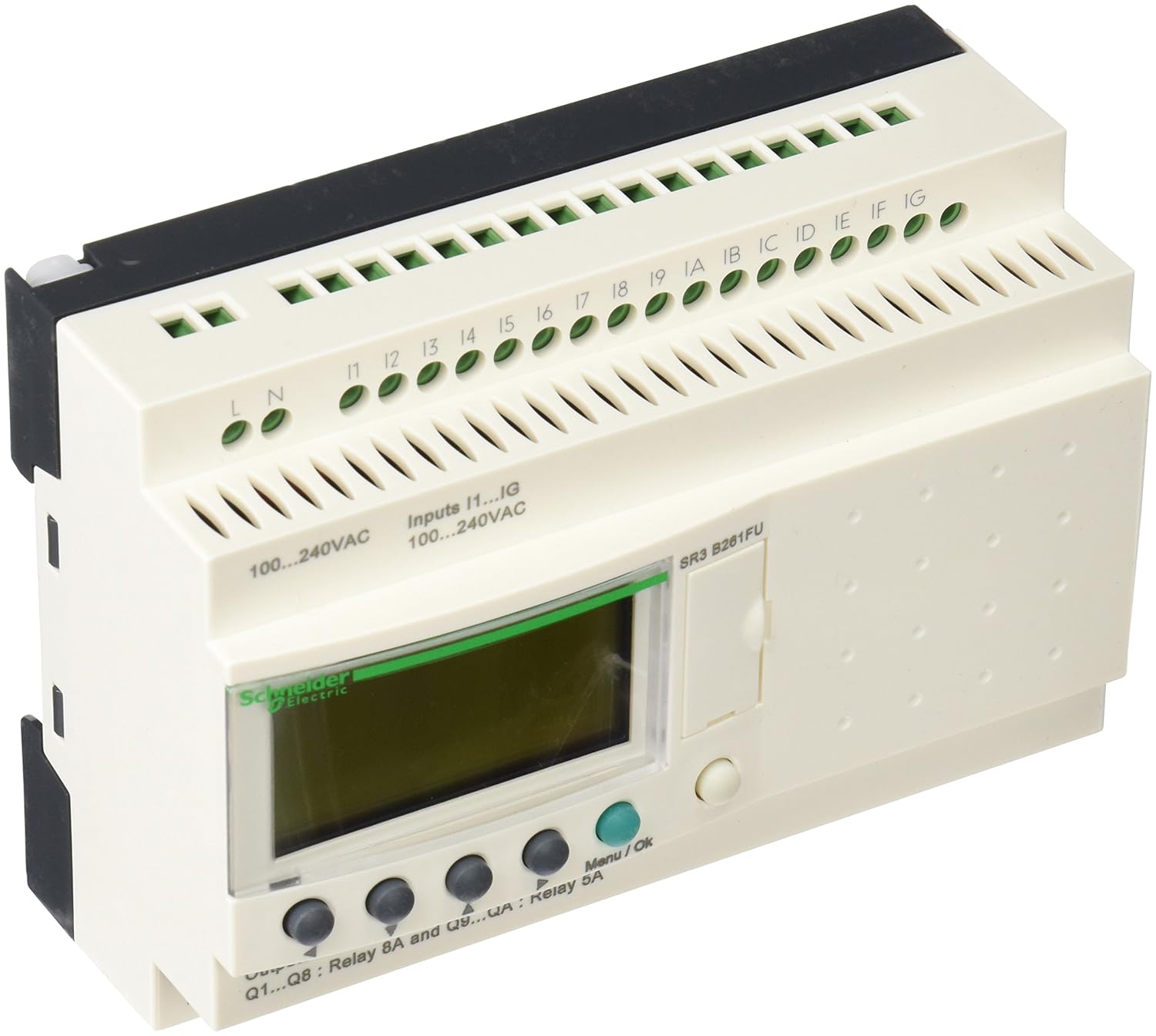
Figure 1: Front view of the Zelio Logic SR3B261FU Smart Relay. The image displays the device with its various connection terminals, including L and N for power input (100-240VAC), digital inputs I1 through IG (also 100-240VAC), and relay outputs Q1 through Q8 (8A) and Q9 through QA (5A). A green LCD screen is visible, along with navigation buttons (Menu/Ok) below it. The model number SR3 B261FU is printed on the right side of the unit.
The Zelio Logic SR3B261FU is a compact, modular smart relay designed for simple automation tasks. It features an integrated display and keypad for direct programming and monitoring, eliminating the need for a separate programming console in many cases. The device supports a wide range of input and output configurations, making it versatile for various control applications.
Setup and Installation
1. Safety Precautions
- Ensure power is disconnected before installation or wiring.
- Installation should be performed by qualified personnel only.
- Adhere to all local and national electrical codes.
- Protect the device from moisture, dust, and extreme temperatures.
2. Mounting
The Zelio Logic SR3B261FU is designed for DIN rail mounting. Snap the device onto a standard 35mm DIN rail securely. Ensure adequate ventilation around the unit.
3. Wiring
Refer to Figure 1 for terminal locations. All wiring should be done with appropriate wire gauges and insulation.
- Power Supply (100-240VAC): Connect the Line (L) and Neutral (N) wires to the corresponding terminals on the left side of the device.
- Digital Inputs (I1...IG, 100-240VAC): Connect input signals to terminals I1 through IG. These inputs are designed for 100-240VAC signals.
- Relay Outputs (Q1...Q8: 8A, Q9...QA: 5A): Connect the loads to the relay output terminals Q1 through QA. Observe the current ratings for each output group.
Ensure all connections are tight and secure to prevent loose contacts and potential hazards.
Operating Instructions
1. Powering On
After completing all wiring, apply power to the Zelio Logic unit. The LCD display will illuminate, and the device will perform a self-test. The default screen will typically show the current program status or a main menu.
2. Programming
The Zelio Logic can be programmed directly using the integrated display and keypad (Menu/Ok buttons) or via software on a PC using the provided cable. For detailed programming instructions, refer to the comprehensive Zelio Soft 2 software manual or the device's programming guide, which is typically available from Schneider Electric's official website.
- Direct Programming: Use the Menu/Ok buttons to navigate through the menus, define logic functions (AND, OR, Timers, Counters), and set parameters.
- PC Programming: Connect the Zelio Logic to a PC using the supplied cable. Install Zelio Soft 2 software. This software provides a user-friendly interface for creating, simulating, and downloading programs to the relay.
3. Monitoring and Diagnostics
The LCD display allows for real-time monitoring of input/output states, timer/counter values, and program execution. Diagnostic messages may also appear on the display to indicate operational issues or errors.
Maintenance
The Zelio Logic SR3B261FU is designed for minimal maintenance. However, regular checks can ensure optimal performance and longevity.
- Cleaning: Periodically clean the exterior of the device with a soft, dry cloth. Do not use abrasive cleaners or solvents. Ensure no dust or debris accumulates in the ventilation slots.
- Environmental Conditions: Ensure the operating environment remains within the specified temperature and humidity ranges to prevent damage.
- Connection Checks: Occasionally inspect wiring connections for tightness and signs of wear or corrosion.
- Firmware Updates: Check the Schneider Electric website for any available firmware updates for your model. Follow the instructions provided with the update carefully.
Troubleshooting
This section provides solutions to common issues you might encounter. For more complex problems, contact Schneider Electric technical support.
| Problem | Possible Cause | Solution |
|---|---|---|
| Device does not power on. | No power supply; incorrect wiring; faulty power source. | Check power connections (L, N). Verify power source voltage. Ensure circuit breaker is on. |
| Inputs not responding. | Incorrect input wiring; input signal outside voltage range; faulty sensor. | Verify input wiring to terminals I1-IG. Check input signal voltage (100-240VAC). Test the sensor or switch connected to the input. |
| Outputs not activating. | Incorrect output wiring; overloaded output; program logic error; faulty load. | Check output wiring to Q1-QA. Ensure load current does not exceed 8A (Q1-Q8) or 5A (Q9-QA). Review your program logic. Test the connected load. |
| Display shows an error message. | Internal error; programming error; hardware issue. | Note the error code and consult the detailed Zelio Logic programming manual or Schneider Electric support for specific error definitions and solutions. Try power cycling the device. |
Technical Specifications
| Feature | Specification |
|---|---|
| Product Model Number | SR3PACK2FU (Kit), SR3B261FU (Relay) |
| Input/Output (I/O) Count | 26 I/O (specific configuration varies by model, typically includes digital inputs and relay outputs) |
| Supply Voltage | 100-240 V AC |
| Input Voltage | 100-240 V AC (for digital inputs) |
| Output Type | Relay outputs (Q1-Q8: 8A, Q9-QA: 5A) |
| Dimensions (L x W x H) | 23.5 x 15.5 x 6.5 cm (approximate for kit packaging) |
| Weight | 692 g (approximate for kit) |
| Manufacturer | Schneider Electric |
Warranty Information
Schneider Electric products are covered by a limited warranty. The specific terms and duration of the warranty for your Zelio Logic Kit (SR3PACK2FU) are provided with the product documentation at the time of purchase. Please retain your proof of purchase. For detailed warranty information, including terms, conditions, and how to make a claim, please refer to the warranty card included in your product packaging or visit the official Schneider Electric website.
Support and Contact
For technical assistance, product inquiries, or support, please contact Schneider Electric directly through their official channels:
- Website: Visit the official Schneider Electric website for product documentation, FAQs, software downloads, and contact information.
- Customer Service: Refer to the contact details provided on the Schneider Electric website for your region.
When contacting support, please have your product model number (SR3PACK2FU or SR3B261FU) and any relevant error messages ready.


