
1. Introduction
The Intermatic EI500WC is a 7-day single-pole digital time switch designed for automated control of lights, fans, pumps, and other medium-duty loads. It offers up to 7 ON and 7 OFF operations per week, providing flexibility for energy savings, security, and convenience. This timer is compatible with incandescent, fluorescent, CFL, and LED lighting.
This manual provides detailed instructions for the safe installation, setup, programming, and maintenance of your EI500WC digital time switch.

Figure 1: Intermatic EI500WC Digital Time Switch installed in a standard wall plate.
2. Safety Precautions
Please read and understand all instructions before installing or operating this device. Failure to follow these instructions may result in electrical shock, fire, or serious injury.
- WARNING: Risk of Electric Shock. Disconnect power at the circuit breaker or fuse box before installation or servicing.
- Installation must be performed by a qualified electrician in accordance with all local and national electrical codes.
- Do not use this device with loads exceeding its specified electrical ratings.
- Ensure all wire connections are secure and properly insulated.
- This device is for indoor use only.
3. Package Contents
- Intermatic EI500WC 7-Day Digital Time Switch
- Wire Nuts
- Instruction Manual (this document)
4. Product Overview
The EI500WC features a clear digital display and intuitive buttons for programming. The main ON and OFF buttons are visible on the front, while programming buttons are located behind a hinged cover.

Figure 2: Front view of the EI500WC with the programming button cover open, showing CLK, DAY, PROG, RESET, HOUR, MIN, and MODE buttons.
5. Installation Instructions
5.1. Tools Required
- Screwdriver (Phillips and/or Flathead)
- Wire Strippers
- Voltage Tester
- Electrical Tape
5.2. Wiring Instructions
- Turn off power: Locate the circuit breaker or fuse that controls the switch you are replacing and turn it OFF. Verify power is off using a voltage tester.
- Remove old switch: Carefully remove the existing wall plate and switch from the electrical box.
- Identify wires: The EI500WC requires a neutral wire. Identify the LINE (hot), LOAD, NEUTRAL, and GROUND wires in your electrical box. If a neutral wire is not present, consult a qualified electrician.
- Connect wires: Use the provided wire nuts to connect the EI500WC wires to your household wiring as shown in the diagram below.
- Black wire (LINE): Connect to the incoming hot wire from the circuit breaker.
- Red wire (LOAD): Connect to the wire going to the light fixture or appliance.
- White wire (NEUTRAL): Connect to the neutral wire (typically white) in the electrical box.
- Green wire (GROUND): Connect to the bare copper or green ground wire in the electrical box.
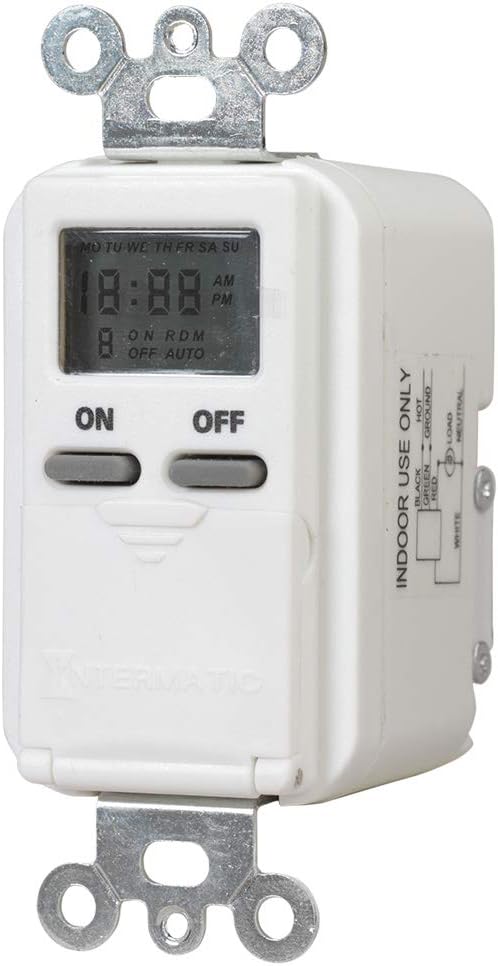
Figure 3: Wiring diagram for the EI500WC, showing connections for LINE (Black), LOAD (Red), NEUTRAL (White), and GROUND (Green).
5.3. Mounting
- Carefully push the wired timer into the electrical box, ensuring wires are not pinched.
- Secure the timer to the electrical box using the mounting screws.
- Attach the wall plate (not included) over the timer.
- Restore power: Turn the power back ON at the circuit breaker.
6. Initial Setup
Upon initial power-up or after a power outage, the display may show '12:00 AM' and 'MO'. The internal battery maintains settings during brief power interruptions.
6.1. Setting Current Time and Day
- Open the hinged cover to access the programming buttons (refer to Figure 2).
- Press the CLK button. The time display will flash.
- Press the HOUR button to set the current hour. Observe the AM/PM indicator.
- Press the MIN button to set the current minute.
- Press the DAY button to set the current day of the week (MO, TU, WE, TH, FR, SA, SU).
- Press CLK again to save the settings and exit time setting mode.
7. Operation and Programming
The EI500WC allows for up to 7 ON and 7 OFF programming events per week. Each event can be set for a specific day or combination of days.
7.1. Setting ON/OFF Programs
- Open the hinged cover.
- Press the PROG button. The display will show '1 ON' and the time will flash.
- Press HOUR and MIN to set the desired ON time for program 1.
- Press DAY to select the day(s) for this program. Options include individual days, weekdays (MO TU WE TH FR), weekends (SA SU), or all days (MO TU WE TH FR SA SU).
- Press PROG again. The display will show '1 OFF' and the time will flash.
- Press HOUR and MIN to set the desired OFF time for program 1.
- Press DAY to select the day(s) for this OFF program (should match the ON program days).
- Repeat steps 2-7 for additional ON/OFF programs (up to 7 pairs). To skip a program, press PROG repeatedly until you reach the desired program number or exit programming mode.
- Press CLK to exit programming mode and return to normal operation.
7.2. Random Mode
The random mode feature varies the ON/OFF schedule by a few minutes, providing a 'lived-in' appearance for enhanced security.
- To activate Random Mode: Press the MODE button until 'RDM' appears on the display.
- To deactivate Random Mode: Press the MODE button until 'RDM' disappears.
7.3. Manual Override
You can manually turn the connected load ON or OFF at any time without affecting the programmed schedule.
- Press the large ON button to manually turn the load ON.
- Press the large OFF button to manually turn the load OFF.
- The timer will revert to its programmed schedule at the next scheduled ON or OFF event.
8. Maintenance
8.1. Battery Information
The EI500WC includes an internal battery that provides backup power to maintain time and program settings during power outages. This battery is typically long-lasting and not user-replaceable. If the display is blank or settings are lost frequently after power interruptions, the unit may need replacement.
8.2. Cleaning
Clean the surface of the timer with a soft, damp cloth. Do not use abrasive cleaners or solvents.
9. Troubleshooting
- Timer display is blank: Ensure power is supplied to the circuit. Check circuit breaker.
- Load does not turn ON/OFF as programmed:
- Verify current time and day are set correctly.
- Check that ON/OFF programs are set for the correct times and days.
- Ensure the timer is not in manual override mode conflicting with the program.
- Confirm wiring connections are secure.
- Timer loses settings after power outage: The internal backup battery may be depleted. The unit may require replacement.
- RESET button: If the timer behaves erratically, use a pointed object (like a paperclip) to press the recessed RESET button. This will clear all settings and restore default values, requiring you to re-enter time, day, and programs.
10. Technical Specifications
| Feature | Specification |
|---|---|
| Model Number | EI500WC |
| Voltage | 125 VAC, 60 Hz |
| Maximum Load | 15 Amps (1875 Watts) Resistive, 1000 Watts Tungsten |
| Motor Load | 1/4 HP |
| Number of Programs | Up to 7 ON/OFF events per week |
| Switch Type | Single-Pole (1-way) |
| Mounting Type | Decorator Wall Plate/Standard Wall Box |
| Dimensions (H x W x D) | 2.75" x 1.75" x 1.36" |
| Color | White |
| Certifications | UL Listed |
11. Warranty Information
Intermatic warrants this product to be free from defects in material and workmanship for a period of one (1) year from the date of purchase. This warranty covers replacement of the unit only and does not include labor costs associated with removal or reinstallation.
This warranty does not apply to defects resulting from improper installation, misuse, abuse, accident, or unauthorized modifications. For warranty service, please contact Intermatic customer support.
12. Customer Support
If you have any questions regarding the installation, operation, or troubleshooting of your Intermatic EI500WC Digital Time Switch, please refer to the Intermatic website or contact their customer support directly. Always have your model number (EI500WC) available when contacting support.


