
Introduction
This manual provides essential information for the setup, operation, and maintenance of your Harman Kardon HKTS20BQ 5.1 Home Theater Speaker System. Please read these instructions carefully before installation and use to ensure optimal performance and longevity of your system.
What's in the Box
Your Harman Kardon HKTS20BQ system includes the following components:
- Four HKTS 20BQ satellite speakers
- One HKTS 20BQ center channel speaker
- One HKTS 20BQ powered subwoofer
- Wall mount brackets for all five speakers (satellite and center)
- Speaker wire

Figure 1: All components of the Harman Kardon HKTS20BQ 5.1 Home Theater Speaker System, including the subwoofer, four satellite speakers, and one center channel speaker.
Setup
1. Speaker Placement
Proper placement of your speakers is crucial for an optimal 5.1 surround sound experience. Consider the following:
- Front Left and Right Satellite Speakers: Place these speakers equidistant from your primary listening position and your television. They should form an equilateral triangle with the listening position.
- Center Channel Speaker: Position the center speaker directly above or below your television, centered horizontally. This speaker is vital for clear dialogue.
- Surround Left and Right Satellite Speakers: Place these speakers to the sides or slightly behind your primary listening position, facing towards the listening area.
- Subwoofer: The subwoofer's placement can significantly impact bass performance. Experiment with different locations in your room to find the spot that provides the most balanced and impactful bass. Corner placement often enhances bass output.
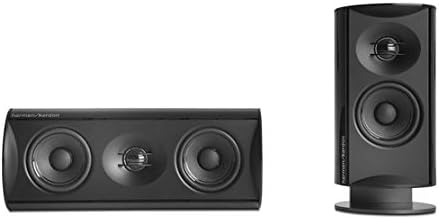
Figure 2: Close-up view of the Harman Kardon HKTS20BQ center channel speaker (left) and a satellite speaker (right), illustrating their design for optimal sound dispersion.
2. Wiring Connections
Connect your speakers to your audio/video receiver using the provided speaker wires. The HKTS20BQ speakers feature high-quality, gold-plated connections for reliable signal transfer.
- Satellite and Center Speakers: Connect the speaker wires from your receiver's corresponding speaker outputs to the terminals on each satellite and center speaker. Ensure correct polarity (+ to + and - to -) for all connections.
- Powered Subwoofer: The powered subwoofer connects to your receiver's LFE (Low-Frequency Effects) output using a line-level connection. The subwoofer includes an "audio sense" circuit that automatically turns it on when an audio signal is detected and off when no signal is present for a period.
3. Mounting Options
The HKTS20BQ system offers flexible mounting solutions:
- Wall Mounting: Use the included wall mount brackets to attach the satellite and center speakers to a wall. The brackets allow for rotation to precisely direct sound.
- Tabletop Stands: Satellite table stands are included for placing speakers on flat surfaces.
- Optional Floor Stands: For a more integrated look and optimal ear-level height, optional black speaker floor stands (HTFS 3, sold separately) are available.
Operating Your System
Subwoofer Controls
The powered subwoofer features controls to fine-tune its performance to your preference:
- Phase Switch: Adjusts the phase of the subwoofer output relative to the main speakers. Experiment with both 0° and 180° settings to find the one that provides the most coherent bass response with your main speakers.
- Level Control: Adjusts the overall volume of the subwoofer. Set this to blend seamlessly with your satellite speakers, ensuring bass is present but not overpowering.
- Bass Boost: Provides an additional boost to low frequencies for a more impactful bass experience, particularly useful for movies.
The subwoofer's "audio sense" circuit automatically manages power, turning the unit on when an audio signal is detected and entering standby mode after a period of inactivity.
Maintenance
To maintain the appearance and performance of your Harman Kardon HKTS20BQ system, follow these simple guidelines:
- Cleaning: Gently wipe the speaker cabinets with a soft, dry cloth. Avoid using abrasive cleaners or solvents, as these can damage the finish.
- Dusting: Regularly dust the speaker grilles and surfaces to prevent buildup.
- Placement: Avoid placing speakers in direct sunlight or near heat sources, which can affect component longevity. Ensure adequate ventilation around the subwoofer.
Troubleshooting
If you experience issues with your HKTS20BQ system, refer to the following common solutions:
- No Sound from Speakers:
- Check all speaker wire connections at both the speaker and receiver ends for secure contact and correct polarity.
- Ensure your receiver is powered on and set to the correct input source.
- Verify that the speaker volume on your receiver is not muted or set too low.
- No Sound from Subwoofer / Subwoofer Cuts Out:
- Confirm the subwoofer is plugged into a working power outlet and its power switch is ON.
- Check the LFE cable connection between the subwoofer and receiver.
- Adjust the subwoofer's Level control.
- If the subwoofer cuts out, ensure the "audio sense" circuit is functioning correctly; sometimes a very low input signal might not trigger it consistently. Increase the receiver's LFE output level if possible.
- Distorted Sound:
- Reduce the volume on your receiver.
- Check for loose speaker wire connections.
- Ensure speakers are not placed too close to walls or corners, which can cause unwanted resonance.
If problems persist, consult your receiver's manual or contact Harman Kardon customer support.
Specifications
| Feature | Detail |
|---|---|
| Model Name | HKTS 20BQ |
| Speaker Type | Center Channel, Satellite, Subwoofer |
| Surround Sound Channel Configuration | 5.1 |
| Subwoofer Diameter | 8 Inches (Woofer Diameter) |
| Speaker Maximum Output Power | 200 Watts (Subwoofer) |
| Impedance | 8 Ohms |
| Connectivity Technology | RCA |
| Mounting Type | Wall Mount |
| Color | Black |
| Product Dimensions | 12.5 x 25 x 15.5 inches |
| Item Weight | 19.8 pounds (9 Kilograms) |
| UPC | 028292508677 |
Product Overview Video
Video 1: An informational video providing an overview of the Harman Kardon HKTS 20BQ 5.1 Home Theater Speaker System, highlighting its features and benefits for home entertainment.
Warranty Information
The Harman Kardon HKTS20BQ 5.1 Home Theater Speaker System comes with a Limited Warranty. Please refer to the warranty card included with your product or visit the official Harman Kardon website for detailed terms and conditions.
Customer Support
For technical assistance, troubleshooting, or service inquiries, please contact Harman Kardon customer support. You can find contact information on the official Harman Kardon website or in the documentation provided with your product.