Introduction
The Sangean DDR-31+ is a compact, acoustically tuned wooden cabinet radio designed for high-quality audio reception. It supports both DAB+ (Digital Audio Broadcasting Plus) and FM radio bands, providing a wide range of listening options. The FM receiver includes RDS (Radio Data System) functionality, displaying additional information such as song titles and artist names. This radio also features an AUX-in connection for external audio devices and a line-out for connecting to an external amplifier. This manual provides detailed instructions for the proper setup, operation, and maintenance of your Sangean DDR-31+ radio.
Safety Instructions
- Read all instructions carefully before operating the device.
- Keep the manual for future reference.
- Do not expose the radio to rain, moisture, or extreme temperatures.
- Ensure proper ventilation; do not block any ventilation openings.
- Use only the power adapter supplied with the unit.
- Do not attempt to service the unit yourself. Refer all servicing to qualified personnel.
- Avoid placing the unit near heat sources such as radiators, heat registers, stoves, or other apparatus (including amplifiers) that produce heat.
Package Contents
Verify that all items are present upon unpacking:
- 1 x Sangean DDR-31+ Portable Radio
- 1 x Power Adapter
- 1 x Remote Control (with batteries)
- User Manual (this document)
Product Overview
Familiarize yourself with the controls and features of your Sangean DDR-31+ radio.
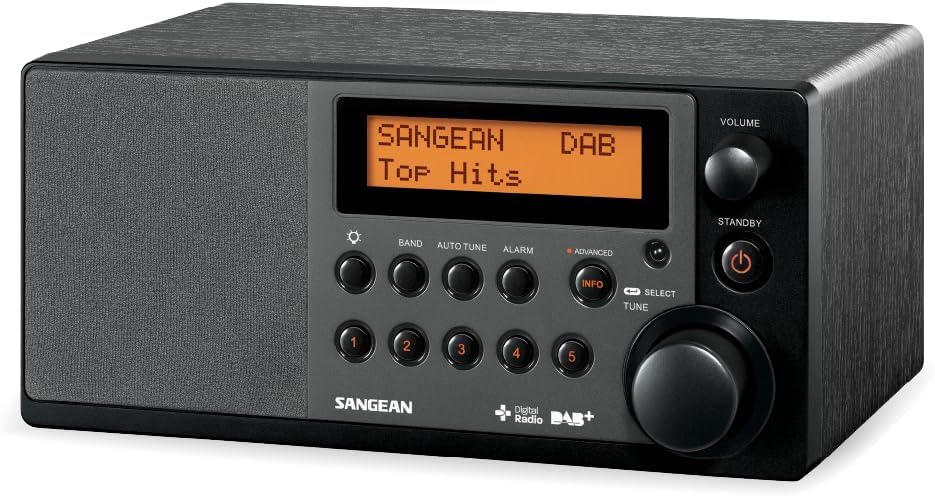
Figure 1: Front view of the Sangean DDR-31+ Portable Radio, showing the display, control buttons, and rotary knobs.
Front Panel Controls
- Display: Shows station information, time, and menu options.
- BAND Button: Switches between DAB+ and FM radio bands.
- AUTO TUNE Button: Initiates automatic station scanning.
- ALARM Button: Accesses alarm settings.
- INFO Button: Displays additional information (e.g., RDS data, program type).
- PRESET Buttons (1-5): Stores and recalls favorite stations.
- SELECT/TUNE Knob: Rotates to navigate menus or tune frequencies; presses to confirm selections.
- VOLUME Knob: Adjusts the audio output level.
- STANDBY Button: Powers the unit on or off.
Rear Panel Connections
- AUX-in Jack: Connects external audio devices (e.g., MP3 player).
- Headphone Jack: For private listening.
- DC In Jack: Connects the power adapter.
- Telescopic Antenna: For DAB+ and FM reception.
Setup
1. Power Connection
- Insert the DC plug of the supplied power adapter into the DC In jack on the rear of the radio.
- Plug the AC adapter into a standard wall outlet.
2. Antenna Adjustment
Extend the telescopic antenna fully for optimal DAB+ and FM reception. Adjust its position for the best signal quality.
3. Initial Power On
Press the STANDBY button to turn on the radio. The unit will typically start in the last used mode or initiate a DAB+ scan upon first use.
Operating Instructions
1. DAB+ Radio Operation
- Press the BAND button repeatedly until "DAB" appears on the display.
- If this is the first time using DAB+ or if the station list is empty, the radio will automatically perform a full scan. Otherwise, press AUTO TUNE to initiate a scan.
- Once the scan is complete, rotate the SELECT/TUNE knob to browse the available stations.
- Press the SELECT/TUNE knob to select and play a station.
- Press the INFO button to cycle through different information displays (e.g., program type, signal strength, bit rate).
2. FM Radio Operation
- Press the BAND button repeatedly until "FM" appears on the display.
- To automatically scan for the next available station, press and hold the SELECT/TUNE knob. The radio will tune to the next strong station.
- To manually tune, rotate the SELECT/TUNE knob in small increments.
- The display will show RDS information (station name, program type, etc.) if available. Press the INFO button to cycle through RDS data.
3. Storing and Recalling Presets
The radio allows you to store up to 5 DAB+ and 5 FM stations as presets.
- To Store: Tune to the desired station. Press and hold one of the PRESET (1-5) buttons until the display confirms the station has been saved.
- To Recall: Briefly press the desired PRESET (1-5) button to instantly tune to the stored station.
4. Setting the Alarm
The Sangean DDR-31+ features two alarm timers.
- Press the ALARM button to enter the alarm setup menu.
- Rotate the SELECT/TUNE knob to select Alarm 1 or Alarm 2, then press to confirm.
- Follow the on-screen prompts to set the alarm time, source (DAB+, FM, or Buzzer), and volume.
- Press the SELECT/TUNE knob to confirm each setting.
5. AUX-in Mode
Connect an external audio device (e.g., MP3 player, smartphone) to the AUX-in jack on the rear panel using a 3.5mm audio cable.
- Press the BAND button repeatedly until "AUX" appears on the display.
- Start playback on your external device. The audio will be routed through the radio's speaker.
- Adjust the volume using the VOLUME knob on the radio or on your external device.
6. Sound Modes
The radio offers various equalizer presets to enhance your listening experience:
- Flat
- Jazz
- Rock
- Classic
- Pop
- News
Access these modes through the menu system (refer to the on-screen prompts or remote control for specific navigation).
Maintenance
Cleaning
- Wipe the exterior of the radio with a soft, damp cloth.
- Do not use abrasive cleaners or solvents, as they may damage the finish.
- Ensure the unit is unplugged before cleaning.
General Care
- Avoid placing heavy objects on the radio.
- Keep the unit away from strong magnetic fields.
- If the unit will not be used for an extended period, unplug it from the power outlet.
Troubleshooting
| Problem | Possible Cause | Solution |
|---|---|---|
| No power | Power adapter not connected or faulty outlet. | Check power connections. Try a different outlet. |
| Poor DAB+/FM reception | Antenna not extended or poor signal area. | Fully extend and adjust the telescopic antenna. Try relocating the radio. |
| No sound | Volume too low or headphones connected. | Increase volume. Disconnect headphones if not intended for use. |
| Remote control not working | Batteries depleted or obstruction. | Replace remote control batteries. Ensure no obstruction between remote and radio. |
Specifications
| Feature | Specification |
|---|---|
| Model Number | A500212 |
| Brand | Sangean |
| Radio Bands | DAB+, FM |
| Connectivity | Auxiliary (AUX-in), IR (for remote control) |
| Special Features | Portable, RDS, 2 Alarm Timers, Sound Effects (Flat, Jazz, Rock, Classic, Pop, News) |
| Compatible Devices | MP3 Player (via AUX-in) |
| Power Source | AC Power Adapter (12V 1A) |
| Dimensions (L x W x H) | 18.1 x 24 x 11.7 cm (approx.) |
| Acoustic Design | Acoustically tuned wooden cabinet |
Warranty and Support
Sangean products are manufactured to high-quality standards. This product comes with a limited warranty against defects in materials and workmanship.
- Spare Parts Availability: 1 Year
- For warranty claims or technical support, please refer to the contact information provided on the Sangean official website or your local distributor.
- Keep your proof of purchase for warranty service.


