
Introduction
This manual provides comprehensive instructions for the installation, operation, and maintenance of your Codelocks CL410 Stainless Steel Deadlatch. The CL410 is a robust mechanical lock designed for secure access control, offering over 8000 possible code combinations. Please read this manual thoroughly before installation and use to ensure proper function and longevity of the product.
Important Safety Information
- Always follow local building codes and regulations during installation.
- Ensure all components are securely fastened to prevent accidental dislodgement.
- Do not attempt to modify the lock mechanism, as this may compromise security and void the warranty.
- Keep small parts away from children to prevent choking hazards.
- Use appropriate personal protective equipment (PPE) during installation, such as safety glasses.
Package Contents
Please verify that all items listed below are present in your package:
- Codelocks CL410 Stainless Steel Deadlatch Unit (Front and Rear Assemblies)
- Spindle
- Fixing Bolts
- Deadlatch Mechanism
- Strike Plate
- Code Change Kit (Pins)
- Installation Template
- User Manual (this document)
Installation Guide
Follow these steps carefully to install your Codelocks CL410 Deadlatch. Professional installation is recommended if you are unfamiliar with door hardware installation.
Tools Required:
- Drill
- Drill Bits (appropriate sizes for spindle and fixing bolts)
- Screwdriver (Phillips head)
- Measuring Tape
- Pencil
- Chisel (optional, for strike plate recess)
Step-by-Step Installation:
- Prepare the Door: Use the provided template to mark the positions for drilling holes on the door face and edge. Ensure correct backset measurement.
- Drill Holes: Carefully drill the marked holes for the spindle and fixing bolts through the door. Drill the hole for the deadlatch mechanism into the door edge.
- Install Deadlatch: Insert the deadlatch mechanism into the door edge hole. Secure it with screws. Ensure the latch bolt extends and retracts smoothly.
- Attach Front Assembly: Place the front (keypad) assembly onto the door, aligning the spindle hole and fixing bolt holes.
- Insert Spindle: Insert the spindle through the deadlatch mechanism and into the front assembly.
- Attach Rear Assembly: Position the rear assembly (with the knob/lever) onto the door, engaging the spindle. Secure both front and rear assemblies using the fixing bolts, tightening them evenly.
- Install Strike Plate: Mark and chisel out a recess for the strike plate on the door frame, aligning it with the deadlatch bolt. Secure the strike plate with screws.
- Test Operation: Close the door and test the lock's operation with the factory default code (if applicable) or a newly set code. Ensure the latch retracts and extends properly and the door locks securely.
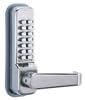
Figure 1: The Codelocks CL410 Stainless Steel Deadlatch, showing the keypad and lever handle. This image illustrates the typical appearance of the installed unit.
Operating Instructions
Setting/Changing the Code:
The Codelocks CL410 is a mechanical lock, and its code is changed by repositioning internal pins. This process requires the lock to be removed from the door or partially disassembled. Refer to the detailed instructions provided with your code change kit.
- Remove Lock: Carefully remove the lock from the door, following the reverse of the installation steps.
- Access Code Chamber: Locate the code chamber on the rear of the front assembly.
- Change Pins: Using the code change kit, remove the existing code pins and insert new pins according to your desired code. Ensure the correct type of pin (code or non-code) is used for each slot.
- Reassemble and Test: Reassemble the lock and reinstall it on the door. Test the new code thoroughly before relying on it for security.
Note: The CL410 offers over 8000 possible code combinations. Keep your code confidential and change it periodically for enhanced security.
Unlocking the Door:
- Enter your valid code by pressing the corresponding buttons in sequence.
- Turn the lever/knob to retract the deadlatch bolt.
- Open the door.
Locking the Door:
The CL410 is a deadlatch, meaning it automatically locks when the door is closed and the latch bolt extends into the strike plate. No code entry is required to lock the door from the outside.
- Simply close the door. The deadlatch will engage automatically.
- From the inside, the door can typically be opened by turning the lever/knob without a code (passage function).
Maintenance
Regular maintenance ensures the smooth operation and extends the lifespan of your Codelocks CL410.
- Cleaning: Wipe the exterior surfaces with a soft, damp cloth. Avoid abrasive cleaners or solvents, as these can damage the finish.
- Lubrication: Periodically apply a small amount of silicone-based lubricant to the latch bolt and internal moving parts (if accessible) to ensure smooth operation. Do not use oil-based lubricants, as they can attract dust and grime.
- Inspection: Regularly check all fixing screws for tightness. Ensure the deadlatch mechanism operates freely and the strike plate is properly aligned.
- Code Change: Consider changing your access code periodically for enhanced security.
Troubleshooting
| Problem | Possible Cause | Solution |
|---|---|---|
| Lock does not open with correct code. | Incorrect code entered; internal mechanism jammed; worn pins. | Ensure correct code sequence. Check for obstructions. If pins are worn, a code change kit may be needed. |
| Lever/knob is stiff or difficult to turn. | Lack of lubrication; misaligned spindle; debris in mechanism. | Apply silicone lubricant. Check spindle alignment. Clean any visible debris. |
| Deadlatch bolt does not retract or extend fully. | Misaligned strike plate; debris in latch mechanism; worn spring. | Adjust strike plate position. Clean latch bolt area. If spring is worn, professional service may be required. |
| Lock feels loose on the door. | Loose fixing bolts. | Tighten all fixing bolts evenly. Do not overtighten. |
If you continue to experience issues, please contact Codelocks customer support.
Specifications
| Feature | Detail |
|---|---|
| Model | CL410 SS |
| Brand | Codelocks |
| Material | Stainless Steel |
| Controller Type | Mechanical knob |
| Shape | Rectangular |
| Item Weight | 10 Pounds (approx. 4.5 kg) |
| Code Combinations | Over 8000 |
| ASIN | B0038A7K84 |
| First Available | June 7, 2010 |
Warranty and Support
Codelocks products are manufactured to high standards and are backed by a manufacturer's warranty. For specific warranty terms and conditions, please refer to the warranty card included with your product or visit the official Codelocks website.
For technical support, troubleshooting assistance, or to inquire about replacement parts, please contact Codelocks customer service:
- Website: www.codelocks.com
- Contact Information: Refer to the website for regional contact details (phone, email).
When contacting support, please have your product model (CL410 SS) and purchase date available.


