
Introduction
The Sure-Lites LPX7 Series LED Exit Light is a universal emergency exit sign designed for general purpose applications. This unit features a durable polycarbonate housing and is equipped with LED lamps, offering energy efficiency and reliability. It supports dual voltage input (120/277 VAC) and includes a nickel cadmium battery for emergency operation, providing a minimum run time of 90 minutes during power loss.
The LPX7 series is engineered for ease of installation and maintenance, making it a suitable replacement for previous models like the CCX Series. It ships with components to configure either red or green exit legends, providing flexibility for various installation requirements.

Figure 1: Sure-Lites LPX7 Universal Emergency Exit Light with red legend illuminated.
Safety Information
Please read and understand all instructions before installing or operating this product. Failure to follow these instructions may result in electric shock, fire, or other hazards that could cause property damage or personal injury.
- Always disconnect power at the circuit breaker before installation or servicing.
- Ensure all electrical connections comply with local codes, ordinances, and the National Electric Code (NEC).
- Do not mount near gas or electric heaters.
- Do not allow power supply cords to be pinched or damaged.
- Servicing should be performed by qualified service personnel only.
- Do not use outdoors. This unit is designed for indoor use only.
- The battery in this unit is a Nickel Cadmium (NiCAD) battery. Dispose of batteries properly according to local regulations.
Package Contents
Verify that all components are present and undamaged before beginning installation:
- LPX7 Emergency Exit Sign Unit
- Mounting Hardware Kit
- Configurable Red and Green Lettering Inserts
- Installation Instructions (this manual)
Setup & Installation
The LPX7 exit sign is designed for universal mounting, allowing for ceiling, wall, or end mount installations. Follow these steps for proper setup:
1. Site Selection
Choose a mounting location that is visible and meets local building codes for emergency exit signage. Ensure the mounting surface is structurally sound to support the unit's weight.
2. Power Disconnection
Before starting any electrical work, turn off power to the circuit at the main breaker panel to prevent electric shock.
3. Mounting Preparation
Determine the desired mounting method (ceiling, wall, or end mount). The unit is designed for semi-flush mount installation. Refer to the dimensions diagram for precise measurements.

Figure 2: Dimensional drawing of the LPX7 exit light, showing overall width of 13 inches (330mm), overall height of 7 1/2 inches (190mm), and overall depth of 2 1/8 inches (54mm).
4. Electrical Connection
Connect the unit to a 120 VAC or 277 VAC, 60 Hz power source. The LPX7 features dual voltage input. Ensure proper wiring according to the provided wiring diagram (typically found inside the unit or on a separate sheet). All connections must be secure and insulated.
5. Battery Connection
Connect the internal Nickel Cadmium (NiCAD) battery. The battery is typically pre-installed but may require connecting a small plug to the circuit board. Ensure the connection is firm.
6. Legend Configuration
Insert the desired red or green legend panels into the unit. The LPX7 ships with both options, allowing for field configuration.
7. Final Assembly
Secure the unit to the mounting surface using the provided hardware. Ensure the housing is properly closed and secured.
8. Power Restoration & Testing
Restore power to the circuit. The exit sign should illuminate. Press the "TEST" button (usually a small push-button on the side or bottom of the unit) to verify emergency operation. The unit should switch to battery power and remain illuminated for at least 30 seconds. Release the button, and the unit should return to AC power.
Operation
The Sure-Lites LPX7 Emergency Exit Light operates automatically. When connected to a continuous AC power source, the LED lamps will remain illuminated, indicating the exit path. The internal Nickel Cadmium battery continuously charges while AC power is present.
Emergency Mode
In the event of a power outage or interruption to the AC supply, the unit will automatically switch to emergency mode, drawing power from its internal battery. The LED lamps will remain illuminated for a minimum of 90 minutes, providing essential egress lighting.
Test Button
A test button is provided on the unit for routine maintenance checks. Pressing and holding this button simulates a power failure, allowing you to verify that the battery and lamps are functioning correctly in emergency mode. Release the button to return to normal AC operation.
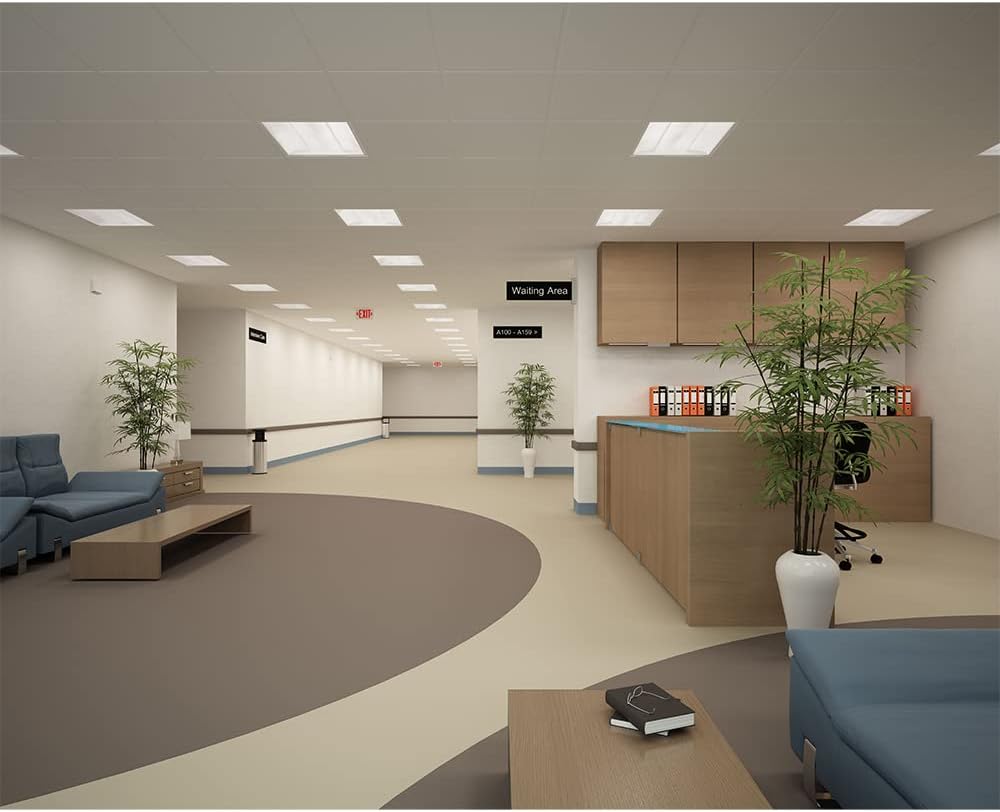
Figure 3: Example installation of an emergency exit light in a commercial waiting area, demonstrating its function in a public space.

Figure 4: Example installation of an emergency exit light in an auditorium, highlighting its visibility in a large gathering space.
Maintenance
Regular maintenance ensures the continued reliable operation of your emergency exit light. Always disconnect power before performing any maintenance.
Monthly Testing
Perform a monthly 30-second test by pressing the test button. The unit should operate on battery power for the duration of the test. If the lamps do not illuminate or dim significantly, the battery may need replacement or further charging.
Annual Testing
Conduct an annual 90-minute discharge test. Disconnect AC power to the unit and allow it to operate on battery power for 90 minutes. The lamps should remain illuminated for the entire duration. If the unit fails to operate for 90 minutes, the battery requires replacement.
Cleaning
Clean the exterior of the unit periodically with a soft, damp cloth. Do not use abrasive cleaners or solvents, as these can damage the polycarbonate housing.
Battery Replacement
The Nickel Cadmium battery has a typical lifespan of 5-7 years. If the unit fails to meet the required emergency run time during testing, replace the battery with an approved Sure-Lites replacement battery. Ensure proper polarity when connecting the new battery.
Troubleshooting
If your Sure-Lites LPX7 Emergency Exit Light is not functioning as expected, refer to the following common issues and solutions:
| Problem | Possible Cause | Solution |
|---|---|---|
| Unit does not illuminate when AC power is on. | No AC power to the unit; Loose wiring connection; Faulty LED lamps. | Check circuit breaker and power supply. Verify all wiring connections are secure. Contact qualified service personnel if lamps are faulty. |
| Unit does not illuminate in emergency mode (during test or power outage). | Battery not connected; Battery not charged; Battery has reached end of life; Faulty circuit board. | Ensure battery is properly connected. Allow 24 hours for initial battery charge. Replace battery if it fails annual test. Contact qualified service personnel. |
| Lamps are dim in emergency mode. | Battery not fully charged; Battery nearing end of life. | Allow unit to charge for 24 hours. If problem persists, replace battery. |
If the problem persists after attempting these solutions, contact Sure-Lites customer support or a qualified electrician.
Specifications
| Feature | Detail |
|---|---|
| Model Number | LPX7 |
| Input Voltage | 120/277 VAC, 60 Hz |
| Light Source | LED (2 Lamps) |
| Color Temperature | 5000K |
| Legend Color | Configurable Red or Green |
| Legend Height | 6 inches |
| Mounting Type | Universal (Ceiling, Wall, End Mount) |
| Housing Material | Polycarbonate |
| Housing Color | White |
| Battery Type | Nickel Cadmium (NiCAD) |
| Emergency Run Time | 90 minutes minimum |
| Overall Height | 7.5 inches (190mm) |
| Overall Width | 13 inches (330mm) |
| Overall Depth | 2.125 inches (54mm) |
| Item Weight | 2.88 pounds |
Warranty and Support
Warranty Information
The Sure-Lites LPX7 Emergency Exit Light comes with a 5-year warranty from the date of purchase. This warranty covers defects in materials and workmanship under normal use and service. The warranty does not cover damage resulting from improper installation, misuse, abuse, or acts of nature.
Customer Support
For technical assistance, warranty claims, or replacement parts, please contact Sure-Lites customer support. Refer to the Sure-Lites official website or product packaging for the most current contact information.
Note: Always provide your product model number (LPX7) and date of purchase when contacting support to expedite assistance.


