
Introduction
The Keeley Java Boost is a high-quality guitar effects pedal meticulously designed to replicate the authentic sound and dynamic response of legendary treble boosters from the late 1960s. This pedal offers guitarists precise control over their tone, allowing for adjustments to both output frequency range and boost gain. It is handcrafted using premium components, including original New Old Stock (NOS) Mullard OC44 transistors, ensuring a vintage and rich sonic character, particularly when paired with a tube amplifier.
Key Features
- Authentic sound and response of legendary '60s treble boosters.
- Enhanced control over tone and level for versatile sound shaping.
- Handcrafted construction ensures superior quality and durability.
- Utilizes original NOS Mullard OC44 transistors for classic tone.
- Equipped with cream-colored knobs and distinctive violet LEDs.
Controls and Connections
The Keeley Java Boost pedal features intuitive controls and standard connections for seamless integration into your guitar rig.

Figure 1: Front view of the Keeley Java Boost pedal. This image displays the pedal's top panel, highlighting the 'Tone' and 'Level' control knobs, the 'In' and 'Out' jacks on the sides, and the central footswitch. The pedal is a vibrant blue with white text and graphics, including a coffee cup logo.

Figure 2: Angled view of the Keeley Java Boost pedal. This perspective provides a clearer view of the 'In' jack on the right side of the pedal and the overall compact enclosure design.
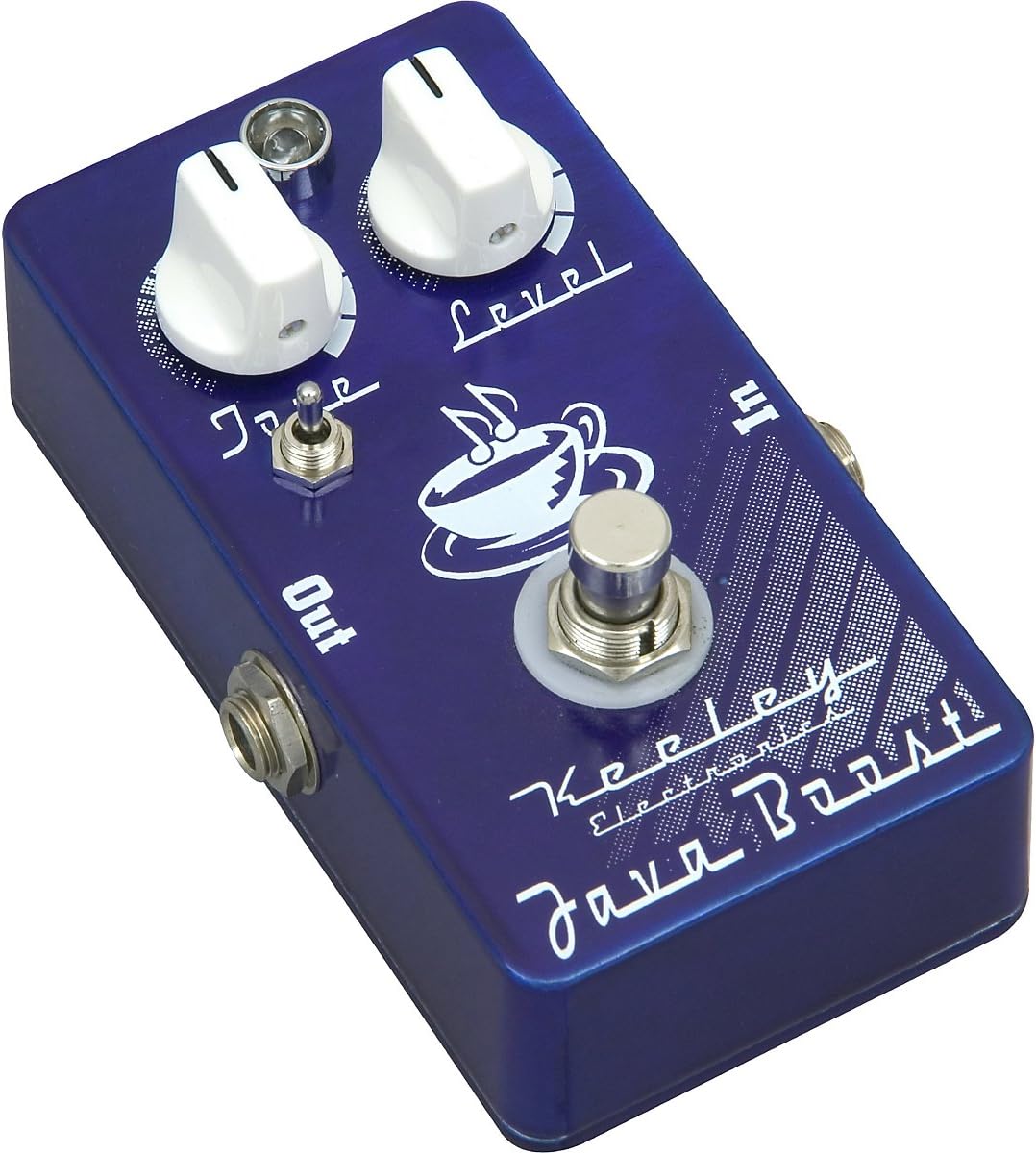
Figure 3: Another angled view of the Keeley Java Boost pedal. This image focuses on the 'Out' jack on the left side of the pedal, illustrating its robust construction and the placement of the jacks.
- Tone Knob: Controls the frequency response of the boosted signal. Turning it clockwise increases the treble content, while turning it counter-clockwise reduces it, allowing you to fine-tune the brightness of your sound.
- Level Knob: Adjusts the overall output volume of the pedal. Use this to set the desired boost level, from a subtle push to a significant volume increase.
- Input (IN) Jack: Connect your guitar or the output of a preceding pedal to this jack.
- Output (OUT) Jack: Connect this jack to your amplifier's input or to the input of the next pedal in your signal chain.
- Footswitch: Engages or bypasses the effect. Press once to activate the boost, press again to return to bypass.
Setup Guide
Power Requirements
The Keeley Java Boost pedal operates on a standard 9V DC power supply (not included) with a center-negative polarity. Ensure your power supply meets these specifications to prevent damage to the unit. Always use a regulated power supply for optimal performance and noise reduction.
Connecting the Pedal
- Ensure your amplifier is turned off or set to a low volume.
- Connect your guitar cable from your instrument's output to the IN jack on the Java Boost pedal.
- Connect another guitar cable from the OUT jack on the Java Boost pedal to the input of your amplifier.
- Connect the 9V DC power supply to the power input jack on the pedal.
- Once all connections are secure, you may power on your amplifier and begin using the pedal.
Operation
Engaging the Effect
To activate the Java Boost effect, press the footswitch. The violet LED will illuminate, indicating that the effect is active. Press the footswitch again to bypass the effect; the LED will turn off.
Using the Tone Control
The Tone knob allows you to shape the high-frequency content of the boosted signal. Start with the knob at the 12 o'clock position and adjust it to taste. Turning it clockwise will add more bite and presence, while turning it counter-clockwise will result in a warmer, smoother tone. Experiment with this control to find the ideal treble response for your guitar and amplifier combination.
Using the Level Control
The Level knob controls the overall output volume of the pedal. This allows you to use the Java Boost as a clean volume boost, a mild overdrive, or to push your amplifier's input for natural tube saturation. Adjust this knob to achieve the desired volume increase or drive level.
Maintenance
Cleaning
To clean the pedal, use a soft, dry cloth. Avoid using abrasive cleaners or solvents, as these can damage the finish and internal components. Ensure the pedal is disconnected from power before cleaning.
Storage
When not in use for extended periods, store the pedal in a cool, dry place away from direct sunlight and extreme temperatures. Disconnect all cables and the power supply before storing.
Troubleshooting
No Sound
- Check all cable connections (guitar to IN, OUT to amp).
- Ensure the power supply is correctly connected and providing the correct voltage (9V DC, center-negative).
- Verify that your guitar and amplifier are functioning correctly.
- Test with different cables to rule out faulty cables.
Unwanted Noise or Hum
- Ensure you are using a regulated power supply. Unregulated power supplies can introduce noise.
- Check for ground loops in your setup.
- Move the pedal away from power transformers or other sources of electromagnetic interference.
- Test in a different electrical outlet or location.
Specifications
| Item Weight | 9.6 ounces |
| Product Dimensions | 8 x 10 x 8 inches |
| ASIN | B003776M0U |
| Item Model Number | 0868515002 |
| Date First Available | July 10, 2007 |
| Brand | Keeley |
| UPC | 859743001023 |
Warranty and Support
Keeley Electronics stands behind the quality of its products. For specific warranty information, repair services, or technical support, please refer to the official Keeley Electronics website or contact their customer service directly. Keep your proof of purchase for any warranty claims.