
Introduction
This manual provides comprehensive instructions for the proper use, setup, operation, and maintenance of your WeighMax Gram Precision Digital Pocket Scale (Model W-3805-650). This compact and durable digital scale is designed for precise measurements up to 650 grams with an accuracy of 0.1 grams, making it ideal for on-the-go use. Its backlit LCD display ensures clear readability, and the protective flip-open lid safeguards the weighing surface. The stainless steel platform allows for easy cleaning. Please read this manual thoroughly before operating the device to ensure optimal performance and longevity.
Safety Information
- Do not overload the scale beyond its maximum capacity of 650g, as this may cause permanent damage.
- Avoid exposing the scale to extreme temperatures, humidity, or direct sunlight.
- Keep the scale away from strong electromagnetic fields, which can affect accuracy.
- Handle the scale with care; dropping or subjecting it to strong impacts can damage internal components.
- Do not immerse the scale in water or any other liquids. Clean with a soft, damp cloth only.
- Remove batteries if the scale will not be used for an extended period to prevent leakage.
Package Contents
Please verify that all items are present in the package:
- WeighMax Gram Precision Digital Pocket Scale (Model W-3805-650)
- 2 x AAA Batteries
- User Manual (this document)
Setup
1. Battery Installation
- Locate the battery compartment on the underside of the scale.
- Open the battery compartment cover.
- Insert two (2) AAA batteries, ensuring correct polarity (+/-) as indicated inside the compartment.
- Close the battery compartment cover securely.
2. Initial Placement
Place the scale on a hard, flat, and stable surface, free from vibrations or drafts, to ensure accurate readings.
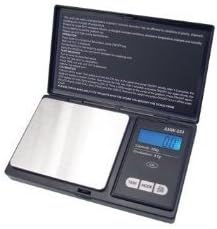
Figure 1: WeighMax Digital Pocket Scale with its protective lid open, revealing the weighing platform and control panel.
Operating Instructions
1. Power On/Off
- To turn on the scale, press the ON/OFF button. The display will show "88888" and then "0.0g" (or the last used unit).
- To turn off the scale, press and hold the ON/OFF button for a few seconds until the display turns off. The scale also features an auto-off function to conserve battery power after a period of inactivity.
2. Unit Conversion
The scale can measure in multiple units. To change the weighing unit:
- With the scale on, press the MODE button repeatedly to cycle through the available units: grams (g), ounces (oz), troy ounces (ozt), and pennyweights (dwt).
- Select the desired unit for your measurement.
3. Tare Function
The tare function allows you to subtract the weight of a container, so you only measure the contents.
- Place the empty container on the weighing platform.
- Wait for the display to stabilize and show the container's weight.
- Press the TARE button. The display will reset to "0.0" (or "0.00").
- You can now add the items you wish to weigh into the container, and the display will show only the net weight of the items.
4. Weighing Procedure
- Ensure the scale is on a stable surface and displaying "0.0".
- Place the item(s) to be weighed gently onto the center of the stainless steel weighing platform.
- Read the stable weight displayed on the LCD screen.
- Remove the item(s) from the platform.
Maintenance
- Cleaning: Use a soft, slightly damp cloth to clean the scale's surface. For the stainless steel platform, a mild detergent can be used, but ensure no liquid enters the scale's interior. Do not use abrasive cleaners or immerse the scale in water.
- Storage: When not in use, store the scale in a clean, dry place, away from extreme temperatures and humidity. Close the protective flip-open lid to prevent dust and damage to the weighing surface.
- Battery Replacement: If the display shows "LO" or becomes dim, replace both AAA batteries with new ones.
Troubleshooting
| Problem | Possible Cause | Solution |
|---|---|---|
| Scale does not turn on. | Dead or incorrectly installed batteries. | Check battery polarity or replace with new AAA batteries. |
| Inaccurate readings. | Unstable surface, overload, or strong electromagnetic interference. | Place on a flat, stable surface. Do not exceed 650g. Move away from electronic devices. |
| Display shows "LO". | Low battery power. | Replace both AAA batteries. |
| Display shows "O_LD". | Overload. | Remove item immediately. Do not exceed 650g. |
Specifications
- Model: W-3805-650
- Capacity: 650g
- Accuracy: 0.1g
- Units: Grams (g), Ounces (oz), Troy Ounces (ozt), Pennyweights (dwt)
- Display: Backlit LCD
- Platform Material: Stainless Steel
- Power: 2 x AAA Batteries (included)
- Auto-Off: Yes, to conserve battery life
- Dimensions: Approximately 3.9 x 2.28 x 0.91 inches (9.9 x 5.8 x 2.3 cm)
- Item Weight: 0.8 ounces (22.7 grams)
Warranty and Support
For warranty information or technical support regarding your WeighMax Gram Precision Digital Pocket Scale, please refer to the contact information provided with your purchase receipt or visit the official WeighMax website. Please have your model number (W-3805-650) and purchase date ready when contacting support.