
1. Introduction
Welcome to the user manual for your new Citizen Promaster Eco-Drive Aqualand Diver Watch, model BJ2120-07E. This timepiece combines robust design with advanced Eco-Drive technology, ensuring reliable performance without the need for battery replacement. Designed for adventurers, particularly divers, it features a durable construction and specialized functions to support your activities.
The Eco-Drive system harnesses light from any source, converting it into energy and storing it in a power cell. This innovative technology ensures your watch is always ready for use, provided it receives adequate light exposure.
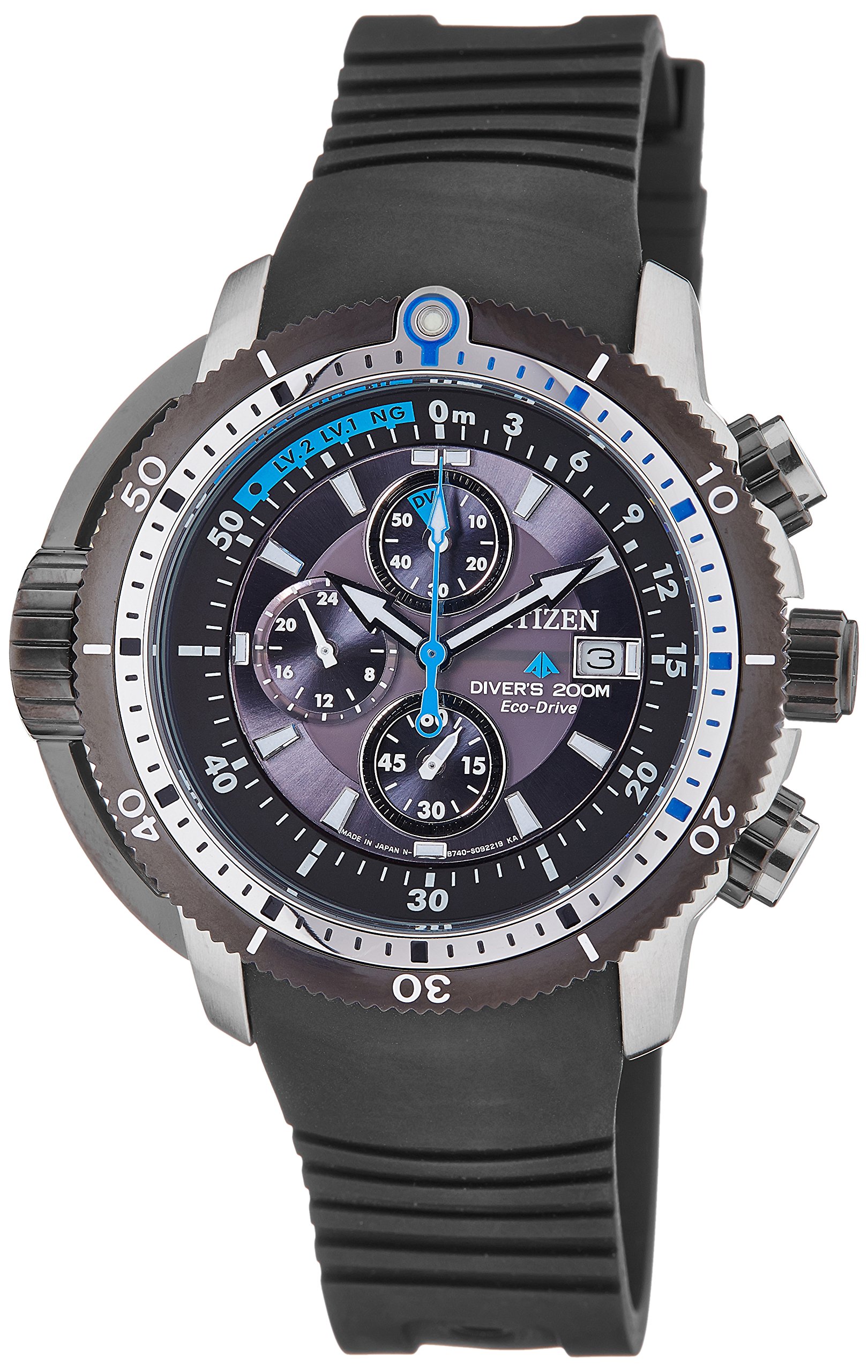
Image: Front view of the Citizen Promaster Eco-Drive Aqualand Diver Watch BJ2120-07E, showcasing its black dial, sub-dials, and robust case.
2. Setup
2.1 Initial Charging
Before initial use, ensure your watch is fully charged. Expose the watch dial to direct sunlight or strong artificial light for several hours. The watch will begin operating once sufficient charge is accumulated. For optimal performance, regular exposure to light is recommended.
2.2 Setting the Time and Date
- Pull out the crown: Gently pull the crown (located at the 3 o'clock position) to the second click position.
- Set the time: Rotate the crown to set the hour and minute hands. Ensure the AM/PM is correctly set if your watch features a 24-hour indicator.
- Set the date: Push the crown back to the first click position. Rotate the crown to adjust the date.
- Push in the crown: Once time and date are set, push the crown back to its normal position to start the watch.
2.3 Adjusting the Band
The watch features a durable rubber band. To adjust the fit, locate the buckle and adjust the pin to the desired hole on the strap. Ensure the watch fits snugly but comfortably on your wrist.

Image: Side view of the watch, highlighting the crown and pushers used for setting and operating functions.
3. Operating the Watch
3.1 Basic Timekeeping
Your watch displays the current time with hour, minute, and second hands. The Eco-Drive movement ensures accurate timekeeping as long as it receives sufficient light.
3.2 Chronograph Function
The BJ2120-07E model includes a chronograph function, indicated by the three sub-dials. These typically measure elapsed time in seconds, minutes, and a 24-hour format.
- Start/Stop: Press the upper pusher to start and stop the chronograph.
- Reset: Press the lower pusher to reset the chronograph to zero after it has been stopped.
3.3 Diver's Unidirectional Rotating Bezel
This watch is equipped with a unidirectional rotating bezel, essential for divers to track elapsed dive time. The bezel rotates only counter-clockwise to prevent accidental increases in recorded dive time, enhancing safety.
- Align the bezel: Before diving, align the '0' mark on the bezel with the minute hand.
- Read elapsed time: The minute hand will then indicate the elapsed time against the bezel's scale.
3.4 Water Resistance
The watch has a water resistance depth of 50 meters. This makes it suitable for swimming, showering, and recreational diving. Ensure the crown is fully pushed in before any water exposure to maintain water resistance.
4. Maintenance
4.1 Cleaning Your Watch
To maintain the appearance of your watch, wipe the case and crystal with a soft, dry cloth. For the rubber band, a damp cloth with mild soap can be used, followed by rinsing with clean water and drying thoroughly. Avoid using harsh chemicals or abrasive materials.
4.2 Eco-Drive Charging Best Practices
To ensure continuous operation and prolong the life of your watch, expose it to light regularly. Avoid prolonged storage in dark places. If the watch stops, expose it to bright light for several hours to recharge.
4.3 Storage
When not wearing your watch, store it in a location where it can receive some ambient light to maintain its charge. Avoid extreme temperatures or direct exposure to strong magnetic fields.

Image: Rear view of the watch, showing the case back with model information and the Eco-Drive logo.
5. Troubleshooting
5.1 Watch Not Running or Stopping Frequently
- Insufficient Charge: The most common reason. Expose the watch to bright light (sunlight or strong artificial light) for several hours to fully recharge.
- Power Save Mode: If the watch has been in darkness for an extended period, it may enter a power-saving mode. Exposing it to light should reactivate it.
5.2 Incorrect Time or Date
- Resetting: Follow the instructions in Section 2.2 to reset the time and date. Ensure the crown is fully pushed in after setting.
5.3 Water Ingress
- If you suspect water has entered the watch (e.g., condensation under the crystal), immediately take it to an authorized Citizen service center. Do not attempt to open the watch yourself.
6. Specifications
| Feature | Detail |
|---|---|
| Model Number | BJ2120-07E |
| Brand | Citizen |
| Movement Type | Eco-Drive (Light Powered) |
| Display Type | Analog |
| Dial Color | Black |
| Case Material | Stainless Steel |
| Case Diameter | 48 Millimetres |
| Case Thickness | 14 Millimetres |
| Band Material | Rubber |
| Band Color | Black |
| Band Width | 22 Millimetres |
| Crystal Material | Mineral Glass |
| Water Resistance Depth | 50 Metres |
| Special Features | Chronograph, Unidirectional Rotating Bezel |
| Item Weight | 380 g (0.84 Pounds) |
7. Warranty and Support
7.1 Warranty Information
Your Citizen Promaster Eco-Drive Aqualand Diver Watch BJ2120-07E comes with a 1 Year International Guarantee from the manufacturer. This warranty covers manufacturing defects under normal use. Please refer to the warranty card included with your purchase for full terms and conditions.
7.2 Customer Support
For any questions, service, or repair needs not covered in this manual, please contact an authorized Citizen service center or visit the official Citizen website for support. Keep your proof of purchase and warranty card handy.
You can find more information and locate service centers on the Official Citizen Website.


