Introduction
Welcome to the user manual for your TIMEX Expedition E-Altimeter Watch, Model T49795. This robust timepiece is designed for outdoor enthusiasts, featuring a durable stainless steel case, a comfortable rubber strap, and an advanced E-altimeter function. It combines classic watch features with specialized instruments to assist you in your adventures.
Key features include an E-altimeter with an altitude range of -400 to 25,000 feet, a chronograph, QuickDate display, and the signature Indiglo night light for visibility in low-light conditions. This manual provides detailed instructions for setting up, operating, and maintaining your watch to ensure optimal performance and longevity.
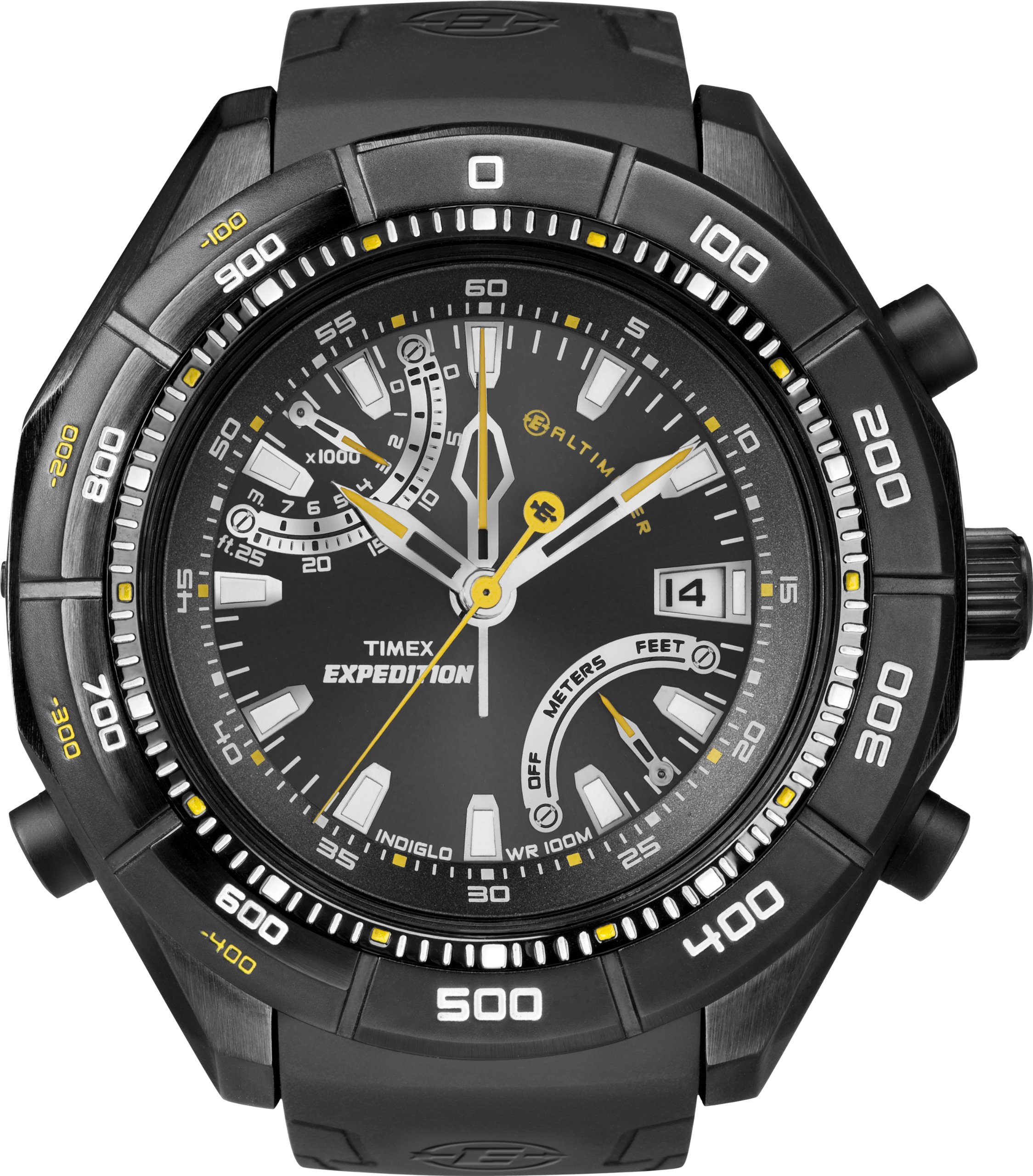
Figure 1: Front view of the TIMEX Expedition E-Altimeter Watch T49795. This image displays the watch's black dial, skeletal hands, index hour markers, and the black rubber strap. The watch features a stainless steel case and a unidirectional black ion-plated bezel.
Setup
1. Initial Time Setting
- Pull the crown out to the time-setting position (usually the outermost position).
- Rotate the crown to set the correct time. Ensure you differentiate between AM and PM if your watch has a 24-hour indicator or a date change mechanism.
- Push the crown back in to start the watch.
2. Setting the Date (QuickDate Feature)
Your watch is equipped with a QuickDate feature.
- Pull the crown out to the date-setting position (usually the middle position).
- Rotate the crown to adjust the date.
- Push the crown back in when the correct date is displayed.
Note: Avoid setting the date between 9 PM and 3 AM, as this may interfere with the automatic date change mechanism.
3. Altimeter Calibration
For accurate altitude readings, the altimeter requires simple calibration. Refer to the specific instructions provided with your watch for detailed steps on how to calibrate the E-altimeter. This typically involves setting a known altitude reference point.
Operating Instructions
1. Using the E-Altimeter
The E-altimeter measures your current altitude. It has an operational range of -400 to 25,000 feet (-120 to 7,600 meters).
- Activation: Press the designated altimeter button (refer to your watch's specific button layout).
- Reading: The watch display will show the current altitude.
- Memory: The altimeter can recall minimum and maximum altitudes recorded during a session. Consult your watch's specific instructions for accessing these memory functions.
- Accuracy: For best accuracy, calibrate the altimeter regularly, especially when significant weather changes occur or when moving to a new location with a known altitude.
2. Chronograph Function
Your watch includes a chronograph (stopwatch) function for measuring elapsed time.
- Start/Stop: Press the top pusher button to start and stop the chronograph.
- Lap/Split: If available, press the bottom pusher button to record lap or split times while the chronograph is running.
- Reset: With the chronograph stopped, press the bottom pusher button to reset it to zero.
3. Indiglo Night Light
The Indiglo night light illuminates the entire watch dial for easy reading in the dark.
- Activation: Press the crown (or a designated Indiglo button) to activate the night light.
- Night Mode: Some models feature a "Night Mode" where Indiglo remains active for a longer duration with a single press. Refer to your specific model's instructions for activating and deactivating Night Mode.
Maintenance
1. Cleaning Your Watch
To maintain the appearance of your watch:
- Wipe the case and crystal with a soft, damp cloth.
- For the rubber strap, use mild soap and water, then rinse thoroughly and dry.
- Avoid using harsh chemicals or abrasive cleaners, as these can damage the watch's finish.
2. Water Resistance
Your TIMEX Expedition T49795 watch is water-resistant to 100 meters (330 feet). This means it is suitable for showering, swimming, and snorkeling.
- Important: Do not operate the crown or pushers when the watch is wet or submerged in water.
- Ensure the crown is fully pushed in before exposing the watch to water.
- Water resistance is not a permanent condition and may eventually be compromised by wear and tear or accidental damage. Have your watch's water resistance checked periodically by an authorized service center.
3. Battery Replacement
When the watch battery needs replacement, it is recommended to have it replaced by an authorized TIMEX service center or a qualified watch technician. This ensures proper sealing for water resistance and correct battery type installation.
Troubleshooting
- Watch Not Running:
Check if the crown is fully pushed in. If the watch still does not run, the battery may need replacement.
- Incorrect Time/Date:
Refer to the "Setup" section for instructions on setting the time and date. Ensure the crown is fully pushed in after setting.
- Altimeter Inaccurate:
The altimeter requires regular calibration. Calibrate it at a known altitude. Significant changes in atmospheric pressure (weather) can affect readings, requiring recalibration.
- Indiglo Not Working:
Ensure the battery is not depleted. If other functions work but Indiglo does not, there might be an internal issue requiring professional service.
- Water Inside Watch:
If you notice condensation or water inside the watch, immediately take it to an authorized service center. Do not attempt to dry it yourself, as this can cause further damage.
Specifications
| Feature | Detail |
|---|---|
| Model Number | T49795 |
| Brand | TIMEX |
| Movement Type | Quartz |
| Display Type | Chronograph |
| Case Material | Stainless Steel |
| Case Diameter | 50 Millimetres |
| Case Thickness | 16 Millimetres |
| Band Material | Rubber |
| Band Width | 22 Millimetres |
| Band Colour | Black |
| Dial Colour | Black |
| Crystal Material | Mineral |
| Water Resistance Depth | 100 Metres (330 Feet) |
| Altimeter Range | -400 to 25,000 feet (-120 to 7,600 meters) |
| Special Features | Chronograph, Glow In The Dark (Indiglo), Water Resistant, QuickDate, Altimeter |
| Item Weight | 454 g |
Warranty and Support
Your TIMEX Expedition E-Altimeter Watch T49795 is covered by a manufacturer's warranty. Please refer to the warranty card included with your purchase for specific terms, conditions, and duration of coverage.
For technical support, service, or warranty claims, please contact TIMEX customer service or visit their official website for a list of authorized service centers. Keep your proof of purchase for warranty validation.


