
Introduction
This manual provides comprehensive instructions for the setup and operation of your RCA RCU704 4-Function Universal Remote Control. This remote is designed to control up to four different audio/video components, simplifying your home entertainment experience.
Safety Information
- Do not mix old and new batteries.
- Do not mix alkaline, standard (carbon-zinc), or rechargeable (nickel-cadmium) batteries.
- Remove batteries if the remote will not be used for an extended period to prevent leakage.
- Keep batteries out of reach of children.
Package Contents
- RCA RCU704 Universal Remote Control
- User Manual (this document)
Product Overview
The RCA RCU704 remote control features a straightforward layout for easy operation of your home entertainment devices.
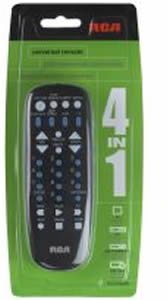
Image: Front view of the RCA RCU704 universal remote control, showcasing its button layout and ergonomic design.
Key buttons and their functions include:
- POWER: Turns the selected component on or off.
- TV, VCR, DVD, AUX: Component selection buttons to switch control to the desired device.
- VOL +/-: Adjusts the volume level.
- CH +/-: Changes channels up or down.
- MUTE: Silences the audio output.
- INPUT/VIDEO: Selects the video input source on your TV or other display device.
- NUMBER PAD (0-9): For direct channel entry or menu navigation.
Setup
1. Battery Installation
- Remove the battery compartment cover located on the back of the remote control.
- Insert two fresh AAA batteries, ensuring that the (+) and (-) terminals align correctly with the markings inside the compartment.
- Replace the battery compartment cover securely.
2. Programming the Remote
There are two primary methods to program your universal remote to control your devices:
Method A: Direct Code Entry
- Turn on the component (e.g., TV, DVD player) you wish to control.
- Press and hold the CODE SEARCH button until the indicator light on the remote turns on.
- While continuing to hold CODE SEARCH, press and release the component button (e.g., TV, DVD) corresponding to the device you want to program. The indicator light will blink once and then remain steadily on.
- Enter the 4-digit code for your brand from the provided code list (refer to the separate code booklet that came with your remote).
- If the code is valid, the indicator light will turn off. If the code is invalid, the light will flash rapidly.
- Test the remote by pressing the POWER button. If the component turns off, try other functions like VOL +/-. If it works, programming is complete.
- If the component does not respond or functions incorrectly, repeat the process with the next code listed for your brand.
Method B: Auto Code Search
- Turn on the component you wish to control.
- Press and hold the CODE SEARCH button until the indicator light on the remote turns on.
- While continuing to hold CODE SEARCH, press and release the component button (e.g., TV, DVD) you want to program. The indicator light will blink once and then remain steadily on.
- Point the remote at the component and repeatedly press the POWER button (or CH+ for TVs) until the component turns off.
- Once the component turns off, immediately press the ENTER button to save the code. The indicator light will turn off.
- Test the remote. If it does not work correctly, repeat the auto code search process.
Operating the Remote
To operate a component after it has been programmed:
- Press the corresponding component button (TV, VCR, DVD, or AUX) to select the device you want to control. The indicator light will flash once to confirm selection.
- Point the remote at the component and press the desired function button (e.g., POWER, VOL +/-, CH +/-).
Maintenance
- Clean the remote with a soft, dry cloth. Do not use liquid cleaners or abrasive materials.
- Avoid exposing the remote to extreme temperatures, high humidity, or direct sunlight.
- Do not drop the remote or subject it to strong impacts, as this may damage internal components.
Troubleshooting
| Problem | Solution |
|---|---|
| Remote does not operate your component. | Ensure batteries are fresh and installed correctly. Reprogram the remote using a different code for your brand or try the auto code search method. Ensure the remote is pointed directly at the component and there are no obstructions. |
| Indicator light does not turn on. | Check battery installation. Replace batteries if necessary. Ensure the battery compartment cover is closed properly. |
| Some buttons work, but others don't. | The programmed code may only partially match your component. Try programming with a different code for your brand or use the auto code search to find a more compatible code. |
| Remote loses programming. | This is typically due to low batteries. Replace batteries with fresh ones and reprogram the remote. |
Specifications
- Model: RCU704 (RCARC704)
- Functions: 4 (TV, VCR, DVD, AUX)
- Connectivity: Infrared (IR)
- Power: 2 x AAA Batteries (not included)
- Maximum Range: 10 Meters (approximately 33 feet)
- Number of Buttons: 4 component selection buttons + various function buttons
- Weight: Approximately 2.4 ounces (without batteries)
Warranty and Support
For detailed warranty information or technical support, please refer to the documentation included with your original purchase or visit the official RCA website. It is recommended to keep your purchase receipt as proof of purchase for warranty claims.
Note: Specific warranty terms and support contact details may vary by region and retailer.


