
Introduction
This manual provides detailed instructions for the safe and effective use of your Nikon Coolpix S3000 digital camera. The Coolpix S3000 combines a 12.0 effective megapixel sensor with a 4x optical Zoom-Nikkor glass lens, designed for capturing high-quality images. Its sleek, all-metal design and bright 2.7-inch LCD enhance usability. Please read this manual thoroughly before operating the camera to ensure optimal performance and longevity.

Figure 1: Front view of the Nikon Coolpix S3000 Digital Camera, showcasing the lens and flash.
Setup
1. Unpacking and Contents
Verify that all items are present in the package:
- Nikon Coolpix S3000 Digital Camera
- EN-EL10 Rechargeable Li-ion Battery
- EH-68P AC Adapter/Charger
- UC-E6 USB Cable
- EG-CP14 Audio Video Cable
- AN-CP19 Strap
- Coolpix Software Suite CD-ROM
2. Charging the Battery
Before initial use, fully charge the EN-EL10 Li-ion battery.
- Insert the EN-EL10 battery into the camera.
- Connect the camera to the EH-68P AC Adapter/Charger using the UC-E6 USB Cable.
- Plug the AC Adapter/Charger into a power outlet. The charging indicator will illuminate.
- Charging is complete when the indicator turns off.
Alternatively, the camera can be charged via a PC using the UC-E6 USB Cable.
3. Inserting a Memory Card
The Coolpix S3000 supports SD/SDHC memory cards.
- Open the battery/card compartment cover.
- Insert the memory card with the contacts facing the correct direction until it clicks into place.
- Close the compartment cover securely.
The camera also has approximately 47 MB of internal memory for temporary storage.
Operating the Camera
1. Powering On/Off
Press the ON/OFF button located on the top of the camera to power it on or off.

Figure 2: Top view of the Nikon Coolpix S3000, showing the ON/OFF button and shutter release.
2. Basic Photography
- Shutter Release: Press the shutter button halfway to focus, then fully to take a picture.
- Zoom: Use the zoom control around the shutter button to adjust the 4x optical zoom.
- LCD Display: The 2.7-inch LCD screen displays your composition and camera settings.
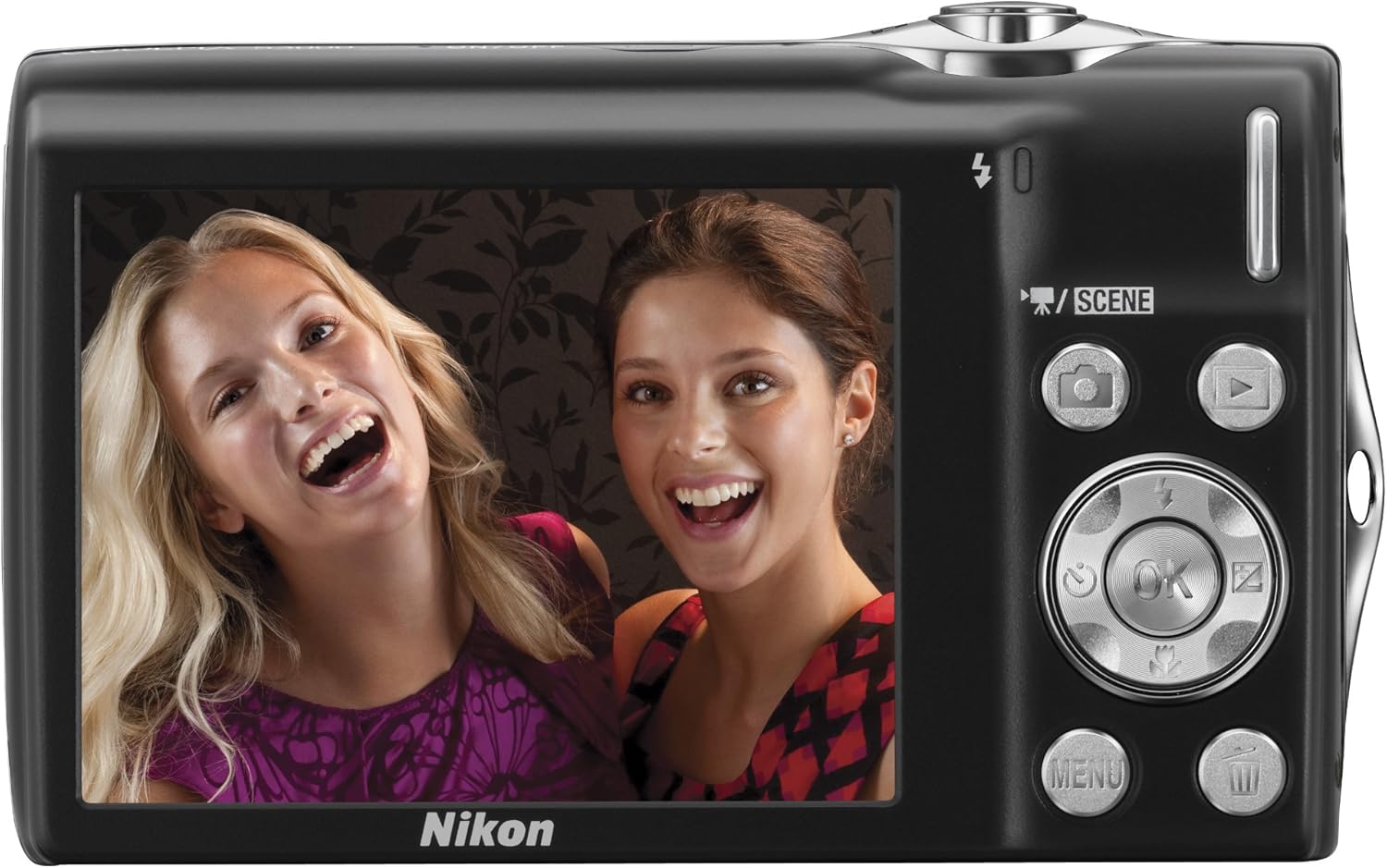
Figure 3: Back view of the Nikon Coolpix S3000, showing the 2.7-inch LCD and control buttons.
3. Shooting Modes
The camera offers various modes to optimize your shooting experience.
- Scene Auto Selector: This intelligent function automatically analyzes the subject and its surroundings, then selects the most appropriate scene mode from six options (Portrait, Landscape, Night Portrait, Night Landscape, Close-up, or Backlight) for optimal results.
- 16 Scene Modes: For specific shooting conditions, you can manually select from 16 optimized scene modes.
- Flash Modes: Adjust flash settings (Auto, On, Off, Slow Synch) via the menu for different lighting conditions.
Image Stabilization
The Nikon Coolpix S3000 features a 4-way Image Stabilization System to help ensure sharper results by minimizing blur caused by camera shake and subject movement.
- Electronic VR Image Stabilization: Compensates for camera shake.
- Motion Detection: Automatically adjusts shutter speed and ISO settings to compensate for both subject movement and camera shake.
- ISO 3200 Capability: Allows for faster shutter speeds in low light or when capturing fast-moving subjects.
- Best Shot Selector (BSS): Automatically shoots a series of frames and saves the sharpest one.
The camera automatically selects and uses the necessary features to optimize each image.
Smart Portrait System
Nikon's exclusive Smart Portrait System is designed to enhance portrait photography.
- Face-priority AF: Automatically detects up to 12 faces in a shot and adjusts focus and exposure for optimal portraits.
- Smile Timer: Automatically releases the shutter when the primary subject smiles.
- Blink Proof Function: Automatically captures two sequential frames and saves the one where the subject's eyes are open.
- In-Camera Red-Eye Fix: Automatically corrects red-eye effect before saving the image.
Subject Tracking
Subject Tracking automatically detects and maintains focus on a moving subject. This feature is particularly useful for capturing children or other active subjects. It can even re-acquire focus if the subject temporarily leaves and re-enters the frame within three seconds.
Movie Recording
The Coolpix S3000 can record movies with sound.
- Resolution: Record at 640 x 480 pixels at 30 frames per second (fps).
- Duration: Up to 1.6 hours of movie shooting, though recording stops automatically after 29 minutes or when the file size reaches 2 GB.
- File Format: MJPEG.
Actual recording time may vary based on ambient temperature, zoom usage, and autofocus operations.
Maintenance
Proper care and maintenance will ensure the longevity and optimal performance of your camera.
- Cleaning: Use a soft, lint-free cloth to clean the camera body. For the lens, use a lens brush or blower to remove dust, then gently wipe with a lens cleaning cloth and solution if necessary. Avoid touching the lens surface directly.
- Storage: When not in use for extended periods, remove the battery and store the camera in a cool, dry place away from direct sunlight and extreme temperatures.
- Battery Care: Recharge the battery regularly, even if not in use, to maintain its capacity. Avoid fully discharging the battery frequently.
Troubleshooting
This section addresses common issues you might encounter with your Nikon Coolpix S3000.
| Problem | Possible Cause | Solution |
|---|---|---|
| Camera does not turn on. | Battery is depleted or incorrectly inserted. | Ensure battery is fully charged and correctly inserted. |
| Images are blurry. | Camera shake, subject movement, or incorrect focus. | Hold the camera steady, use the Image Stabilization features, or ensure the camera has focused correctly before pressing the shutter. |
| Flash does not fire. | Flash mode is set to "Off" or battery is low. | Check flash settings in the menu. Recharge the battery. |
| Memory card error. | Card is full, corrupted, or incorrectly inserted. | Delete unnecessary files, format the card (this will erase all data), or reinsert the card. Try a different card. |
If you encounter issues not covered here, please refer to the official Nikon support resources.
Specifications
| Feature | Detail |
|---|---|
| Brand | Nikon |
| Model Name | Coolpix S3000 |
| Effective Still Resolution | 12 MP |
| Photo Sensor Technology | CCD |
| Optical Zoom | 4x |
| Maximum Focal Length | 108 Millimeters |
| Minimum Focal Length | 27 Millimeters |
| Image Stabilization | Electronic |
| Screen Size | 2.7 Inches |
| Display Type | LCD |
| Flash Memory Type | SD/SDHC, Internal (47 MB) |
| Battery Type | Lithium-ion EN-EL10 |
| Video Resolution | 640 x 480 (30 fps) |
| Connectivity Technology | USB |
| Item Weight | 0.26 Pounds |
| Color | Silver (as per current product) |
Warranty and Support
For information regarding warranty coverage, technical support, or service, please refer to the official Nikon website or contact Nikon customer service directly. Keep your proof of purchase for warranty claims.
You can visit the official Nikon Store for additional resources: Nikon Store.


